


Onboarding new support agents usually goes one of two ways. Either you rush them onto the phones after three days of watching videos and they drown in tickets they can't handle, or you drag out training for six weeks while they forget everything from week one. Neither approach works.
The real problem isn't the length of training—it's that most support teams don't have a structured progression system. New agents get dumped with random information, shadow different people doing things differently, then suddenly they're expected to handle complex escalations alone. No wonder turnover hits around 45% in the first 90 days at most contact centers.
A proper 30 day agent onboarding program needs competency gates that actually measure readiness, not just attendance. You need clear milestones that prove someone can handle specific ticket types before moving to harder ones. And you need a curriculum that builds skills systematically instead of hoping osmosis works during random shadowing sessions.
Week 1: Foundation and Systems Access
The first week sets everything up. Most teams mess this up by trying to teach product knowledge before agents even understand the ticketing system.
Start with tool competency first. Your new agent needs to navigate your helpdesk without thinking before they touch a single customer conversation. That means practicing ticket creation, status updates, internal notes, and basic routing—without any customer context. Pure mechanical skill building.
-
Ticket queue views and filters
-
Customer history panels
-
Knowledge base search
-
Internal communication channels
-
Escalation workflows
Create sandbox tickets for practice. Real ticket data from six months ago works great—old enough that nothing matters anymore, recent enough to feel realistic. Have them practice finding information, updating fields, adding notes. Time them. A competent agent should navigate between any two screens in under 5 seconds.
Day 3 Competency Gate: Navigation test using 15 common scenarios. Pass rate needs to hit 13/15 or they repeat tool training. Sounds harsh, but agents who can't navigate efficiently will struggle forever.
Days 4-5 focus on your knowledge base structure. Not memorizing articles—understanding how information is organized. Show them the taxonomy, the search patterns that actually work, which sections get updated most frequently.
Most knowledge bases are disasters. Outdated articles, conflicting information, broken links everywhere. Your new agent needs to learn which sources to trust and when to ask for clarification. Build this skepticism early or they'll confidently give customers wrong information.
Week 1 Assessment:
-
Tool navigation
20 scenarios, 3 minutes each
-
Knowledge base scavenger hunt
Find 10 specific pieces of information
-
Communication basics
Write 5 internal notes following your format standards
-
Pass threshold
85% accuracy
Build this foundation so agents can focus on customer problems instead of hunting tools and information.
Week 2: Shadowing With Structure
Shadowing usually means sitting behind someone for eight hours watching them work while trying not to fall asleep. That's not training.
Never let a customer request slip through the cracks.
Helpyly helps you track, resolve, and optimize every support interaction effortlessly.
- Centralized ticket management
- Automated customer notifications
- Performance analytics dashboard
No credit card required
Structured shadowing means specific observation goals for each session. You're not just watching—you're analyzing patterns and documenting decisions.
-
Password reset calls (simple, high volume)
-
Billing questions (medium complexity)
-
Technical troubleshooting (complex, multi-step)
-
Angry customer de-escalation
Each observation sheet lists specific things to notice. For password resets: How does the agent verify identity? What security questions work best? How do they handle customers who can't remember anything? When do they escalate to account recovery?
Your new agent shadows three different people handling the same interaction type. They'll see three approaches, notice what works consistently, and identify personal style differences versus actual process variations. This prevents the "but Sarah does it differently" confusion later.
After each shadowing session, the new agent writes up their observations—not a transcript, but an analysis. What patterns did they notice? Which approaches seemed most effective? What would they do differently?
Day 8 Milestone: Reverse shadowing begins. The new agent narrates what they would do while watching live interactions. The experienced agent corrects misconceptions in real-time. This catches dangerous gaps before they handle real customers.
By day 10, they're doing parallel work. Both agents have the same ticket open. The new agent drafts responses that the experienced agent reviews before sending. Start with easy tickets—password resets, shipping status, basic how-to questions. Gradually increase complexity as accuracy improves.
Week 2 Competency Gate:
-
Parallel response accuracy
Draft 20 responses, need 16/20 approved without major changes
-
Observation analysis
Submit three shadowing reports demonstrating understanding of decision patterns
-
Process knowledge quiz
25 questions on standard procedures, pass at 22/25
This structured shadowing builds pattern recognition and allows safe practice before independent handling.
Week 3: Controlled Practice With Safety Rails
Week three is where real learning happens. The new agent handles actual tickets but with heavy guardrails.
Start with a restricted queue. Only specific ticket types route to them—the ones they've practiced most. Password resets, order status checks, basic troubleshooting. Nothing that could explode if handled wrong. Set up your ticketing system to automatically route only these categories to agents flagged as "training level 1."
Every response goes through review before sending. This isn't micromanagement—it's quality control during the learning phase. The reviewer isn't rewriting everything; they're catching mistakes that would upset customers or create more work later. A good review takes 30 seconds for a correct response, two minutes for one needing fixes.
-
Critical errors (wrong information that could cause damage)
-
Process violations (skipped verification, missed escalation triggers)
-
Quality issues (unclear writing, missing empathy)
-
Minor improvements (style preferences, optional enhancements)
Track everything. How many tickets can they handle per hour? What's their first-contact resolution rate? How many need major revisions? You're building a performance baseline, not judging final ability. Someone handling 3 tickets per hour with 90% accuracy is progressing well at this stage.
Introduce complexity gradually. Day 11-12: password resets only. Day 13-14: add billing inquiries. Day 15-16: include basic technical issues. Day 17-18: introduce upset customers. Each addition comes with specific training on that ticket type's unique challenges.
The progression matters. Password resets teach system navigation and security protocols. Billing inquiries add research skills and policy knowledge. Technical issues require troubleshooting logic. Upset customers need emotional regulation and de-escalation. Stack these skills deliberately.
Week 3 Assessment Framework:
-
Volume target
30 tickets across all categories
-
Accuracy requirement
Maximum 3 critical errors, 5 process violations
-
Customer feedback
No negative ratings on reviewed tickets
-
Escalation appropriateness
Correctly identify 5/5 tickets needing escalation
Time reviewer interactions to calibrate expectations—measure how often reviews take 30 seconds versus two minutes to set realistic throughput goals.
This controlled practice with safety rails lets agents build real skills without exposing customers to unnecessary risk.
Week 4: Graduated Independence
The final week transitions from supervised practice to monitored independence. The safety rails come off gradually, not all at once.
Start Monday with "delayed review"—responses send immediately but get reviewed within an hour. If something goes wrong, you can still catch it before the customer responds again. This builds confidence while maintaining quality control. Your operational software should flag these tickets for priority review automatically.
By Wednesday, move to "spot check" mode. Random sampling of 20% of tickets, plus automatic review triggers for specific scenarios (refunds over $100, technical escalations, customer complaint keywords). The agent doesn't know which tickets will be reviewed, which keeps quality consistent across the board.
Introduce specialty queues gradually. Every support team has ticket types that require extra knowledge—API issues, enterprise accounts, compliance questions. The new agent observes five of each type, handles three with supervision, then gets measured on two solo attempts. Pass or repeat the progression.
Speed starts mattering now. Week one focused on accuracy only. Week two balanced accuracy with understanding. Week three added volume. Now week four brings time pressure. A fully ramped agent handles 8-12 tickets per hour depending on complexity. Your week-four trainee should hit 5-7 per hour consistently.
Create pressure tests. Send them a surge of simple tickets. Give them a complex technical issue with an impatient customer. Throw in a billing dispute that requires research across multiple systems. Watch how they prioritize, when they ask for help, whether quality drops under stress.
Day 25 Competency Gate:
-
Handle 40 tickets independently
-
Maintain 95% accuracy on reviewed samples
-
Average handle time within 150% of team average
-
Demonstrate competency across all standard ticket types
-
Successfully handle 2/3 complex escalation scenarios
These graduated steps ensure independence without sudden exposure to the full complexity of live support.
The 30-Day Final Assessment
Day 30 isn't graduation—it's verification that the foundation is solid. The assessment should mirror real work conditions exactly.
Morning session: Live ticket handling for four hours. Full queue access, normal volume, no special routing. Monitor everything—tickets per hour, handle time, escalation rate, customer satisfaction on any survey responses. This generates your performance baseline.
The numbers tell you if they're ready. An agent hitting 70% of average team productivity with 95% quality is ready for independence. Below 60% productivity or 90% quality means another week of graduated practice. Don't compromise here—weak agents create more work for everyone through mistakes and rework.
Afternoon session: Knowledge verification and scenario handling.
The knowledge test covers:
-
Product specifications and common issues
-
Company policies and exception procedures
-
System navigation and tool usage
-
Customer communication standards
-
Escalation triggers and routing rules
But the real test is scenario-based. Present five complex situations that combine multiple issues. A customer with a billing dispute who's also experiencing technical problems and threatens to cancel. An API integration failing for an enterprise client during their busy season. A potential security breach requiring immediate escalation.
Watch how they break down complex problems. Do they verify the important information first? Can they identify which issue to address initially? Do they recognize when something exceeds their authority? These meta-skills matter more than memorized procedures.
Building Your Competency Gate System
Competency gates only work if they're objective and consistently enforced. Create rubrics that remove subjective judgment.
For example, your "customer communication" gate might score:
| Criterion | Points |
|---|---|
| Acknowledges issue clearly | 2 |
| Uses customer's preferred name | 1 |
| Provides timeline for resolution | 2 |
| Offers appropriate empathy | 2 |
| Includes next steps | 2 |
| Grammar and spelling correct | 1 |
Total of 10 points, pass at 8. No arguing about whether something was "good enough"—either they hit the points or they don't.
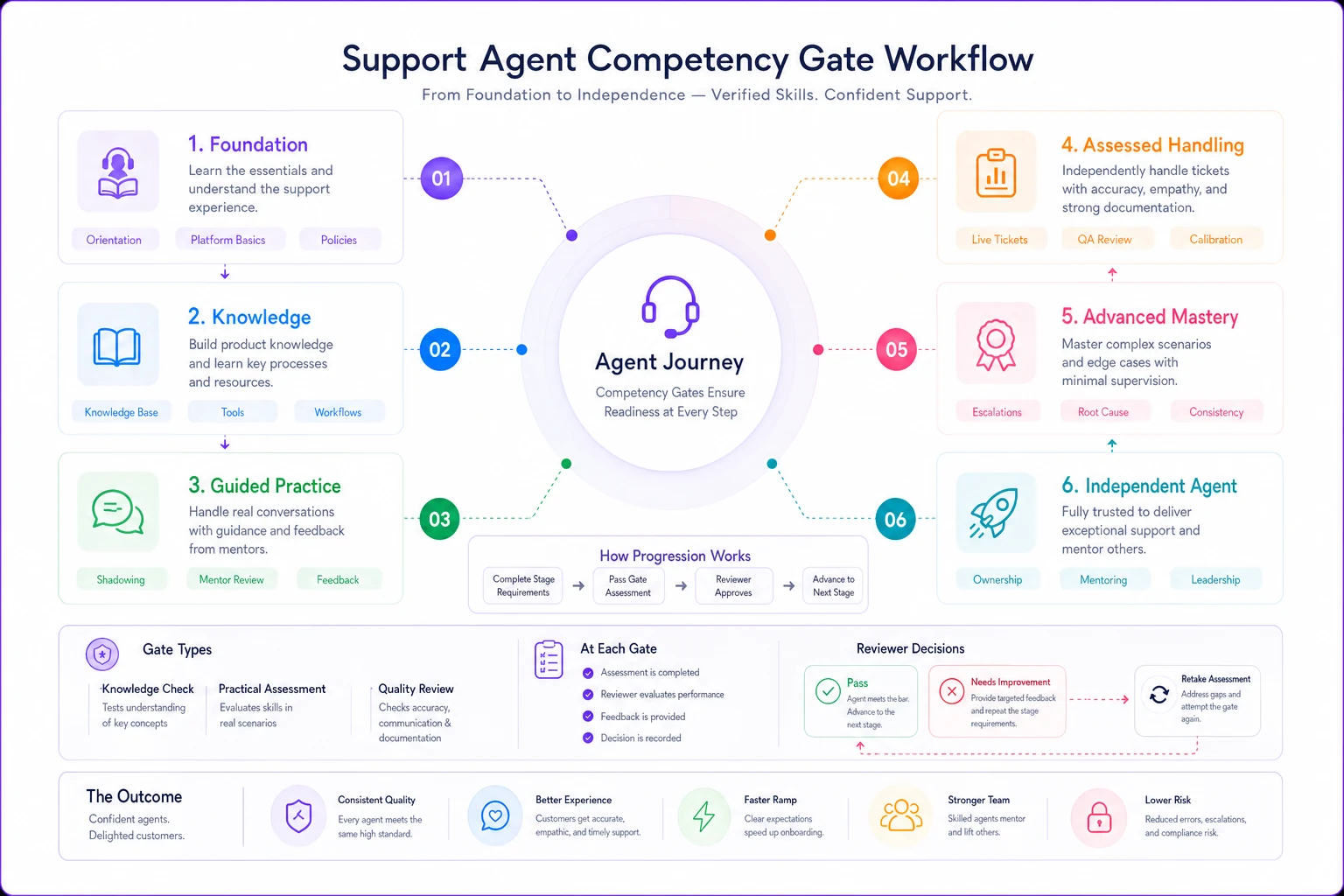
This visual maps gates to outcomes so trainers and managers can follow progression consistently.
Track progression through gates in your operational system. Some agents blast through early gates but struggle with complex scenarios. Others start slow but accelerate once concepts click. The data helps you adjust training pace and identify who needs extra support.
Some agents won't make it through all gates. That's the point. Better to identify poor fits during training than after they've upset dozens of customers. Set clear expectations—failing a gate twice means additional remediation. Failing three times triggers a performance conversation about role fit.
Shadowing Scripts That Actually Teach
Generic shadowing wastes everyone's time. Create specific scripts for different learning objectives.
Technical Troubleshooting Shadow Script: "Watch how I verify the customer's technical setup before diving into solutions. Notice I'm asking about their network, device, and browser in a specific order. This eliminates most issues before we touch advanced debugging. Write down the three most common resolution paths you observe."
De-escalation Shadow Script: "This customer is upset about a billing error from three months ago. Watch my tone and pacing—I'm deliberately slowing down and lowering my voice. Notice how I acknowledge the frustration before explaining anything. Document which phrases seem to calm them versus which ones increase agitation."
Efficiency Shadow Script: "I'm going to handle five quick tickets in a row. Watch how I use keyboard shortcuts, template responses, and parallel browser tabs. Time how long each ticket takes and note which shortcuts save the most time. You should see my average handle time is under 4 minutes for these ticket types."
The shadow guide (the experienced agent) needs to narrate their decision-making. Not every click—that's overwhelming. But major decision points: "I'm escalating this because the customer mentioned legal action." Or "I'm offering a 20% discount because this is their third contact about the same issue."
Milestone Tracking That Prevents Surprises
Nobody should be surprised on day 30 that an agent isn't ready. Build milestone checks that predict final performance.
-
Day 5
Can navigate all systems and find information independently
-
Day 10
Understands ticket flow and can identify correct routing
-
Day 15
Drafts accurate responses for basic inquiries
-
Day 20
Handles standard tickets with minimal corrections
-
Day 25
Manages complex issues with appropriate escalation
-
Day 30
Performs at 70% of team productivity with high quality
Missing any milestone triggers immediate intervention—not punishment, but focused help on the specific gap. Someone struggling with system navigation gets extra tool training. Someone writing unclear responses gets communication coaching.
Track milestone performance across multiple training cohorts. If 60% of new hires struggle with the day 15 milestone, your training for days 11-14 needs work. The data reveals systematic training gaps versus individual performance issues.
Your training tracking system should automatically flag when someone falls behind milestones. Don't wait for weekly reviews to identify problems. If someone's accuracy drops below 80% on day 18, their supervisor should know that day. Early intervention prevents bad habits from solidifying.
Creating Assessment Templates That Scale
Assessment templates need to be specific enough to be useful but flexible enough to adapt as your product evolves.
Build modular assessment components:
-
System navigation (same for everyone)
-
Product knowledge (updates quarterly)
-
Communication skills (consistent standards)
-
Problem-solving scenarios (rotate monthly)
-
Policy application (updates as needed)
Don't create entirely new assessments for each hire. Use the same core components, swapping in updated product knowledge or new scenario modules as needed. This ensures consistency while keeping content fresh.
Your assessment template library should include:
-
Multiple versions of each component (to prevent cheating)
-
Clear scoring rubrics
-
Time limits for each section
-
Acceptable resource usage (can they use knowledge base?)
-
Automatic fail triggers (critical errors that override percentage scores)
Store everything in a central system where trainers can pull appropriate assessments. Include version control—you need to know which assessment version each agent completed for fair comparison.
The Operational Reality of 30-Day Readiness
Be realistic about what "ready" means at day 30. They're not experts. They're not handling the toughest escalations. They're competent beginners who can handle 70-80% of standard tickets without creating problems.
Full proficiency takes 90-120 days for most agents. The 30 day agent onboarding program builds the foundation. Days 31-90 add depth, speed, and specialization. Days 91-120 develop expertise and some leadership potential.
Your operational software should track this progression automatically. Flag agents at day 60 who haven't improved beyond their day 30 baseline—they need intervention. Celebrate agents who hit full productivity ahead of schedule. Use the data to refine your ongoing training programs.
Some agents will always need more support. That's not failure if you identify it early and provide appropriate structure. Maybe they excel at written communication but struggle with phone calls—route tickets accordingly. Maybe they're strong on technical issues but weak on billing—specialize their queue. The assessment data tells you how to optimize each person's role.
The investment in structured onboarding pays off through reduced errors, faster ramp time, and lower turnover. Agents who go through competency-gated training feel more confident and stay longer. They make fewer mistakes that require manager intervention. They handle more tickets with higher customer satisfaction.
A structured 30 day agent onboarding program also scales. You can onboard five new agents as easily as one because the curriculum, assessments, and competency gates are already defined. Your experienced agents know exactly what's expected when they're asked to shadow or review. Your managers can track progress without constant check-ins.
This approach transforms onboarding from a chaotic scramble into a predictable operational process. New agents know what's expected. Trainers know what to teach. Managers know when someone's ready. And your customers get consistent service from properly prepared agents instead of suffering through rookie mistakes.
Start with clear competency definitions and build everything else around those markers. Don't just track time in seat—track actual capability development. Don't shadow randomly—shadow with specific learning objectives. Don't just test at the end—gate progression throughout.
When you nail this process, day 30 becomes a beginning, not an endpoint. Your agents have the foundation to build real expertise instead of just survival skills. And that makes everything else in your support operation run more smoothly.
Ready to elevate your customer support?
Join 2,000+ support teams using Helpyly to reduce response times, automate workflows, and deliver outstanding customer experiences.