

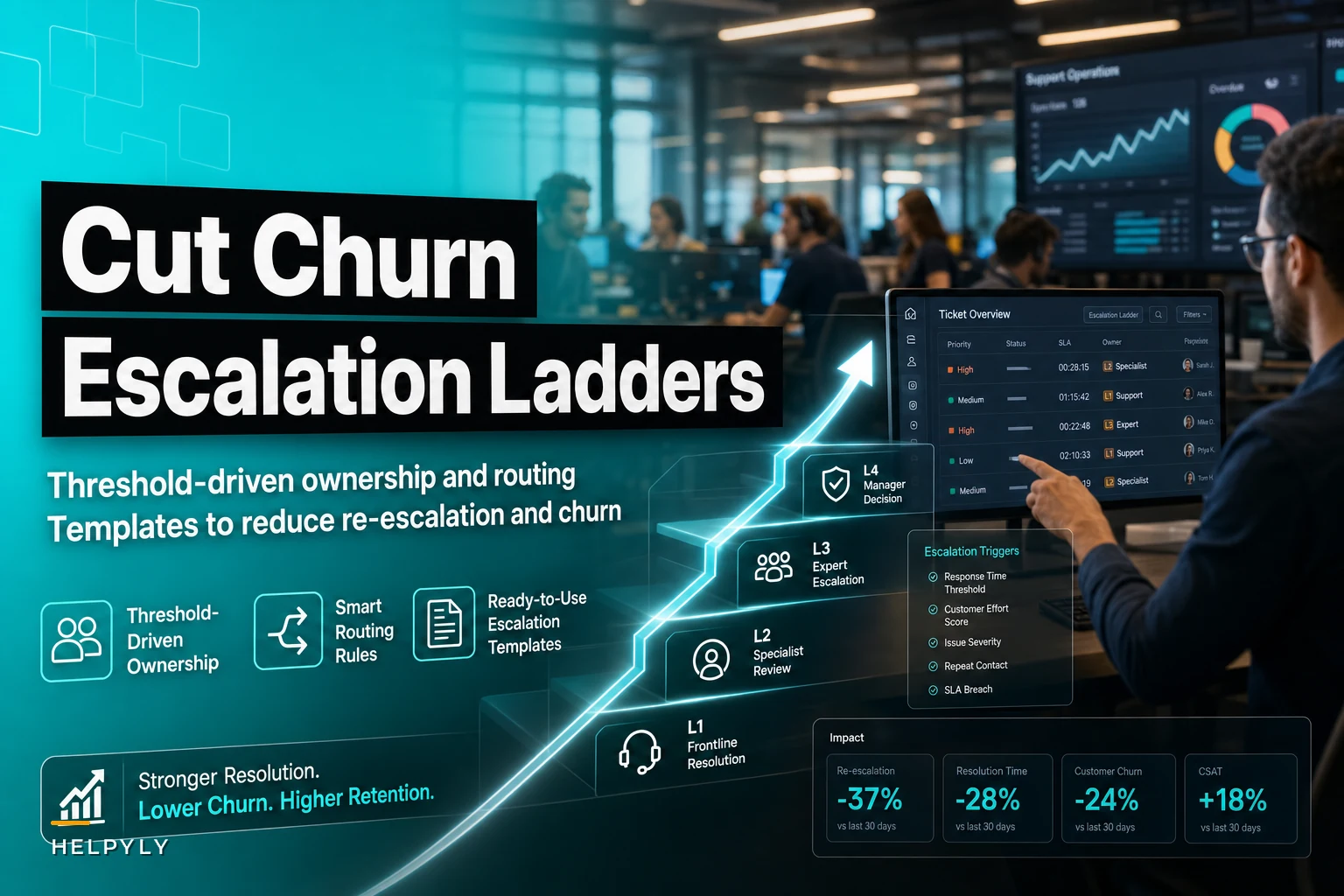

Most support teams build their escalation ladders backward. They start with anger levels—how upset the customer sounds—instead of actual business impact. That mismatch drives re-escalation rates and churn more than almost anything else.
The typical escalation structure looks organized on paper. Tier 1 handles basic issues, Tier 2 gets the complex stuff, managers jump in when someone's screaming. Clean org chart, clear hierarchy. But watch what happens during a busy Tuesday afternoon and you'll see exactly where it falls apart.
A customer loses access to their account dashboard. Not angry, just needs it fixed. Gets routed to Tier 1. Agent can't resolve it, escalates to Tier 2. Tier 2 discovers it's affecting their API integration—now it needs engineering. Three handoffs, two hours. By the time it reaches someone who can actually fix it, that calm customer has quietly become a churn risk.
Meanwhile, another customer calls furious about a $12 billing error. Demands a manager. Gets escalated straight to leadership because of the tone. Manager spends 45 minutes on a refund that any Tier 1 agent could have processed.
Why threshold-based escalation reduces re-escalation by design
Traditional escalation focuses on who's available and how upset the customer seems. Threshold-based escalation maps issues to impact first, then assigns ownership based on actual business consequences.
That shift changes how tickets flow through your support org. Instead of bouncing issues up the ladder until someone figures out who should own it, you define thresholds that trigger specific routing from the start.
Revenue impact becomes your primary threshold. A $50/month customer with a billing issue gets different routing than a $5,000/month enterprise client with the same problem—not because one deserves better service, but because the operational impact and resolution complexity are genuinely different.
Service interruption duration creates your second threshold layer. A login issue blocking access for 10 minutes is different from the same issue blocking access for two hours. The problem might look identical in your ticketing system, but the business impact changes completely based on how long it's been going on.
Account history adds the third dimension. A customer's fourth complaint about the same integration issue needs different handling than a first-time bug report. Not emotionally different—operationally different. The recurring pattern signals a systemic problem requiring different expertise.
Building ownership rules that stick
Ownership confusion drives most re-escalations. The agent thinks someone else should handle it, escalates, the next tier disagrees, sends it back or sideways. Each handoff adds delay and frustration.
Never let a customer request slip through the cracks.
Helpyly helps you track, resolve, and optimize every support interaction effortlessly.
- Centralized ticket management
- Automated customer notifications
- Performance analytics dashboard
No credit card required
Clear ownership rules eliminate that ping-pong. But clarity means more than writing detailed documentation. It means creating rules that match how your team actually operates, not how the org chart says they should.
Start with impact zones rather than skill levels. Instead of "Tier 2 handles complex technical issues"—which means different things to different agents—define specific thresholds:
Revenue Impact Zones:
-
Under $500/month
Tier 1 owns resolution
-
$500–$2,000/month
Tier 2 owns resolution
-
$2,000–$10,000/month
Senior support owns resolution
-
Over $10,000/month
Account management owns resolution
These aren't suggestions. They're ownership assignments. The agent doesn't decide whether to escalate based on their comfort level or the customer's tone. The threshold makes that call automatically.
Service Interruption Thresholds:
-
Under 30 minutes
Current tier owns resolution
-
30 minutes to 2 hours
Automatic escalation to next tier
-
2 to 6 hours
Technical lead takes ownership
-
Over 6 hours
Engineering takes primary, support assists
Duration tracking happens through your ticketing system, not through agent judgment. When a ticket crosses the 30-minute mark, it routes itself. No decision needed.
Where most teams mess this up: they create threshold rules without escape valves. Every system like this needs override conditions or you'll create new problems while solving old ones.
Override Triggers:
-
Security breach indicators (immediate engineering escalation)
-
Legal threats or regulatory mentions (immediate legal/compliance routing)
-
Third failed resolution attempt (automatic senior review)
-
Pattern detected across multiple accounts (system-wide issue escalation)
These overrides don't replace your thresholds—they supplement them. A low-revenue customer mentioning GDPR still triggers legal routing, even if the revenue threshold suggests Tier 1 ownership.
Routing logic that prevents bottlenecks
Even well-designed ownership rules fail without smart routing. You need routing that adapts to reality: agent availability, skill matching, workload, timezone coverage.
Most routing systems run on simple round-robin or skill-based assignment. But when you're trying to prevent re-escalation, you need routing that considers resolution probability, not just availability.
Dynamic skill scoring changes things here. Instead of binary "can handle" or "can't handle" classifications, you track actual resolution rates by issue type and agent. If Sarah is technically qualified on API issues but closes them at 40% compared to Mike's 85%, routing to Mike first prevents a likely re-escalation. That's not about performance management—it's about operational efficiency. Every re-escalation costs time and increases churn risk.
Route to agents with demonstrably higher resolution rates for specific issue types to reduce likely re-escalations.
Primary routing factors:
-
Threshold-based ownership (from above)
-
Historical resolution rate for issue type
-
Current agent workload, weighted by complexity
-
Previous interaction history with the customer
Secondary routing factors:
-
Time zone alignment
-
Language preferences
-
Industry expertise (for B2B accounts)
-
Product version familiarity
Fallback routing rules:
-
If primary owner unavailable
route to designated backup
-
If backup unavailable
escalate to next tier immediately
-
If pattern detected across tickets
bundle similar issues for batch resolution
-
If SLA at risk
override all other rules, route to available senior agent
Each rule exists to prevent a specific re-escalation scenario you've already encountered in your support patterns. That's the framing that makes these rules actually stick with agents.
Communication templates that reduce customer frustration
Templates feel robotic when they're written to protect the company rather than inform the customer. They apologize generically, explain vaguely, promise nothing specific. Customers see through it immediately, get more frustrated, and push for escalation.
Impact-based templates work differently. They acknowledge the specific impact, explain what's actually happening, and give concrete next steps. The customer feels like someone understood their situation because the response matches their reality.
Threshold-triggered responses:
For revenue impact over $2,000/month:
"I can see this issue is affecting your [specific feature/service], which is critical to your operations. I've assigned this directly to our senior technical team who specialize in enterprise integrations. You'll hear from [Name] within 30 minutes with a resolution timeline."
For service interruption over 2 hours:
"Your access has been interrupted for [exact duration], and that's not acceptable. I've triggered our rapid response protocol:
-
A senior engineer is investigating now (started [timestamp])
-
You'll receive updates every 30 minutes until this is resolved
-
Your account manager will contact you within 2 hours to discuss service credits"
For third escalation on the same issue:
"This is your third contact about [specific issue], which tells us we haven't actually fixed the root problem. I've escalated directly to our technical leadership with a mandate to find a permanent solution—not another workaround. [Name] will contact you within [timeframe] with a complete resolution plan."
These templates don't just acknowledge the problem—they show the customer that your system recognized their situation and triggered something specific. That distinction matters more than the tone.
Handoff communication that maintains context:
The worst re-escalation experience happens when customers have to re-explain their issue from scratch. Your handoff language should prove that context transferred with the ticket.
Instead of: "I'm transferring you to our technical team who can better assist you."
Use: "I'm transferring this to Sarah from our API team—she resolved several similar integration issues this week. She already has your account details, error logs from the last three hours, and the two solutions we've already tried. She'll pick up exactly where we left off."
The specificity matters. Customers want to know they're going to someone qualified, not just someone available.
Measuring what actually matters for churn prevention
Re-escalation rate tells you about internal efficiency. First-contact resolution tells you about agent capability. Neither directly measures what matters for churn: whether customers feel their issues were handled at the right level.
Impact resolution rate captures something different—the percentage of high-impact issues resolved without customer-initiated escalation. That metric tells you whether your thresholds and routing are actually working.
Track by threshold category:
| Threshold Type | Target Resolution Rate | Acceptable Re-escalation | Churn Risk if Exceeded |
|---|---|---|---|
| Revenue >$5k/month | 95% first assignment | <5% | High – ~32% churn probability |
| Service interruption >4hr | 90% first assignment | <8% | Critical – ~48% churn probability |
| Third+ contact same issue | 100% first assignment | 0% | Severe – ~61% churn probability |
| Security/compliance mention | 100% correct routing | 0% | Legal risk + churn |
These aren't uniform standards because different thresholds carry different stakes. A re-escalation on a small billing issue is annoying. A re-escalation on a service interruption affecting a major client is a relationship crisis.
You also need to track escalation velocity—how quickly issues move through the ladder when they do require multiple touches. A fast-moving escalation that reaches resolution feels responsive. A slow one with long gaps between handoffs just looks like incompetence.
Velocity benchmarks by impact level:
-
Critical impact
under 15 minutes between escalation levels
-
High impact
under 30 minutes between escalation levels
-
Medium impact
under 2 hours between escalation levels
-
Low impact
under 4 hours between escalation levels
These aren't SLA targets for total resolution time. They're internal targets for how quickly issues move when they need to move. Customers judge your competence by how you handle complexity, not easy issues.
Implementation sequence that doesn't break current operations
Switching to threshold-based escalation while running daily operations requires careful sequencing. Most teams try to implement everything at once, create chaos, then retreat to their old system.
Start with data gathering, not system changes. For two weeks, tag every ticket with its actual impact metrics—revenue affected, duration, previous contact history. Don't change routing yet. Just document reality.
Your existing escalation patterns will reveal natural thresholds. You'll probably find certain revenue levels already trigger unofficial escalation. Certain duration points already cause customers to demand managers. These organic thresholds are your starting point, not the ones you invent in a planning meeting.
-
Weeks 1–2 Tag tickets with impact metrics without changing routing. Document what's actually happening.
-
Weeks 3–4 Implement shadow routing. The system calculates where tickets would route under threshold rules but doesn't change actual routing yet. Agents see both the current assignment and the suggested one. This surfaces gaps before they affect customers.
-
Weeks 5–6 Pilot with one threshold category. Revenue impact usually works best first because it's objective and easy to pull from your CRM. Keep other escalation rules running in parallel to limit risk while you tune the system.
-
Weeks 7–8 Add duration thresholds for the pilot group. Now you're tracking two dimensions but still for a subset of tickets. Watch for conflicts between threshold types and adjust ownership rules where they create confusion.
-
Weeks 9–10 Full rollout with escape valves active. All tickets now route through threshold logic, but agents can still override with justification. Track every override—they'll tell you where your rules don't match reality.
-
Weeks 11–12 Template deployment and communication training. Only after routing works smoothly do you standardize your communication templates. Templates deployed too early feel scripted. Deployed after agents understand the system, they feel natural.
A visual workflow of the implementation phases helps teams align on sequencing.
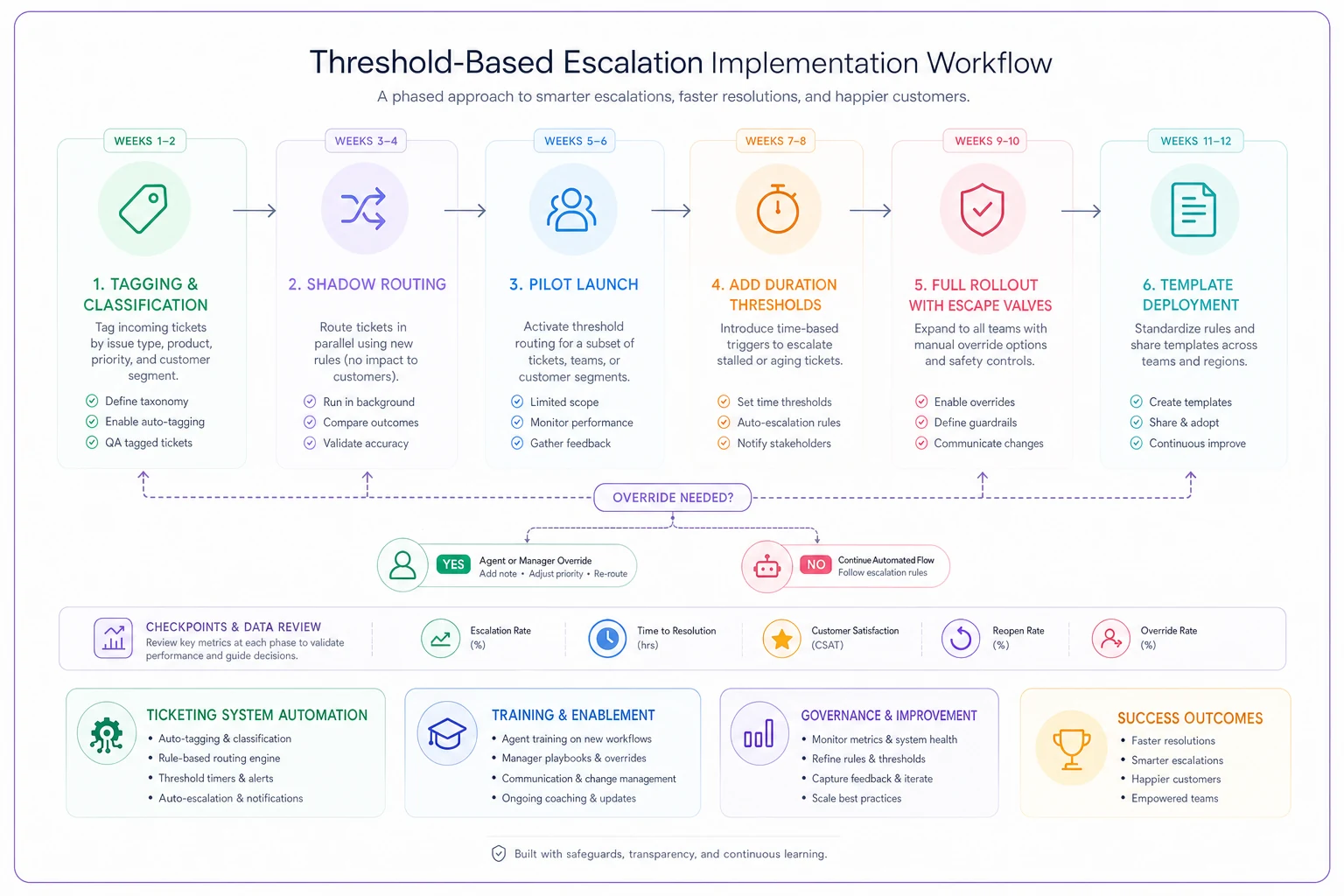
Use this diagram during planning and training to show sequence, checkpoints, and override decisions.
The sequencing matters because each phase surfaces problems that would otherwise blow up during a full rollout. Teams that skip ahead usually end up rebuilding trust with agents who got burned by a chaotic transition.
The operational reality after implementation
A working threshold-based escalation system changes your support culture. Agents stop making emotional calls about what to escalate. They stop worrying about whether they're bothering senior staff. The thresholds make decisions objective.
But new challenges appear. Senior agents who previously got all the interesting problems now handle high-impact issues regardless of complexity. Tier 1 might handle technically complex issues for small accounts while Tier 3 handles simple password resets for enterprise clients. That feels backwards until you remember the goal: appropriate response, not organizational hierarchy. The enterprise client's password reset needs immediate senior attention because five minutes of downtime costs them real money.
Training focus shifts from technical skills to impact assessment. Agents need to quickly identify and document business impact, not just technical symptoms. They need to understand why a threshold triggered specific routing—not just follow the rules blindly.
The most successful implementations integrate threshold logic directly into the ticketing system. When an agent opens a ticket, the system already displays the calculated impact, suggested owner, and routing rationale. The agent isn't guessing—they're verifying and proceeding. Modern support platforms can handle this through workflow automation—you define the thresholds, map them to customer data, and let the system handle routing while agents focus on resolution.
Manual systems built on spreadsheets and documentation almost always fail at this point. Manual systems require constant human judgment at exactly the moments when you want objective routing. Your ticketing system needs to calculate thresholds automatically based on customer data, issue patterns, and timing.
The companies that do this well treat escalation like a supply chain problem, not a customer service problem. They optimize for throughput, minimize handoffs, and measure success by destination accuracy. Customer satisfaction improves as a byproduct of that operational efficiency—not because of scripted empathy or white-glove service theater. The real shift is moving from "how upset is this customer?" to "what's the business impact?"—and once your system is built around that second question, the churn reduction follows naturally.
The real shift is moving from "how upset is this customer?" to "what's the business impact?"—and once your system is built around that second question, the churn reduction follows naturally.
Ready to elevate your customer support?
Join 2,000+ support teams using Helpyly to reduce response times, automate workflows, and deliver outstanding customer experiences.