


Support teams usually figure out they're understaffed about three days into their seasonal peak. By then, response times have tripled, the queue looks like a vertical line on the dashboard, and experienced agents are pulling 12-hour shifts while managers scramble to find temps who need four weeks of training.
Why traditional capacity models break during seasonal peaks
Standard support capacity planning uses a basic formula: tickets per day divided by tickets per agent equals agents needed. Works fine when volume stays within 20% of your baseline. Falls apart when volume jumps 300% in 48 hours.
The problem compounds because seasonal peaks don't just bring more tickets—they bring different tickets. A November surge for an e-commerce platform isn't just 3x normal volume. It's order tracking questions from first-time buyers, shipping delays from overwhelmed carriers, gift return policies, payment failures from high transaction volumes. Average handle time can jump from 6 minutes to 11 minutes because agents are dealing with edge cases they haven't seen since last November.
Then there's the scheduling problem. You can't just multiply your regular shift pattern by three. Peak hours shift, overlap differently, and cluster around specific events. Black Friday tickets don't distribute evenly across 24 hours—they avalanche between 6 AM and 2 PM Eastern, then spike again around 8 PM when people shop after dinner.
Most teams also underestimate ramp-up time for seasonal agents. Regular new hires might need 30 days to hit productivity targets. Seasonal temps who know they're leaving in 8 weeks tend to plateau around 60% of a regular agent's efficiency. The math gets ugly fast.
Forecasting formulas that account for seasonal complexity
Here's a forecasting framework that actually works for seasonal planning. Start with your baseline daily ticket volume from the same period last year, then apply multipliers for growth and seasonal intensity.
Never let a customer request slip through the cracks.
Helpyly helps you track, resolve, and optimize every support interaction effortlessly.
- Centralized ticket management
- Automated customer notifications
- Performance analytics dashboard
No credit card required
Base Seasonal Volume Calculation:
``
Expected Daily Tickets = (Last Year Same Day × Growth Factor) + Holiday Modifier
Growth Factor = Current YTD Volume / Last Year YTD Volume
Holiday Modifier = Special Event Impact (product launches, sales, etc.)
``
But raw ticket count is just the start. You need to factor in handle time changes:
``
Peak Handle Time = Base Handle Time × Complexity Multiplier × Experience Dilution
Complexity Multiplier = 1.3-1.8 (based on ticket type mix)
Experience Dilution = 1 + (Temp Agent % × 0.4)
``
This gives you actual capacity needs:
``
Agents Needed = (Expected Daily Tickets × Peak Handle Time) / (Shift Hours × Utilization Rate)
Utilization Rate = 0.75 for regular agents, 0.60 for temps
``
Notice the utilization difference. Regular agents handle tickets roughly 75% of their shift after accounting for breaks, meetings, and admin work. Temps run closer to 60% because they need more supervisor help, take longer between tickets, and make more errors that require correction.
Visual workflow for the forecasting steps:
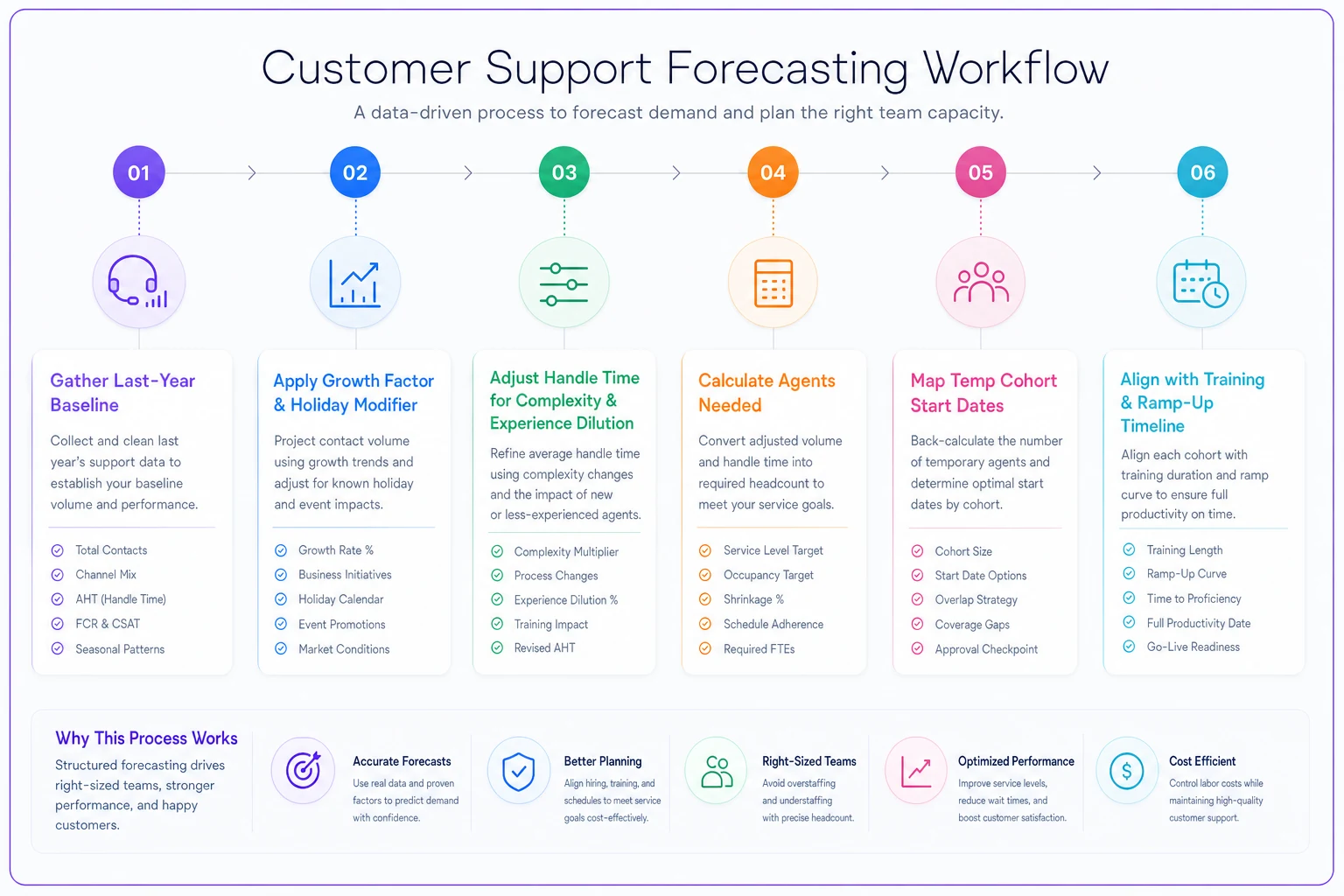
Use this to align recruiting and training timelines.
Sample spreadsheet for week-by-week planning
Here's a planning template that maps expected volume to staffing needs:
| Week | Expected Tickets/Day | Regular Agents | Temp Agents | Total Coverage Hours | Cost Impact |
|---|---|---|---|---|---|
| Nov 1-7 | 1,200 | 15 | 0 | 120 | Baseline |
| Nov 8-14 | 1,450 | 15 | 3 | 144 | +$2,400 |
| Nov 15-21 | 2,100 | 15 | 8 | 184 | +$6,400 |
| Nov 22-28 | 3,800 | 15 | 18 | 248 | +$14,400 |
| Nov 29-Dec 5 | 2,900 | 15 | 12 | 216 | +$9,600 |
| Dec 6-12 | 2,200 | 15 | 6 | 168 | +$4,800 |
The ramp pattern matters. You bring temps in waves, starting three weeks before peak. First wave gets the most training and handles simpler tickets. Second wave joins a week later with compressed training. The final wave might only get two days of shadowing before they're answering tickets.
Build your schedule backwards from peak day. If Black Friday is your summit, count back:
-
21 days
First temp cohort starts
-
14 days
Second temp cohort starts
-
7 days
Final temp cohort starts
-
3 days
All hands on deck, no PTO
-
Peak day
Maximum coverage
-
+7 days
Begin scaling down
-
+14 days
Release final temps
Build your schedule backwards from peak day. If Black Friday is your summit, count back:
Shift scheduling tactics for coverage without burnout
Traditional 9-5 coverage doesn't work during seasonal peaks. You need staggered shifts that match actual demand curves. Here's a scheduling structure that maintains coverage without destroying your team:
Staggered Shift Pattern: Morning surge team: 6 AM - 2 PM Mid-day overlap: 10 AM - 6 PM Evening coverage: 2 PM - 10 PM Overnight skeleton: 10 PM - 6 AM
During peak week, run four 10-hour shifts instead of five 8-hour shifts. Agents get an extra day off while you maintain coverage with fewer handoffs. You reduce transition time, and agents are generally more willing to push through longer shifts when they know a real break is coming.
For temps, use split shifts strategically. A temp working 7 AM - 11 AM and 5 PM - 9 PM covers both surge periods without the dead zone in between. You pay for 8 hours but get coverage exactly when you need it.
Overtime vs. Temp Calculation: The breakeven point for temps versus overtime usually lands around 15 hours per week. If you need 15+ additional hours weekly for more than three weeks, hire a temp. Less than that, pay overtime to existing agents. The training investment doesn't pay off for shorter bursts.
-
Two 15-minute breaks (staggered)
-
One 45-minute meal break (covered by floaters)
-
5-minute reset every 90 minutes (built into handle time)
Without enforced breaks, your best agents burn out by day three of peak week and quality crashes.
Offer a small shift premium for split shifts to reduce no-shows and encourage punctuality.
Without enforced breaks, your best agents burn out by day three of peak week and quality crashes.
Cross-training playbook for maximum flexibility
Cross-training isn't about making everyone handle everything. It's about creating specific backup capabilities for your highest-volume ticket types. Map your ticket categories and identify which ones spike during seasonal peaks:
Tier 1 Cross-Training (Everyone learns):
-
Order status lookups
-
Basic shipping questions
-
Password resets
-
Return initiation
Tier 2 Cross-Training (50% of team):
-
Payment processing issues
-
Inventory questions
-
Promotional code problems
-
Account modifications
Tier 3 Cross-Training (Specialists only):
-
Technical integrations
-
Bulk order problems
-
B2B account issues
-
Escalated complaints
The training sequence matters. Start with read-only access to systems—agents can look up information but can't modify anything. After they've handled 20 supervised tickets successfully, grant modification access. After 50 tickets with less than 5% error rate, they're certified for independent handling.
Create quick reference guides for seasonal issues. Not documentation—actual decision trees:
"Customer asking about shipping delay" → Check tracking shows movement in 48 hours? → Provide update → No movement in 48 hours? → Create shipping investigation → Investigation exists? → Add note, inform customer of 24-hour update
These guides reduce handle time by roughly 30% for cross-trained agents handling unfamiliar ticket types.
Temporary staffing rules and contractual considerations
Temp agencies love to promise "fully trained" support agents. In practice, you get people who've used Zendesk before and can type 40 words per minute. Budget three days minimum for system training, regardless of their listed experience.
Temp Contract Essentials:
-
Minimum commitment period
Usually 4-6 weeks. Shorter terms cost around 40% more per hour.
-
Performance clauses
Include quality metrics in contracts. If a temp stays below 80% quality score after week two, you should be able to release without penalty.
-
Equipment requirements
Specify who provides hardware. Temp agencies often charge $200-400 per agent for equipment—maintaining a seasonal equipment pool is frequently cheaper.
-
Scheduling flexibility
Lock in schedule change notice periods. Most contracts require 48-hour notice for shift changes. During peak season, you really need 24-hour flexibility.
Conversion options: Include the right to convert high-performing temps to permanent roles without agency fees after 90 days. Around 15% of seasonal temps turn out to be strong permanent candidates.
Background check timelines matter. Basic checks take 3-5 days. If you need financial or healthcare compliance checks, add another week. Start recruiting five weeks before you need people in seats.
Building your seasonal operations playbook
A seasonal surge isn't just about adding bodies. You need modified workflows that account for inexperienced agents and higher error rates.
Create dedicated seasonal ticket queues with restricted scope. Temps handle the "Seasonal-Simple" queue with order lookups and basic questions. Regular agents handle "Seasonal-Complex" with payment issues and technical problems. This alone reduces mis-routing by around 40%.
Implement automatic escalation triggers. If a temp's ticket sits longer than 20 minutes or requires more than three customer responses, auto-escalate to a regular agent. Better to escalate early than let temps struggle with complex issues and frustrate customers.
Set different SLA expectations internally. Your regular 2-hour first response might stretch to 4-6 hours during peak. Communicate this proactively rather than missing expectations you never mentioned.
Quality assurance needs to shift too. Instead of reviewing 5 tickets per agent weekly, review 2 tickets daily for temps and newly cross-trained agents. Catching problems early prevents them from becoming patterns.
Technology stack adjustments for seasonal scale
Your regular help desk setup probably can't handle 3x volume without some changes. Most platforms have seasonal licensing options—Zendesk offers monthly seats, Freshdesk has seasonal add-ons. Usually works out to around $50-75 per temp agent per month versus $100+ for annual licenses.
Queue management becomes critical at scale. Standard round-robin routing fails when you have agents with widely different skill levels. Implement skills-based routing with these priorities:
-
Route to specialized agent if available
-
Route to cross-trained agent if specialized queue exceeds 10 tickets
-
Route to temp only if all other agents are at capacity
-
Auto-escalate if no response in 15 minutes
Macro templates need seasonal versions. Your standard "checking on this for you" response needs holiday-specific language about delays and peak volumes. Build 10-15 seasonal macros that acknowledge the situation while setting realistic expectations.
Consider offering callback options during peak. When hold times exceed 20 minutes, a callback queue helps significantly—around 60% of customers prefer callbacks to holding, and it lets you smooth demand spikes across the day.
AI automation is genuinely useful during seasonal peaks, but it needs careful governance. Use it for ticket classification and initial routing, but be cautious with automated responses for seasonal issues that change daily. An outdated automated response about shipping times causes more problems than no response at all.
Measuring success beyond survival
Most teams measure seasonal success by whether they survived. That's a low bar. Track these metrics to actually improve year-over-year:
Peak Performance Metrics:
-
Response time degradation
How much did response times increase versus baseline?
-
Quality score variance
Did quality drop below acceptable thresholds?
-
Agent overtime hours
How much burnout did you create?
-
Temp conversion rate
How many seasonal agents became permanent?
-
Cost per ticket
Did seasonal scaling blow up unit economics?
Post-Season Analysis Points:
-
Which cross-training investments paid off?
-
What ticket types surprised you with volume?
-
When did you actually need peak coverage versus when you staffed for it?
-
Which temps ramped fastest and why?
Write the retrospective within a week of seasonal end while memories are fresh. Include specific recommendations with numbers attached. "Hire 3 more temps" is useless. "Hire 3 more temps by November 10 because we were 4 hours behind SLA from November 24-26" actually drives action next year.
Making seasonal capacity planning sustainable
Teams that handle seasonal peaks well treat them like a separate operational mode, not just "more of the same." They build specific playbooks, train for specific scenarios, and measure specific outcomes.
Start planning 8 weeks before your peak. That sounds excessive until you map out recruiting (2 weeks), training (3 weeks), ramp-up (2 weeks), and buffer (1 week). Suddenly 8 weeks feels tight.
Your forecasting formulas will be wrong the first year. Probably off by 20-30%. That's fine. The structure of thinking through handle time changes, temp efficiency rates, and scheduling patterns matters more than perfect numbers. Each year you'll get closer.
The goal isn't just surviving seasonal demand—it's building institutional knowledge that makes each peak smoother than the last. When an experienced agent can tell a temp "last December we saw this exact payment gateway issue, here's the workaround," you've built something more valuable than just coverage.
Focus on repeatable systems, not heroic efforts. Heroes burn out. Systems scale. And when January arrives and volume drops back to normal, you want a team that's tired but not broken, ready to handle steady state until the next seasonal surge rolls around.
Ready to elevate your customer support?
Join 2,000+ support teams using Helpyly to reduce response times, automate workflows, and deliver outstanding customer experiences.