

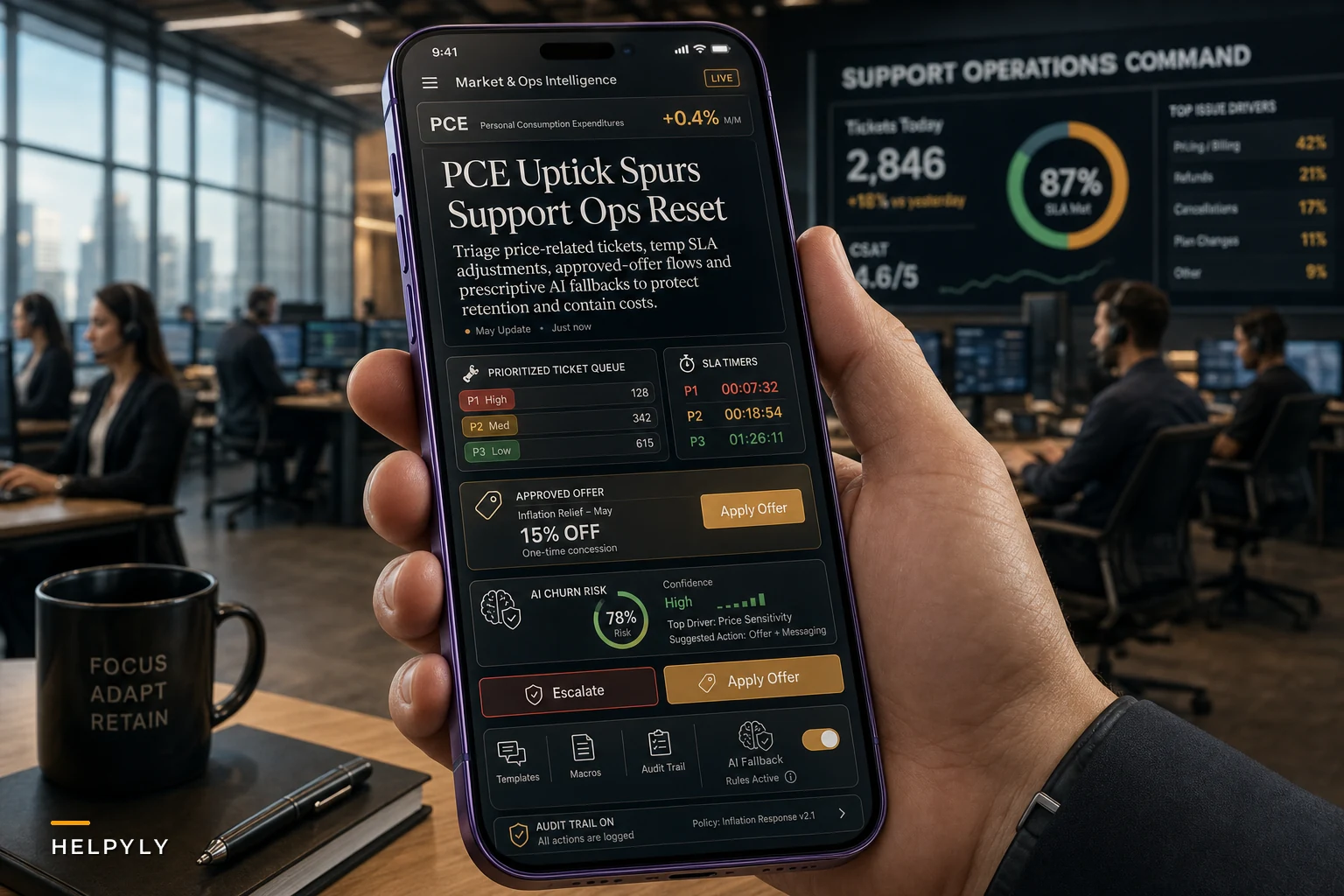

The inflation numbers from May weren't supposed to happen. After months of steady decline, the PCE inflation measure jumped back above 4%—the fastest pace in three years according to Reuters. For support managers, this creates an immediate triple squeeze: customers complaining about higher prices, pressure from finance to cut costs, and vendors pushing AI automation as the fix for both problems at once.
A mid-sized B2B software company I was working with last month went from handling around 1,200 tickets weekly to nearly 1,800 as customers pushed back on renewal pricing. Finance froze headcount. The VP of Customer Success panicked and bought an AI chatbot platform that ended up generating more escalations than it resolved. That wasn't a technology problem. It was a prioritization and fallback problem.
The compound effect of inflation on support operations
Support teams feel inflation differently than other departments. You're not just dealing with your own budget pressures—you're absorbing the frustration of every customer who's getting squeezed everywhere else in their life.
A subscription charging $79 a month might have been easy to justify six months ago. That same customer is now scrutinizing every recurring charge because their grocery bill went up 30% and their kid's daycare added a fuel surcharge. The support ticket about a minor billing discrepancy becomes a cancellation threat.
What makes this worse is the typical corporate response: cut support costs while somehow maintaining service levels. The math doesn't work, but that won't stop leadership from trying. They'll point to strong retail sales numbers as proof that consumers are still spending, completely missing that those same consumers are becoming hyper-selective about where their money goes.
The pressure builds until someone suggests AI automation as the answer. That's where things get dangerous.
Why rushed AI deployments fail during cost crunches
Companies deploy AI fastest when they're under the most pressure—which is exactly when they should move slowest. I've watched this play out across roughly 40 different support organizations and the pattern is pretty consistent.
Never let a customer request slip through the cracks.
Helpyly helps you track, resolve, and optimize every support interaction effortlessly.
- Centralized ticket management
- Automated customer notifications
- Performance analytics dashboard
No credit card required
A telecom provider implemented an AI-powered ticket classifier during a hiring freeze. The system hit 94% accuracy in testing. Sounds great until you realize that 6% error rate meant around 180 misrouted tickets per day in production. Each misrouted ticket took an average of three additional touches to resolve, which actually increased total handle time.
The fundamental mistake was treating AI as a drop-in replacement for human judgment rather than a tool that requires careful boundaries and fallback mechanisms. When you're dealing with inflation-stressed customers who are already on edge, even small AI mistakes trigger outsized reactions.
Think about what happens when an AI agent responds to someone threatening to cancel over a price increase with standard troubleshooting steps. Or when automated routing sends a billing complaint to technical support while every day of delay pushes that customer closer to churning.
The answer isn't avoiding AI—it's building proper governance and fallback systems before you actually need them. This connects directly to the principles covered in our post on establishing clear AI governance with human-in-the-loop fallbacks, but with specific adaptations for inflation-driven scenarios.
Building your inflation response framework
Most support playbooks assume stable economic conditions. They optimize for efficiency in normal operations and break down when external pressures spike. An inflation customer support playbook needs different assumptions and different triggers.
Start with workload segmentation based on customer lifetime value and churn risk—not just ticket type. A password reset from a three-year customer deserves different handling than one from someone in their first month, especially when that newer customer just saw their first price adjustment.
Priority matrix for inflation-stressed support teams
| Customer Segment | Churn Risk Signal | Response Time SLA | Automation Allowed |
|---|---|---|---|
| High-value, tenured | Price complaint + usage drop | 2 hours | Never on first touch |
| High-value, new | Multiple tickets in 30 days | 4 hours | Only acknowledgment |
| Mid-value, stable | Billing inquiry only | 8 hours | Full automation OK |
| Low-value, churning | Cancellation mentioned | 1 hour | Escalate immediately |
This matrix came from analyzing ticket patterns at an e-learning platform that saw support volume spike roughly 40% after a price increase. They tried to maintain uniform SLAs across all tickets initially, which meant their best customers were waiting behind routine inquiries. It didn't take long for that to show up in churn data.
Escalation triggers specific to inflation scenarios
-
Any mention of "can't afford" or "budget constraints" from customers with 12+ month history
-
Competitor pricing comparisons from accounts over $500 monthly revenue
-
Multiple accounts from the same household complaining about the same price change
-
Business customers citing their own cost pressures as a cancellation reason
-
Requests for payment plans or temporary discounts beyond normal thresholds
Each trigger should map to a specific escalation path with pre-approved response options. Your frontline agents can't negotiate pricing on the fly, but they need authority to offer something beyond "I understand your frustration." The goal isn't to give agents unlimited flexibility—it's to make sure they're not stuck reading from a script when the situation clearly calls for something more.
The hidden costs of over-automation
When budgets tighten, the temptation to automate everything becomes overwhelming. A customer support platform I evaluated claimed their AI could handle 70% of tickets without human intervention. Technically true—if you count auto-closing tickets after no customer response as "handling" them.
The real cost shows up in second-order effects. An online retailer automated their refund request process to cut costs. The AI approved refunds under $50 automatically but flagged everything above for manual review. Customers figured this out quickly and started splitting returns into multiple smaller requests, tripling the processing workload.
During inflation, these workaround behaviors accelerate. Every automated barrier spawns creative solutions from customers who have a bigger financial incentive to find them. Sometimes those workarounds consume more resources than the original manual process ever did.
Here's how that cascade typically plays out with a price complaint:
-
AI sends a template response about "providing value"
-
Customer replies angrier, mentions cancellation
-
AI escalates based on keyword detection
-
Human agent inherits an already-escalated situation
-
Resolution takes longer and costs more than direct handling would have
This is why pure automation metrics mislead during economic stress. You can show a 70% automation rate while your actual cost per resolution quietly increases.
Creating sustainable AI boundaries
The companies successfully using AI during this inflation spike share one trait: they defined operational boundaries before deploying anything. Not just feature limits—operational ones.
A financial services company created what they called "economic empathy zones"—areas where AI was explicitly not allowed to operate:
-
Any ticket mentioning job loss or income reduction
-
Complaints about fees when account balance is under $500
-
Requests for hardship programs or payment deferrals
-
Elderly customers identified through account age and interaction patterns
-
Small business accounts in their first six months
These boundaries seem restrictive until you calculate the cost of getting them wrong. One badly handled hardship request that goes viral can undo months of marketing spend. The conservative approach is almost always cheaper in the end.
Have agents flag ambiguous boundary cases so you can quickly refine rules and reduce false positives.
The conservative approach is almost always cheaper in the end.
Templates and communication frameworks
Your agents need pre-approved language for inflation-related complaints that acknowledges economic reality without admitting fault or opening liability. Generic empathy doesn't cut it when someone's genuinely struggling with their bills.
Bad template: "We understand price increases can be frustrating. Our product provides exceptional value through..."
Better template: "You're right that costs are rising everywhere right now. While we've had to adjust our pricing due to our own increased operational costs, let me see what options might help with your budget..."
The difference seems subtle but it changes the entire conversation. You're joining the customer in a shared reality rather than defending against their complaint.
Build templates for these specific scenarios:
-
Long-term customer seeing their first price increase
-
New customer who signed up at old pricing
-
Business customer passing costs to their own clients
-
Customer comparing you to competitors who haven't raised prices yet
-
Customers asking about grandfather pricing
Each template should include escalation points and approval limits. A two-year customer complaining about a 10% increase might qualify for a three-month gradient increase. A newer customer might only get additional onboarding support.
Measuring effectiveness during volatility
Traditional support metrics assume stable baselines. During an inflation spike, those baselines become misleading. A 15% increase in ticket volume might look like failure until you realize your competitors are seeing 40% increases.
Churn prevention rate: Of customers who mention pricing or costs, what percentage still retain after 90 days?
Escalation accuracy: When AI escalates based on economic triggers, how often do human agents agree the escalation was warranted?
Template effectiveness: Which response templates result in the lowest follow-up rates?
Automation reversal rate: How often do human agents override AI decisions on pricing-related tickets?
Competitor mention frequency: How often are tickets referencing competitor pricing?
An insurance software provider tracked these during their last price adjustment and discovered their AI was escalating too aggressively—routing around 60% of pricing mentions to senior agents when only about 15% actually needed that level of response. Tuning the thresholds freed up senior capacity for cases that actually mattered.
Who should actually implement AI during inflation
Not every support team should rush into AI automation because budgets are tight. Some operations make the problem worse by automating.
Teams that should accelerate AI adoption:
-
High-volume, low-complexity operations like password resets and shipping status
-
Companies with clear, stable policies that rarely need exceptions
-
Organizations with strong technical foundations and real monitoring capabilities
-
Teams already measuring automation impact beyond just deflection rate
Teams that should wait:
-
Companies mid-price increase or mid-policy change
-
Organizations with complex, exception-heavy support needs
-
Teams without clearly defined escalation paths
-
Companies whose brand depends on a human touch
A luxury retail brand learned this the hard way. They automated order status inquiries to cut costs, but their customers interpreted the shift as the brand going cheap. The savings got wiped out by a drop in average order values. Brand perception is harder to recover than the spreadsheet makes it look.
Workflow adjustments for the inflation reality
Your existing workflows probably assume customers have patience and agents have time. Neither holds during an inflation spike.
Instead of the standard verify → investigate → research → respond sequence, parallel processing tends to work better. While one agent handles verification, another pre-researches common resolution paths. This only works with operational software that shows both agents the same real-time information without version conflicts or lag.
Old flow: Agent takes call → Reviews account → Offers discount → Processes cancellation if declined → Total time: 8–12 minutes
New flow: AI pre-identifies churn risk → Account prepared with approved offers → Agent joins with full context → Immediate offer or cancellation → Total time: 3–4 minutes
The shorter interaction time seems like it would hurt saves, but the opposite proved true. Customers who'd already decided appreciated not being dragged through a long retention script. Agents handled more conversations and reached customers earlier in their decision process.
Here's a simple visualization of the new parallel workflow.
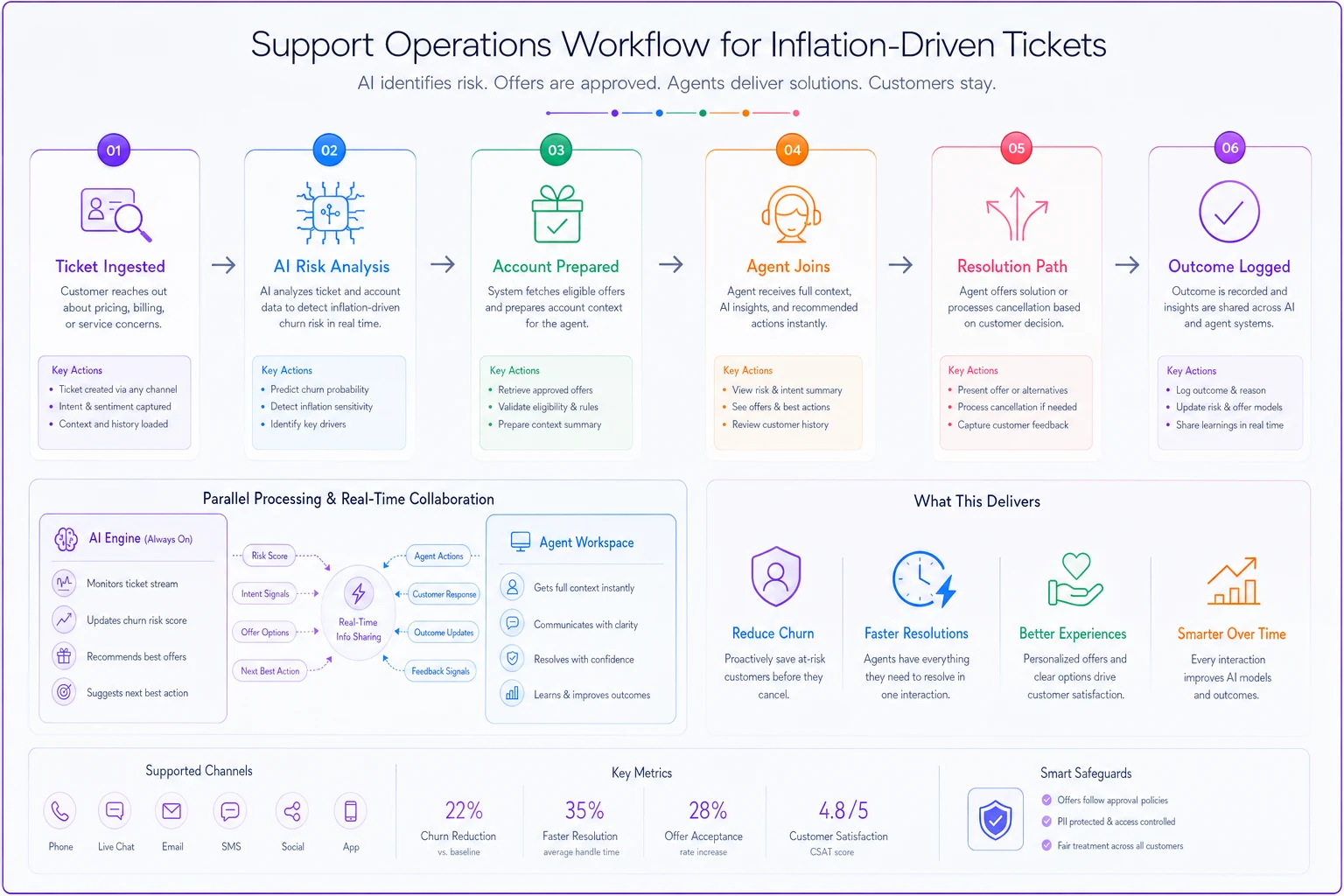
The operational software making this work wasn't doing anything magical—it was just surfacing the right information at the right moment, so agents didn't have to hunt for it mid-call.
When AI creates more work than it saves
A healthcare SaaS company implemented an AI system to handle appointment rescheduling requests. Simple enough—except the AI couldn't distinguish between urgent medical appointments and routine checkups. Every misclassified urgent request created a compliance risk, so they added a human review step. Then they needed quality assurance on those reviews. Within three months, they had more people managing the AI system than they'd originally had handling the requests manually.
This is particularly dangerous during inflation when redundant processes are something you really can't afford. Every AI implementation needs a clear decommission trigger—specific metrics that would cause you to shut it down rather than keep throwing resources at it.
Set these triggers before deployment:
-
Human intervention rate exceeds 40%
-
Customer satisfaction drops more than 5 points
-
Average handle time increases despite automation
-
Escalation rate doubles within 30 days
-
Compliance or quality issues appear in more than 2% of AI-handled tickets
Having these defined upfront makes the conversation easier when things go sideways. Without them, there's always someone arguing the system just needs more time. That argument gets a lot harder to counter when no one agreed on failure criteria from the start.
Building for the next cycle
Inflation isn't permanent but it's also not rare. The support infrastructure you build now needs to handle both expansion and contraction cycles without major restructuring each time.
Focus on capabilities rather than just capacity. An AI system trained only on your current ticket distribution won't help when inflation shifts the entire mix of customer issues. You need platforms that can quickly adjust routing rules, modify templates, and shift automation boundaries as conditions change.
The operational software running your support organization should have what I'd call economic awareness—the ability to recognize when external conditions require different operational rules. That might mean automatically adjusting SLAs when ticket volume spikes, or shifting automation boundaries when certain keywords start appearing more frequently in the queue.
A B2B marketplace built this adaptability into their support operations. When vendor complaints about fees spike—a signal of broader market pressure—their system automatically increases human review rates on vendor tickets, adjusts templates to acknowledge market conditions, flags patterns for leadership review, and pre-emptively generates retention offers for at-risk accounts. They don't wait for quarterly reviews to adjust operations. That responsiveness is what separates teams that manage inflation well from ones that just react to it.
The path forward
The May inflation numbers signal we're heading into a period where support operations can't rely on stable assumptions. Your inflation customer support playbook can't just be about handling more tickets with fewer people. It needs to fundamentally restructure how you prioritize work, when you deploy automation, and where human judgment stays essential.
Three immediate actions worth taking now:
First, segment your current ticket volume by customer value and churn risk—not just issue type. You need to know which fires to fight first when everything's burning at once.
Second, establish your no-automation zones before the pressure to cut costs becomes overwhelming. These boundaries get harder to hold once leadership starts seeing AI vendor pitches.
Third, build economic triggers into your escalation and workflow rules. Your operational software should recognize when external pressures require different handling procedures—not just more volume-based routing.
The companies that navigate this period successfully won't be the ones who automated fastest or cut deepest. They'll be the ones who maintained service quality for their most valuable customers while reducing effort on genuinely low-impact work. That requires more than AI—it requires operational design that takes seriously both the promise and the limits of automation when economic conditions stop being predictable.
Ready to elevate your customer support?
Join 2,000+ support teams using Helpyly to reduce response times, automate workflows, and deliver outstanding customer experiences.