


Support teams handle ticket spikes differently depending on how prepared they actually are. Some scramble and hope for the best. Others have playbooks that turn chaos into something controllable. That difference determines whether customers experience a minor delay or a complete service breakdown.
Most support managers think they're prepared for ticket surges — until one actually hits. Then it all falls apart: agents don't know who handles what, routing rules send tickets to already-overwhelmed queues, customers are getting contradictory information, and nobody captures anything useful for next time. The surge passes, everyone's exhausted, and the exact same thing happens during the next incident.
A proper ticket spike playbook isn't about having more agents on standby. It's about role clarity, routing flexibility, communication consistency, and learning systematically. Those four things separate teams that survive surges from teams that actually manage them.
The anatomy of ticket surge chaos
Ticket surges follow a pretty predictable pattern. First there's a trigger — a product outage, a botched update, a viral complaint. Within minutes, normal ticket flow doubles, then triples. Agents who normally handle 15-20 tickets per shift are suddenly staring at 60+ in their queue.
How a team responds in those first moments reveals almost everything about their preparedness. Unprepared teams watch response times stretch from hours to days. Agents start cherry-picking easy tickets just to keep some metrics alive. Complex issues pile up untouched. Customers submit duplicate tickets because they haven't heard anything, which makes the pile worse.
Meanwhile management scrambles. They pull agents into emergency calls — which just reduces available capacity. Prioritization decisions change every couple hours. Different agents tell customers completely different things about timelines and root causes.
By day three, morale is shot. Agents feel abandoned, customers feel ignored, and nothing gets documented for next time.
Triage roles that actually work under pressure
Effective surge response starts with predefined roles. Not everyone should be answering tickets during a surge — that's actually counterproductive. You need specific people handling specific parts of the response.
Never let a customer request slip through the cracks.
Helpyly helps you track, resolve, and optimize every support interaction effortlessly.
- Centralized ticket management
- Automated customer notifications
- Performance analytics dashboard
No credit card required
The Incident Commander owns the overall response. This person doesn't touch tickets directly. They monitor queue health, make routing decisions, coordinate with other departments, and maintain the response timeline. During normal operations this might be your support manager. During a surge, it needs to be someone with real decision authority and cross-functional relationships who can move fast.
Triage Specialists are your first line of defense. These agents don't solve tickets — they categorize and route them. They identify duplicates, flag critical accounts, and make sure tickets land in the right specialized queues. This role needs your most experienced people who can spot issue patterns quickly.
Resolution Agents handle actual ticket resolution, but only for specific issue categories. Generalist support breaks down fast during a surge. Three agents handling only password resets will outperform six agents trying to handle everything at once.
The Communications Coordinator manages all external messaging — status page updates, social posts, email broadcasts. They ensure consistency across every customer touchpoint. Without this role, customers start getting conflicting information, which amplifies frustration significantly.
Internal Liaison connects support with engineering, product, and operations. They gather technical updates, escalate critical issues, and stop your Incident Commander from getting pulled into technical rabbit holes.
Temporary routing rules that prevent bottlenecks
Standard routing breaks during surges. Whatever distribution logic works for 100 daily tickets will fail at 500. You need pre-configured surge routing rules ready to activate immediately.
Start with issue segregation. Create temporary queues for the specific problems driving the spike. If a payment processing failure triggered it, create a dedicated payments queue and route all payment-related tickets there automatically. This keeps those tickets from drowning your general queue.
Implement severity-based routing overrides. During normal operations you might route by customer tier or ticket type. During surges, severity wins. Critical issues affecting multiple customers or large accounts need immediate routing to senior agents regardless of normal assignments.
Set up overflow rules with clear triggers. When the primary queue hits 50 tickets, automatically route new tickets to overflow. When overflow hits 30, trigger the emergency staffing protocol. Taking the decision-making out of those moments matters more than it sounds — delays in routing decisions compound fast.
Define and document exact queue thresholds for overflow and emergency triggers so activation is automatic and uncontroversial.
Geographic routing helps when surges are region-specific. A European service outage shouldn't be landing on your US team at 3am. Route region-specific issues to timezone-aligned teams, even if that temporarily breaks your normal follow-the-sun coverage.
Time-based routing prevents tickets from aging out unseen. Any ticket untouched for more than two hours during a surge gets automatically re-routed to the rapid response queue, staffed by your strongest agents who can clear backlog quickly.
Staffing pivots without burning out your team
Surge staffing isn't about working everyone harder. It's about working differently. The usual approach — everyone stays late, everyone works overtime — leads to mistakes, burnout, and turnover. Smart pivots maintain sustainable capacity while addressing the surge.
Burst scheduling helps here. Instead of extending shifts, create overlapping mini-shifts. One agent works their normal 9-5, another works 11-3 specifically for surge support, another covers 2-6. You get maximum coverage during peak hours without running individuals into the ground.
Cross-train other departments for surge support. Customer success, account managers, even sales engineers can handle specific ticket types when things get bad. They won't replace skilled support agents, but they can handle password resets, account access issues, and basic troubleshooting. Build simplified workflows and decision trees for these temporary agents so they're not guessing.
A rotation system helps with extended surges. Divide your team into three groups: active response, recovery, and standby. Active handles current tickets. Recovery rests after their surge shift. Standby is available but working normal priority. Rotate every four to six hours.
For serious surges, contractor activation buys additional capacity without adding permanent headcount. Maintain relationships with a handful of contract agents who know your systems. During surges they handle specific, well-defined ticket types. It costs more per ticket but it protects your core team.
Manager participation matters too. Support managers should take tickets during surges — not all day, but visibly. It signals shared sacrifice and gives them ground-truth about what their team is actually dealing with.
Templates that maintain quality during chaos
Speed matters during surges, but so does accuracy. Inconsistent or wrong responses create more problems than delayed ones. Templates ensure quality while enabling speed.
Create surge-specific response templates — your normal ones assume normal context and they'll feel tone-deaf during an incident.
| Template | Content |
|---|---|
| Initial acknowledgment template: | "We're currently experiencing higher than normal ticket volume due to [SPECIFIC ISSUE]. Your issue has been received and categorized. Current expected response time is [TIMEFRAME]. If your issue is preventing critical business operations, please reply with 'URGENT' for escalation review." |
| Status update template: | "Quick update on your [ISSUE TYPE] ticket: We're actively working through the queue. Your ticket is currently position [X] of [Y] in the specialized queue. Expected resolution time remains [TIMEFRAME]. No action needed from you at this time." |
| Resolution template: | "Your [ISSUE TYPE] has been resolved. [SPECIFIC RESOLUTION DETAILS]. This issue was part of a larger incident affecting multiple customers. If you experience any remaining problems, please reference ticket [NUMBER] in your response for priority handling." |
Escalation templates matter when you can't give customers the answer they want:
"I understand this situation is frustrating. The current issue requires engineering intervention which is outside support's direct control. I've escalated your case to [SPECIFIC TEAM] with priority flag [LEVEL]. They commit to review within [TIMEFRAME]. I'll personally monitor and update you upon their response."
Internal handoff templates are just as important. When tickets move between agents during a surge, context gets lost fast:
"SURGE HANDOFF: Customer experiencing [ISSUE]. Already tried [STEPS TAKEN]. Customer sentiment: [FRUSTRATED/PATIENT/ANGRY]. Key context: [BUSINESS IMPACT]. Recommended next step: [SPECIFIC ACTION]."
Postmortem inputs that drive real improvement
Most surge postmortems fail because they rely on memory and emotion instead of data. Good postmortems need systematic input collected during the surge itself, not reconstructed afterward.
The Incident Commander should maintain a response timeline in real time — every major decision, routing change, and staffing adjustment logged with timestamp and rationale. That becomes the factual backbone of your postmortem.
A simple agent feedback form after each surge shift covers a lot of ground with just three questions:
-
What one thing slowed you down most?
-
What one decision actually helped you?
-
What tool, process, or template was missing?
Track customer feedback separately from your normal satisfaction scores. Surge feedback reveals different things. Customers might accept slower response times but be genuinely upset about inconsistent information. That distinction shapes how you improve the playbook.
Document template performance. Which ones got used most? Which needed heavy modification? Which caused confusion? That data drives meaningful refinement for future surges.
And capture cross-functional friction points. Where did handoffs to engineering break down? When did product updates arrive too late? How did sales promises complicate support responses? These observations need to feed back into broader organizational preparedness, not just the support playbook.
Building your surge response system with AI-powered operations
Modern support platforms handle surge response through automated workflows and intelligent routing. When a surge trigger occurs — ticket volume crossing a threshold, error rates spiking — the platform can automatically activate surge protocols rather than waiting for a manager to notice and manually intervene.
AI automation handles the initial triage that would otherwise overwhelm human agents. It categorizes incoming tickets, identifies duplicates, and routes based on surge-specific rules. Natural language processing groups similar issues together, revealing the actual scope of each problem type in seconds rather than minutes. That categorization speed matters a lot in the first hour of a surge.
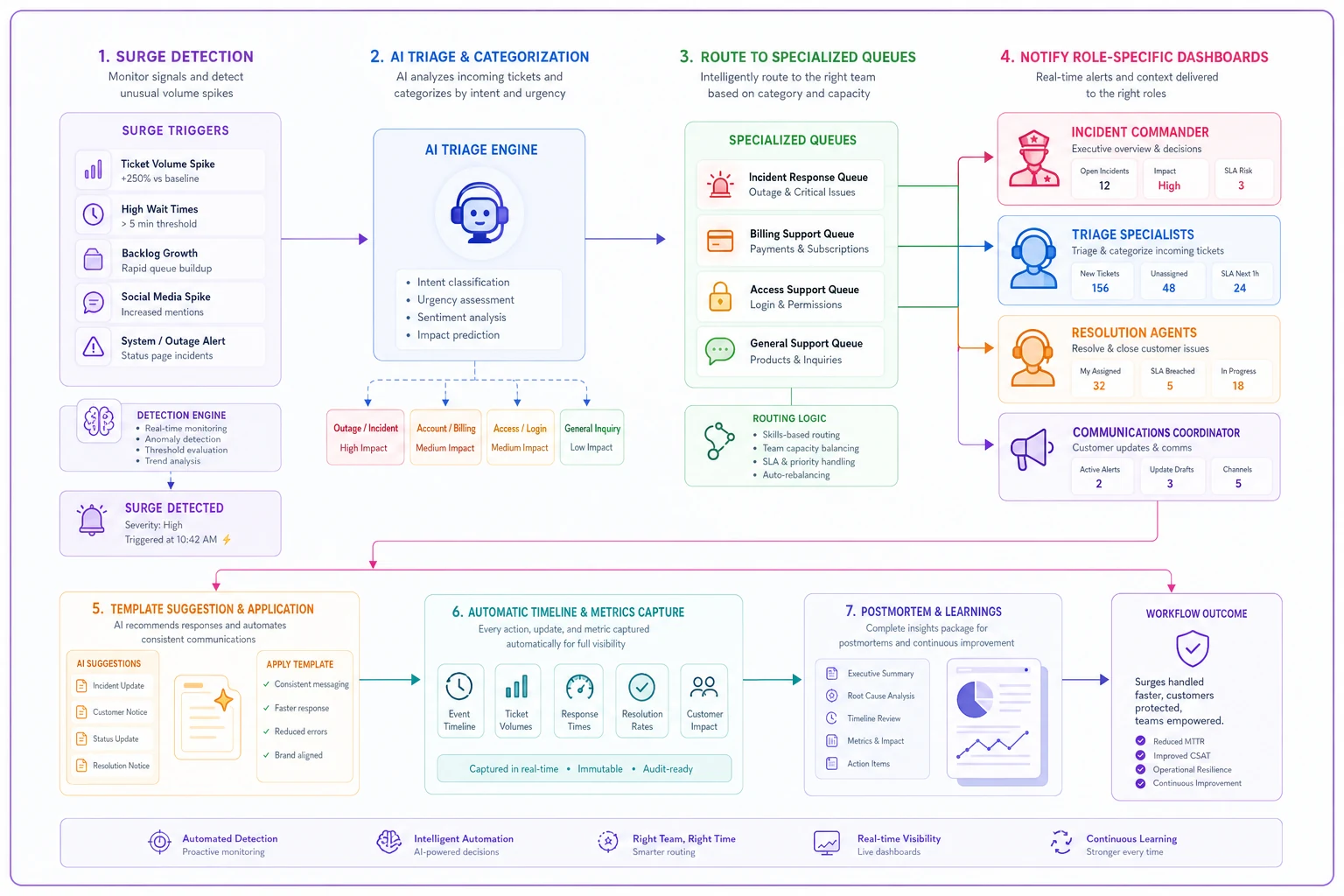
The platform maintains role assignments and notifies the right people when surge conditions hit. Your Incident Commander gets a dashboard showing queue health, response times, and resource allocation. Triage Specialists see their specialized queue with pre-categorized tickets ready for routing. Resolution Agents get tickets bundled by issue type with relevant knowledge base articles attached.
Template management becomes more dynamic too. The system can suggest appropriate templates based on ticket content, track which templates are getting modified, and flag when agents deviate significantly from standard responses. That kind of consistency monitoring is hard to do manually when things are moving fast.
For postmortem prep, the platform automatically captures key metrics, decisions, and timeline events — and correlates customer feedback with specific issues and agent responses. That systematic data collection happens in the background without requiring agents to maintain logs while they're already stretched.
The difference between surviving and managing surges
Teams without playbooks treat every surge like their first. They make the same mistakes, burn out the same people, disappoint customers the same way. Each incident feels like a crisis rather than an operational challenge with a known response.
Teams with proper playbooks treat surges as expected operations. They know who does what, how routing adjusts, what to send customers, and what data to capture. There's still pressure — but it's controlled pressure, not chaos.
The investment pays off during the first major incident where the playbook actually runs. Response times stay measurable in hours. Customer communication stays consistent. Agents feel supported. And each incident makes the playbook a little stronger.
Your next ticket surge is coming. Could be tomorrow from a product bug, next week from a viral complaint, or next month from a competitor's failure driving users your way. The question isn't whether it'll happen — it's whether you'll have a playbook when it does.
Start with role definitions and basic templates. Add routing rules and staffing pivots as you get experience. Build postmortem processes that capture real learning rather than feelings. Whether you implement gradually or all at once, having any playbook beats hoping for the best when tickets start flooding in.
Ready to elevate your customer support?
Join 2,000+ support teams using Helpyly to reduce response times, automate workflows, and deliver outstanding customer experiences.