


Support tickets are data minefields. Credit card numbers typed into complaint forms. Social security numbers pasted into chat windows. Medical records attached to billing disputes. Screenshots containing entire customer databases sent as "proof" of an issue.
Most support teams discover their PII exposure problem the hard way — through an audit, a breach notification, or worse, a customer finding their data on a public forum where an agent shared a "funny ticket" without redacting anything.
The operational reality is messier than any compliance manual acknowledges. Support agents handle 40–60 tickets daily, each potentially containing sensitive data buried in paragraphs of complaints, nested in screenshot annotations, or casually mentioned in follow-up messages. Standard security training says "don't share PII" but never explains how to identify it when a customer embeds their entire medical history in a refund request about a fitness app subscription.
The hidden PII that compliance teams miss
Support operations create unique data exposure patterns that standard security protocols overlook. A customer explaining why they need a refund mentions their divorce proceedings. Someone disputing a charge includes their child's medical diagnosis to justify the expense. Business customers forward internal emails containing employee salaries to prove they need enterprise pricing.
These aren't edge cases — they're Tuesday afternoon tickets.
The challenge runs deeper than obvious credit card numbers. Modern support tickets contain:
Contextual PII that agents don't recognize:
-
IP addresses in technical logs
-
Employee IDs in corporate complaints
-
Prescription details in product feedback
-
Location data from delivery disputes
-
Device identifiers from app crashes
-
Network configurations from IT tickets
Nested sensitive data:
-
Screenshots of banking apps
-
Forwarded email chains with signatures
-
Photos of documents for verification
-
Screen recordings showing browser autofill
-
Copy-pasted chat histories from other platforms
Support agents working through their queue at 2:47 PM aren't forensic data analysts. They see a refund request, not a GDPR violation waiting to happen. A customer attaches their entire tax return to prove they qualify for a discount? That gets processed like any other ticket unless your operational controls catch it first.
Building PII redaction into ticket workflows
Manual redaction fails at scale. Telling agents to "remove sensitive data" without operational automation is like asking them to proofread every ticket in Sanskrit — theoretically possible, practically useless.
Never let a customer request slip through the cracks.
Helpyly helps you track, resolve, and optimize every support interaction effortlessly.
- Centralized ticket management
- Automated customer notifications
- Performance analytics dashboard
No credit card required
Effective PII redaction requires three operational layers working together:
1. Automated detection patterns
| Data Type | Detection Pattern | Auto-Action |
|---|---|---|
| SSN/Tax IDs | XXX-XX-#### format | Mask middle digits, flag for review |
| Credit cards | 13-19 digit sequences | Replace with last 4 only |
| Medical terms | Diagnosis keywords list | Quarantine attachment, alert supervisor |
| Legal documents | .pdf with specific headers | Move to secure queue |
| Personal photos | Image files > 500KB | Require manager approval to view |
| Email signatures | Phone + address patterns | Auto-redact in quoted text |
This isn't about perfect detection — it's about catching the obvious exposures before they spread through your support system. A customer pasting their full credit card into a chat should trigger immediate masking, not rely on an agent noticing during their 47th ticket of the day.
The key is making restricted access the default, not the exception.
2. Role-based viewing permissions
Tier 1 agents see:
-
Masked payment methods (last 4 digits)
-
General location (city, state)
-
Ticket category and description
-
Previous ticket subjects only
Tier 2 specialists access:
-
Full transaction IDs
-
Shipping addresses
-
Order histories
-
Account email addresses
Managers/compliance team views:
-
Unredacted data when justified
-
Audit logs of who accessed what
-
Original attachments
-
Complete conversation history
The key is making restricted access the default, not the exception. Agents should need to request access to sensitive data, which creates an audit trail and forces them to actually consider whether they need it.
3. Retention rules that actually execute
Data retention policies fail when they're suggestions rather than automated operations. Your 90-day retention policy means nothing if tickets from 2019 still exist because "we might need them."
-
Active tickets Full data for 30 days
-
Resolved tickets Auto-redact PII after 7 days, keep metadata
-
Refund/legal holds 180 days then archive offline
-
General inquiries 30 days then permanent deletion
-
Attachments 48 hours in system, then moved to secure storage
These rules need automated enforcement. Schedule weekly retention runs that actually delete data, not just mark it for deletion. Support managers hate losing historical context — understandably — but keeping three years of customer conversations with full PII is a liability problem sitting on a timer.
QA checks that catch redaction failures
Your redaction system will fail. Agents will screenshot unredacted tickets. Automation will miss new PII patterns. Customers will find creative ways to embed sensitive data you never imagined.
Build QA processes that assume failure:
Weekly sampling protocol:
-
Pull 20 random resolved tickets
-
Check for unredacted data in
- Agent notes - Internal comments - Forwarded emails - Slack/Teams shares - Screenshot annotations
Monthly pattern updates:
Review missed PII from QA checks and update detection patterns. If agents repeatedly miss prescription numbers in refund requests, add pharmaceutical name detection. When customers start including passport photos, add image processing rules.
Quarterly compliance audits:
-
Export all ticket metadata (no content)
-
Verify retention rules executed
-
Check access logs for unusual patterns
-
Review permission escalations
-
Test redaction rules with synthetic data
Every missed redaction becomes a new detection rule. Every access violation becomes a training example.
When exposure happens: incident response
Despite all controls, exposure incidents will occur. An agent shares an unredacted screenshot in a public forum. A customer finds another customer's data in their ticket response. A departed employee's personal Google Drive contains ticket exports.
Incident response needs operational triggers, not philosophical frameworks:
Immediate response (first 30 minutes)
Minute 0-5: Containment
-
Lock affected tickets
-
Revoke agent's access
-
Screenshot all evidence
-
Document who has seen exposed data
Minute 5-15: Assessment
-
Identify what data was exposed
-
Count affected customers
-
Check if data is still accessible
-
Review agent's recent ticket history
Minute 15-30: Initial mitigation
-
Remove data from exposed location
-
Reset affected customer passwords
-
Alert legal/compliance team
-
Prepare holding statement
Follow-up actions (24-48 hours)
-
Customer notification - Direct email to affected customers - Specific data that was exposed - Actions they should take - Support contact for questions
-
Internal review - How detection failed - Why agent had access - What training was missing - Which controls need updates
-
Process updates - New detection patterns - Revised access controls - Additional QA checks - Updated training materials
The worst outcome is discovering exposure through a customer complaint three months later. Quick incident response limits damage and tells customers something real about how seriously you take their data.
Real-world implementation: wholesale distributor case
A B2B wholesale distributor with 8 support agents discovered they'd been storing customer tax documents in ticket attachments for four years. Every dispute included PDF copies of resale certificates, business licenses, and tax exemption forms — roughly 3,400 documents containing federal tax IDs, owner SSNs, and banking information.
Their manual approach meant agents downloaded attachments to their computers, reviewed them, then uploaded responses. No tracking, no redaction, no deletion. The "filing system" was whoever remembered which ticket had which document.
After implementing automated controls:
-
Week 1-2
Detection and classification - Scanned existing tickets for PDF attachments - Identified 3,400+ sensitive documents - Categorized by data type and risk level - Quarantined high-risk items immediately
-
Week 3-4
Redaction and retention - Auto-redacted tax IDs in ticket bodies - Moved documents to secure storage - Implemented 90-day retention for resolved tickets - Created view-only permissions for Tier 1
-
Week 5-8
Operational adjustment - Trained agents on new workflows - Built templates for requesting unredacted access - Created audit reports for managers - Established weekly QA reviews
Results after 90 days:
-
Zero tax documents in ticket system
-
94% reduction in PII exposure surface
-
Average ticket resolution stayed at 4.2 hours
-
Compliance audit passed with no findings
-
Agent mistakes dropped from daily to monthly
The key wasn't perfect technology — it was building redaction into their actual workflow rather than bolting it on as an extra step. Proper governance and human oversight kept the automation from becoming another compliance checkbox that everyone quietly ignores.
Templates and automation rules for different support scenarios
Different ticket types require different redaction approaches. A billing dispute needs different data than a technical bug report. Scenario-specific templates reduce both exposure and agent confusion.
Billing and payment tickets
Auto-redaction rules:
-
Mask all but last 4 of credit card
-
Hide middle digits of bank accounts
-
Redact SSN except last 4
-
Remove CVV completely
-
Hide billing address except city/state
What agents can see:
-
Transaction ID
-
Amount disputed
-
Date of charge
-
General location
-
Last 4 of payment method
Template response without PII: "I can see the charge of $XX.XX on [DATE] ending in ####. Let me investigate this for you."
Technical support tickets
Auto-redaction rules:
-
Remove IP addresses from logs
-
Mask device identifiers
-
Redact API keys/tokens
-
Hide server configurations
-
Remove passwords/credentials
What agents can see:
-
Error messages
-
General browser/OS info
-
Timestamp of issues
-
Feature areas affected
-
Previous ticket references
Safe troubleshooting language: "I can see an authentication error occurred at [TIME]. Can you try clearing your cache and attempting again?"
Account verification tickets
Auto-redaction rules:
-
Hide all government ID numbers
-
Redact birthdates except year
-
Mask security question answers
-
Remove mother's maiden name
-
Hide full physical addresses
What agents can see:
-
Account creation date
-
General location (state)
-
Email domain
-
Recent activity patterns
-
Support history count
Verification without exposure: "I can verify recent activity on your account from [STATE]. For security, please provide the email address associated with this account."
Access controls that actually work
Role-based access fails when roles don't match reality. The "Senior Agent" role with full data access made sense until you promoted twelve people and suddenly everyone can see everything.
Build access controls around operational needs:
| Access Level | Can View | Cannot View | Time Limit |
|---|---|---|---|
| Basic Support | Ticket category, general issue | PII, payment details, attachments | Permanent |
| Billing Support | Last 4 payment, transaction IDs | Full payment, SSN, tax docs | During shift |
| Technical Support | Error logs, account status | Personal info, payment, addresses | 24 hours |
| Escalation Team | Previous tickets, unmasked email | Financial docs, government IDs | Case duration |
| Compliance Team | Everything temporarily | - | 48 hour window |
Operational triggers for access:
-
Specific ticket escalation
-
Customer request for data review
-
Refund over threshold
-
Legal hold requirement
-
Audit investigation
Automatic access revocation:
-
End of shift for temporary access
-
Ticket resolution for case access
-
Role change for permanent access
-
90-day review for extended access
The point isn't restricting everything — it's making data access intentional rather than default. An agent working a password reset doesn't need the customer's full purchase history with credit card details.
Automation without losing human context
AI-powered operational software can handle PII detection and redaction at scale, but human context prevents false positives from disrupting service. A customer mentioning their medical condition to explain a late payment needs different handling than someone accidentally pasting their full medical records.
Automated first pass:
-
Pattern matching for obvious PII
-
Flagging suspicious attachments
-
Categorizing risk levels
-
Quarantining high-risk items
Human review layer:
-
Context evaluation
-
Exception handling
-
Customer communication
-
Judgment calls on edge cases
System learning loop:
-
Track human overrides
-
Update detection patterns
-
Refine risk scoring
-
Adjust automation rules
This balance prevents both failure modes: missing obvious PII because agents are overwhelmed, and blocking legitimate support because the system lacks context. The same onboarding discipline that builds independent agents applies to training them on data handling — systematic, measured, with clear checkpoints rather than one-time policy documents.
Measuring redaction effectiveness
Track metrics that reflect real operational safety, not compliance theater:
Weekly operational metrics:
-
Unredacted PII found in QA sampling
-
Agent access escalations requested
-
Time to redact after detection
-
False positive rate on automation
-
Customer data exposure reports
Monthly trending analysis:
-
PII types most commonly missed
-
Departments with most violations
-
Peak exposure times
-
Automation accuracy changes
-
Retention rule execution rate
Quarterly business impact:
-
Support tickets about data concerns
-
Compliance audit findings
-
Agent retraining required
-
System downtime from redaction
-
Customer trust survey responses
Real protection shows in decreased exposure surface, not perfect detection rates. If you're catching 95% of credit cards but missing 80% of medical information, your customers' data isn't safe regardless of how good the card metric looks.
Who actually needs this level of control
Not every support team needs enterprise-grade redaction. The operational overhead might genuinely exceed the risk for some businesses.
You need comprehensive PII redaction if:
-
You handle healthcare, financial, or legal services
-
You process more than 500 tickets weekly
-
Tickets are stored longer than 90 days
-
You have remote or outsourced agents
-
You face regulatory compliance requirements
-
You've had any data exposure incident
Basic redaction is probably fine if:
-
Under 100 tickets weekly
-
No sensitive industries
-
All agents in a single location
-
Tickets deleted after 30 days
-
No compliance requirements
-
Simple product/service model
You might be overdoing it if:
-
Agents can't resolve basic issues without escalating
-
Customers repeatedly have to verify identity
-
Support resolution times have doubled
-
False positives outnumber real catches
-
Compliance has become the primary focus instead of helping customers
The goal is appropriate protection, not maximum restriction. A local bakery handling order complaints needs different controls than a telehealth platform dealing with medical consultations.
How a redaction workflow actually flows
Before jumping to implementation, it helps to visualize how data moves through a protected support environment. Here's a simplified view of how a ticket with sensitive data should travel through your system:
Customer submits ticket (contains PII) ↓ Automated detection layer runs ↓ PII flagged → Auto-redaction or quarantine ↓ Ticket routed to appropriate tier ↓ Agent works ticket (sees masked data only) ↓ Escalation needed? → Access request logged + approved ↓ Ticket resolved → Retention timer starts ↓ 7-day mark → Full PII redacted, metadata kept ↓ 30/90/180-day mark → Deletion or archive
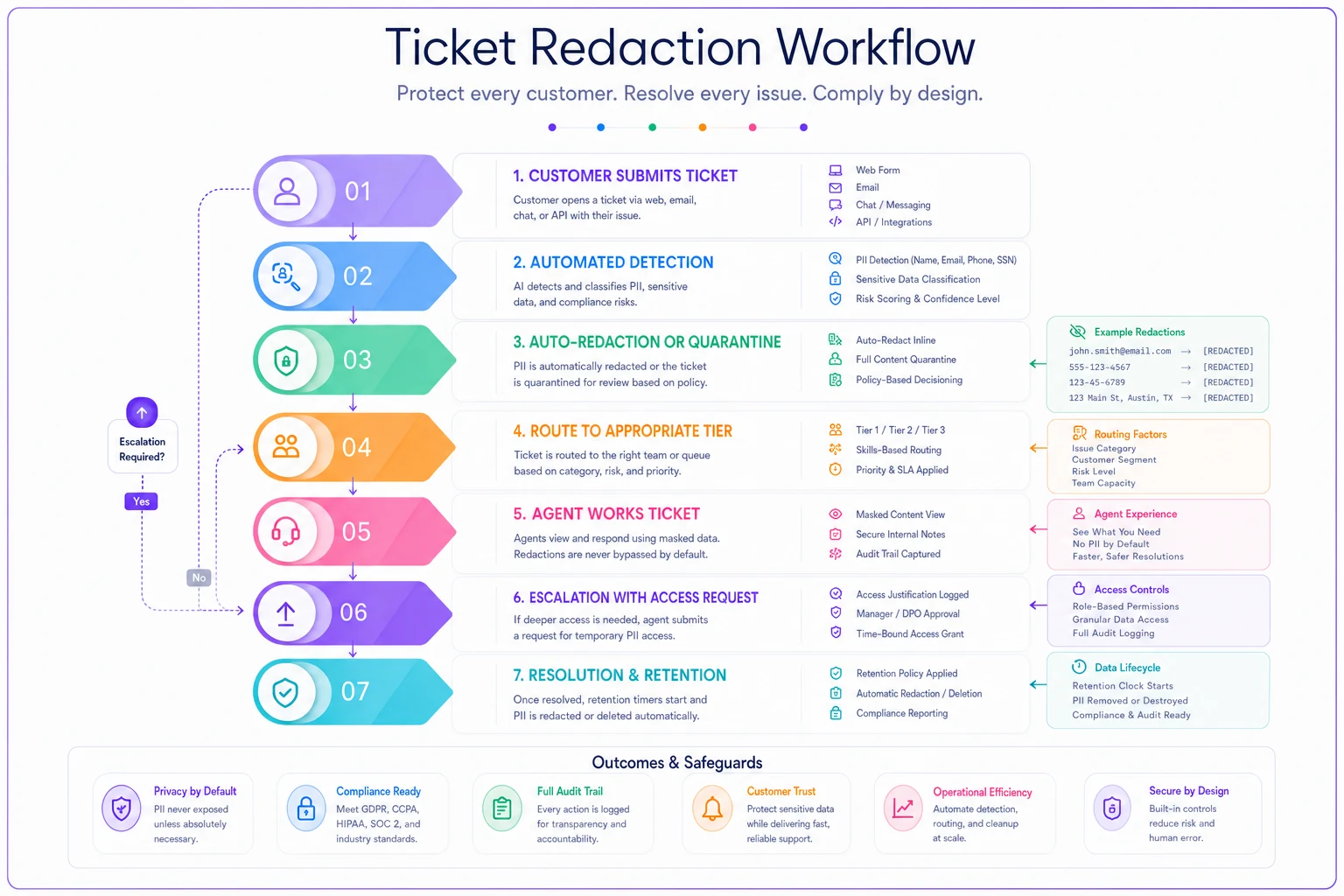
Every step here should be automated wherever possible. The more human decisions required in that chain, the more exposure risk you carry.
Bottom line on PII redaction for support tickets
Support tickets will always contain sensitive data. Customers overshare when they're frustrated. Agents screenshot everything for documentation. Systems store data forever "just in case."
Without operational controls, every ticket becomes a permanent liability. That customer who shared their divorce details in 2021? Their data still sits in your system somewhere. The agent who left six months ago? They might still have ticket exports on a personal device.
Building PII redaction into support operations isn't about achieving perfect security — it's about systematic risk reduction. Automated detection catches the obvious exposures. Role-based access limits the blast radius when something goes wrong. Retention rules prevent eternal liability. QA checks catch what automation misses. Incident response limits damage when — not if — exposure occurs.
That wholesale distributor spent roughly $12,000 implementing automated redaction and avoided an estimated $340,000 in potential compliance fines. More importantly, they can now tell customers with confidence that their sensitive data is actually protected, not just promised to be protected.
Start with your highest-risk data types. Build detection patterns around what you see most often. Add access controls that reflect how your team actually operates. Create retention rules with automated enforcement. Then keep improving as you discover new exposure patterns.
Modern AI-powered operational platforms can handle detection, redaction, and retention automatically while preserving the context agents need to actually help customers. The technology exists — the hard part is integrating it into your team's daily workflow instead of treating it as another compliance layer they'll eventually route around.
Protecting customer data in support tickets isn't purely a technical problem or a training problem. It's an operational one that requires systematic controls, honest QA, and the recognition that human error is inevitable — but uncontrolled exposure doesn't have to be.
Ready to elevate your customer support?
Join 2,000+ support teams using Helpyly to reduce response times, automate workflows, and deliver outstanding customer experiences.