


Most support teams only discover a broken link when a customer complains — or worse, when an agent pastes a dead URL into a reply and gets an email back saying "this page doesn't exist." By then it's already spread across a dozen conversations. The article is gone, the redirect never got set up, and nobody owns the cleanup.
Another "KB audit day" on the calendar isn't the fix. Those run fine for a few weeks and then rot. What actually works is treating KB link integrity tests the way engineering teams treat test suites: runnable, scheduled, with failures that route to a named owner and a deadline attached. Below is how to build that — including the heuristics for stale content, the remediation queue mechanics, and the alert recipes that keep it from becoming noise.
Why manual KB hygiene always decays
The quarterly audit model fails for a pretty boring reason: the work is front-loaded and the decay is continuous.
Links don't break on a schedule. A product team renames a feature and the old docs URL 404s on a Tuesday. A partner restructures their help center and every outbound link you pointed at them dies overnight. A marketing redesign changes /pricing to /plans and now forty internal KB articles reference a path that redirects to a generic homepage.
Across a lot of knowledge bases, roughly 2–5% of links rot every quarter in a KB that's actively changing. In a 600-article KB with an average of four or so links per article, that's around 2,400 links total. Even a 3% rot rate means somewhere around 70 broken links accumulating every three months. Your quarterly audit catches them all at once, someone spends two exhausting days fixing them, and then the counter immediately starts climbing again.
There's also a subtler failure mode. Manual audits catch hard breaks — the 404s — but almost never catch soft rot: the article that still loads fine but describes a workflow that changed six months ago. A link checker returns 200 OK. The content is wrong. The customer follows it and files a ticket anyway.
The two things you're actually testing
Before building anything, separate the two problems. They need different checks and different owners.
Never let a customer request slip through the cracks.
Helpyly helps you track, resolve, and optimize every support interaction effortlessly.
- Centralized ticket management
- Automated customer notifications
- Performance analytics dashboard
No credit card required
Link integrity is mechanical. A URL either resolves to the right thing or it doesn't. This is fully automatable and should run constantly.
Content staleness is heuristic. You can't definitively prove an article is out of date with a script, but you can flag strong signals that it probably is. This runs as a scoring pass, not a pass/fail test.
Here's how they break down:
| Check type | What it tests | How it runs | Confidence |
|---|---|---|---|
| Internal link resolution | KB-to-KB links still point to live articles | Crawl + status check | High — hard pass/fail |
| Outbound link health | External URLs return 2xx, not 3xx chains or 404 | HTTP check with redirect tracing | High |
| Anchor/fragment validity | #section deep links still match a heading | Parse target page headings | Medium |
| Redirect decay | Links resolving via 301/302 instead of direct | Trace redirect chain length | Medium |
| Last-meaningful-edit age | Article not substantively touched in N months | Timestamp + diff size heuristic | Low — signal only |
| Orphaned article | No inbound links, low traffic, old | Graph + analytics join | Low — signal only |
| Product-term drift | References a renamed feature/plan/price | Keyword match against a deprecation list | Medium |
| View-to-ticket mismatch | High views, rising linked tickets | Analytics join | Medium — strong when combined |
The mistake teams make is trying to treat low-confidence checks like high-confidence ones. Staleness heuristics should never auto-flag an article as "broken." They should raise its score so a human looks at it sooner.
The runnable checks, concretely
You want these to be things anyone on the team can trigger and read — not a black box only one engineer understands.
-
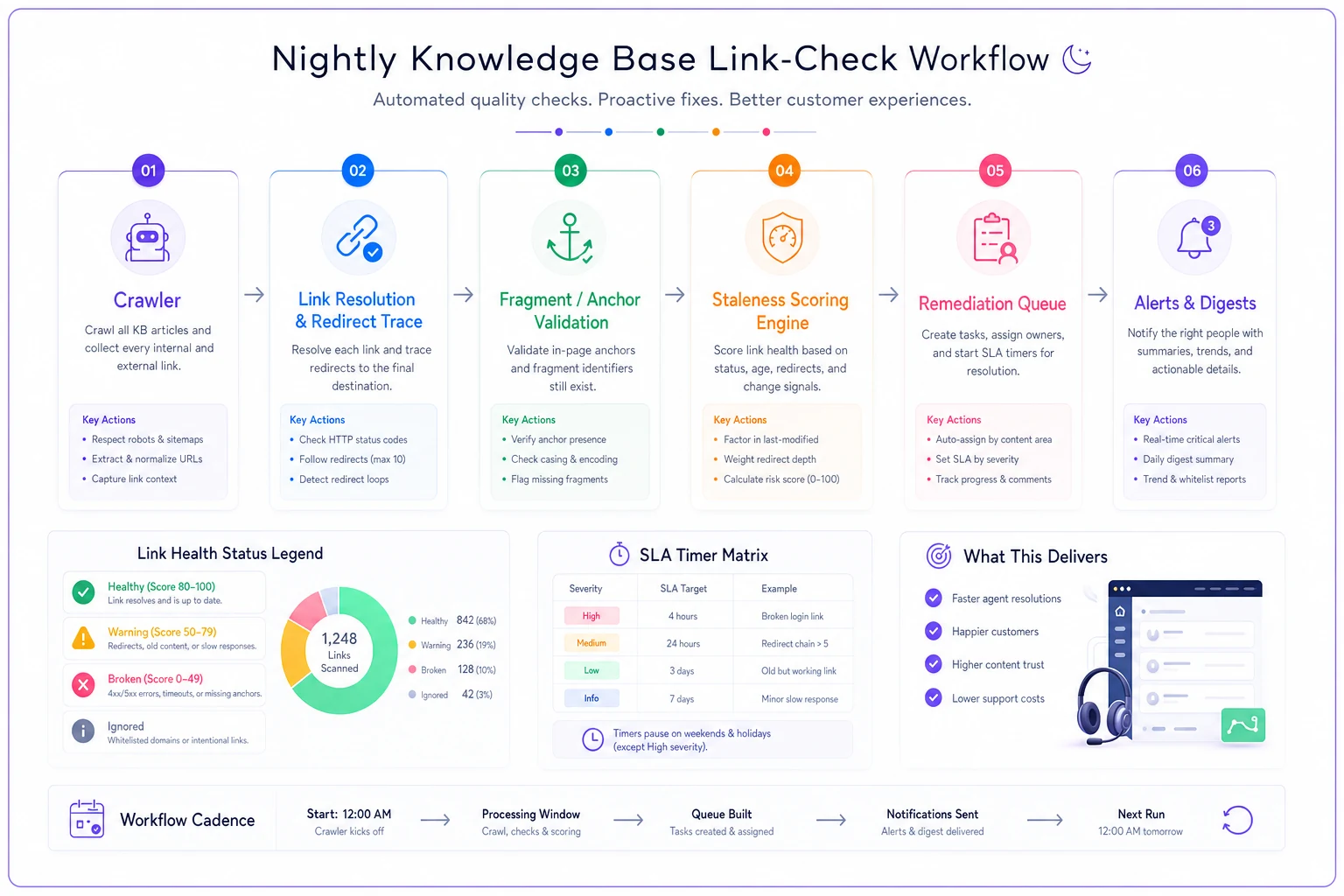
Internal link resolution. Crawl every published article, extract every link pointing to your own KB domain, and hit each one. Any non-200 is a hard failure. Store the result as a row: source article, broken URL, status code, timestamp. This is your cleanest signal and the easiest win.
-
Outbound link health. Same idea for external links, but trace the redirect chain. A link that still "works" but bounces through three redirects to land on a partner's homepage is functionally broken — the customer wanted the specific page. Flag chains longer than one hop and anything resolving to a different domain than originally linked.
-
Fragment checks. If an article links to
help.example.com/billing#refunds, verify a heading or anchor matchingrefundsstill exists on that page. These break silently all the time when someone restructures a long doc. -
Staleness scoring. This is where the heuristics live. Rather than one rule, combine several weak signals into a score:
No single signal means the article is wrong. Together, a high score means "a human should review this before a customer does."
-
Months since last meaningful edit (ignore tiny typo fixes — look at diff size)
-
Presence of any term on your deprecated-feature list
-
Ratio of article views to linked tickets (high views + rising tickets = suspect)
-
Whether the article references a screenshot or UI element that's changed
The deprecated-term list is worth real effort. When product renames something, that rename belongs in a shared list the staleness scanner reads from. It's one of the highest-leverage, lowest-effort habits a support team can build — it converts an invisible drift problem into a searchable one. For the broader framing on review timing and retirement rules, the knowledge lifecycle governance playbook covers how to decide what gets reviewed versus deprecated.
Sample queries you can adapt
Assuming your KB metadata and link-check results land in a table you can query, here are the ones worth running on a schedule. Adjust column names to your schema.
SELECT a.owner, a.articleid, a.title, l.targeturl, l.statuscode FROM linkchecks l JOIN articles a ON l.sourcearticleid = a.articleid WHERE l.statuscode >= 400 AND l.checked_at > NOW() - INTERVAL '24 hours' ORDER BY a.owner, a.title;
SELECT a.articleid, a.title, a.views30d, t.linkedtickets30d, ROUND(t.linkedtickets30d::numeric / NULLIF(a.views30d,0), 4) AS ticketrate FROM articles a JOIN ticketlinks t ON a.articleid = t.articleid WHERE a.views30d > 500 AND t.linkedtickets30d > t.linkedticketsprev30d ORDER BY ticketrate DESC LIMIT 25;
SELECT articleid, title, owner, monthssincemeaningfuledit, deprecatedtermhits, stalescore FROM articlestaleness WHERE stalescore >= 6 ORDER BY stalescore DESC;
That view-to-ticket query is the one most teams skip and really shouldn't. An article can pass every link check, read perfectly, and still generate tickets because the underlying process changed. Pairing search behavior with resolution outcomes is covered in more depth in the piece on diagnosing KB discoverability, which is a useful companion signal here.
The remediation queue is the part everyone forgets
Finding broken links is maybe 20% of the work. The actual value is in what happens next — and this is where "we run a scanner" teams still fail. A list of 70 broken links in a spreadsheet is not progress. It's just guilt in spreadsheet form.
The queue needs four things to actually function:
-
An owner on every item. Not "the KB team" — a named person. The scanner should assign ownership based on the article's owner field, and if that field is blank, that's its own flag.
-
A severity tier so people fix the right things first.
-
An SLA clock that starts when the item enters the queue.
-
A clear "done" definition so items don't sit in limbo at 90% fixed.
A workable severity model:
-
P1 — customer-facing right now. Broken link in an article that's referenced in active tickets or has high recent traffic. Fix within 2 business days.
-
P2 — live but low traffic. Broken link in a published article nobody's hit this week. Fix within 10 business days.
-
P3 — staleness flag. High stale score, no confirmed break. Review within the monthly cadence.
The reason to tier is simple: a broken link in your top-viewed "How to reset your password" article is a bleeding wound, and a dead reference in a three-year-old article about a deprecated feature is a paper cut. Treating them the same is how teams burn out on hygiene and quietly abandon it.
Owner SLAs that don't quietly rot
An SLA nobody watches is just a suggestion. The queue has to surface aging items and escalate them, the same way a ticket SLA does.
A pattern that holds up: when a remediation item passes 75% of its SLA window untouched, it pings the owner. At 100%, it escalates to the KB lead and shows up on a weekly aging report. The aging report matters more than the ping — individual nudges get ignored, but a standing report listing "items past SLA, by owner" creates visible accountability without anyone chasing people down individually.
One thing worth watching: SLA breaches tend to cluster around owners who inherited articles they didn't write. When someone leaves and their 40 articles get reassigned in bulk, that person becomes an instant SLA-breach machine through no fault of their own. Watch for ownership imbalance, not just individual misses.
When reassigning many articles, stagger ownership transfers or add a short grace period to avoid a sudden spike in overdue remediation items.
The queue has to surface aging items and escalate them, the same way a ticket SLA does.
Alert recipes that stay useful
The fastest way to kill a KB hygiene pipeline is to alert on everything. Within a couple of weeks people mute the channel and you're back to manual. Alerts should be rare and meaningful.
-
New P1 break → immediate message to the owner plus a shared channel. These are customer-facing and shouldn't wait for a report.
-
Weekly digest → every Monday, one message
new breaks, items past SLA, top five stale-score risers. One message, not fifty.
-
Spike alert → if the broken-link count jumps more than roughly 3x the weekly baseline, something systemic happened — a bulk redirect, a domain migration. This is the one that catches the "marketing renamed every URL overnight" disaster before customers do.
-
Deprecated-term hit → when a newly added deprecated term shows up in live articles, flag them for review. This catches drift at the source.
Resist adding real-time alerts for every P2 or staleness flag. Those belong in the digest. The signal-to-noise ratio of your alerts is probably the single biggest predictor of whether this system survives past the first quarter.
A real scenario
A mid-sized SaaS support team — around 14 agents, a KB of roughly 500 articles — was running quarterly audit days. Each audit took two people about a day and a half, and between audits they'd accumulate somewhere around 50–60 broken links before anyone noticed. Agents had quietly started double-checking links before pasting them into replies, which added time to every single response.
They moved to a nightly scheduled link check feeding a remediation queue with P1/P2/P3 tiers and the SLA escalations described above. The first run surfaced around 80 accumulated issues, which made for a rough week of cleanup. After that, steady-state was maybe 5–10 new items per week, caught and fixed within days instead of sitting for months.
The cleaner payoff wasn't even the broken-link count — it was ticket-side. The view-to-ticket query flagged a billing article that passed every link test but was generating a steady drip of "this doesn't match what I see" tickets. It referenced an old plan name. Fixing it took about twenty minutes and noticeably reduced that ticket category over the following month. That article would have passed every link check they'd ever run.
When to build this, and when not to
This makes sense when your KB is actively changing, you have more than a couple hundred articles, and links break faster than any person can track manually. If product ships frequently or you depend heavily on outbound links to partner docs, you need the pipeline.
This is overkill when you've got 40 stable articles that barely change. A monthly manual click-through is genuinely fine at that scale, and building scheduled checks and queues would be effort spent on a problem you don't have.
Who should hold off: teams without clear article ownership. If nobody owns individual articles, the remediation queue has nowhere to route items and you'll just generate a backlog with no assignees. Fix ownership first — even a rough owner field is enough to start — then layer the checks on top. A pipeline that detects problems but can't route them just produces anxiety.
Where to start this week
You don't need the full system to get value. Build it in order:
-
Run one internal-link crawl and see how bad it actually is. The number is usually worse than people expect.
-
Dump the results into a table with an owner column, even if you fill it manually the first time.
-
Add the three severity tiers and pick SLA windows you can actually honor.
-
Stand up exactly one weekly digest. Nothing else yet.
-
Once that's steady, add the staleness scoring and the view-to-ticket query.
The whole point is to stop treating KB hygiene as an event and start treating it as a background process that runs whether or not anyone remembers to schedule it. Link checks that run nightly and route to an owner with a deadline will outperform the most disciplined quarterly audit, because the decay never stops and neither should the checks.
The whole point is to stop treating KB hygiene as an event and start treating it as a background process that runs whether or not anyone remembers to schedule it. Link checks that run nightly and route to an owner with a deadline will outperform the most disciplined quarterly audit, because the decay never stops and neither should the checks.
Ready to elevate your customer support?
Join 2,000+ support teams using Helpyly to reduce response times, automate workflows, and deliver outstanding customer experiences.