

Your knowledge base has 1,847 articles. Agents use maybe 200 of them. The rest? Dead weight that clutters search results, confuses new hires, and sends customers down the wrong path.
Knowledge lifecycle governance isn't about having more documentation. It's about maintaining a living system where every article either helps or gets removed. Most support teams treat their knowledge base like a storage unit—stuff goes in, nothing comes out. Then they wonder why resolution rates tank and tickets bounce back.
The silent killer: knowledge base rot
Knowledge bases die slowly. An article about password resets from 2019 still ranks first in search results, except the reset flow changed three times since then. Agents link it out of habit. Customers follow outdated steps. Tickets multiply.
This is what actually plays out in support operations. A product update ships. Nobody updates the corresponding articles. Six months pass. Now you have:
-
Agents giving conflicting answers depending on which article they found first
-
Customers getting frustrated following wrong instructions
-
Escalations because the "documented solution" flat-out doesn't work
-
New agents learning incorrect processes from old content
The average support team has somewhere around 40% of their knowledge base articles untouched in over a year. That's not institutional knowledge—that's institutional debt.
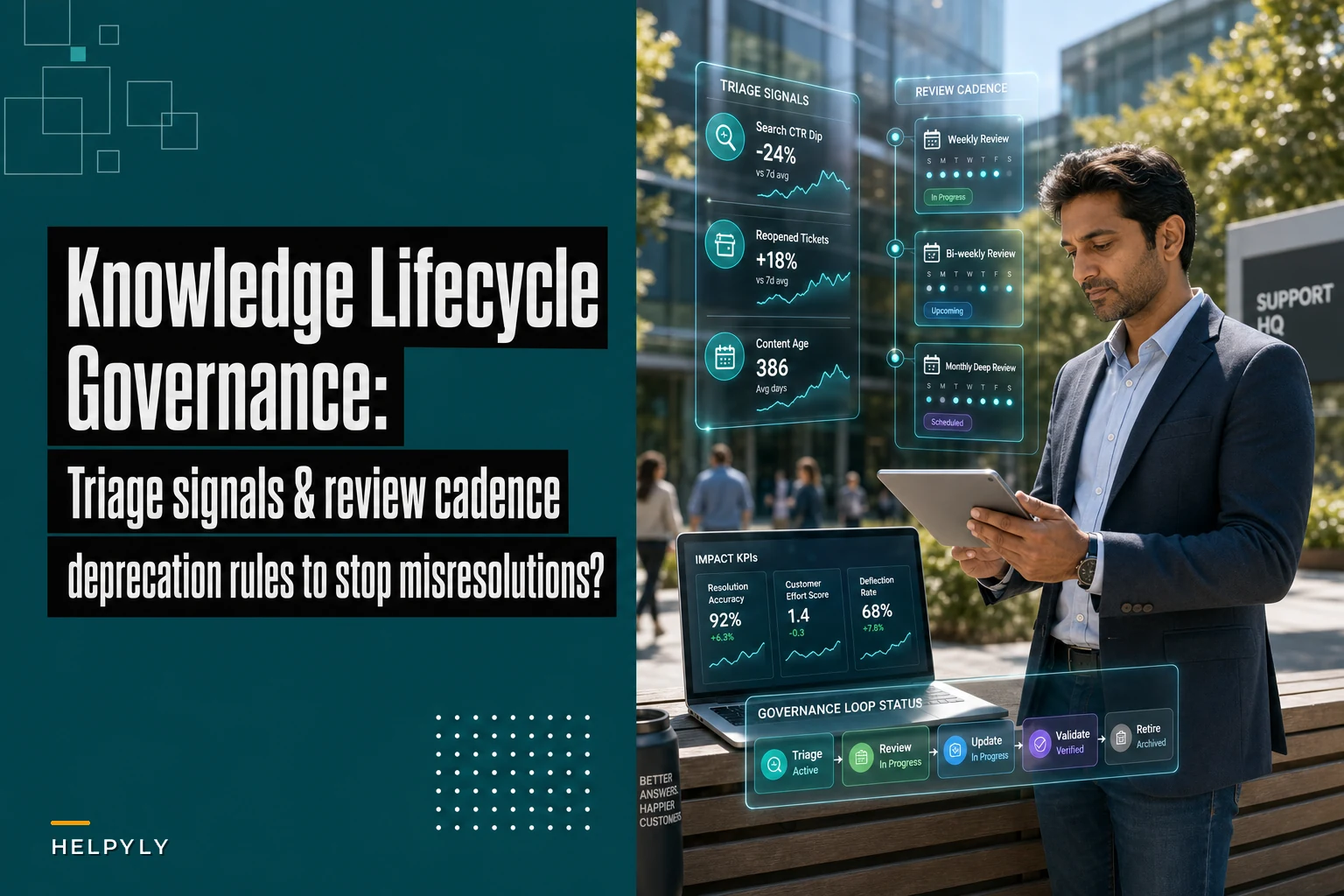
Triage signals that actually matter
Search-to-resolution tracking: When an article gets searched 300 times but linked in tickets only 12 times, something's wrong. Either the title misleads or the content doesn't solve the actual problem. Track the ratio monthly. Below 20% link rate? Flag for review.
Never let a customer request slip through the cracks.
Helpyly helps you track, resolve, and optimize every support interaction effortlessly.
- Centralized ticket management
- Automated customer notifications
- Performance analytics dashboard
No credit card required
Ticket linkback patterns: Articles that appear in reopened tickets are toxic. Build a simple report: which articles show up most in tickets that bounce back within 48 hours? Those articles are actively hurting your support operation.
Agent avoidance signals: Your experienced agents know which articles are bad. They just work around them instead of saying anything. Track which agents never link certain high-traffic articles. When your top performers are consistently avoiding specific content, that's your deprecation list.
Customer feedback loops: Not satisfaction scores—actual behavior. Articles where customers immediately open another ticket or escalate to chat? Dead on arrival. Track the next action after article delivery. High bounce rates mean the article failed its job.
Building a review cadence that scales
Annual reviews don't work. Quarterly reviews are theater. Real knowledge lifecycle governance runs on triggers, not calendars.
Set up threshold-based reviews:
-
Any article linked in 3+ reopened tickets gets immediate review
-
Articles with search-to-link ratios below 15% get flagged weekly
-
Content older than 6 months with declining usage enters sunset review
-
New product releases trigger review of all related articles within 72 hours
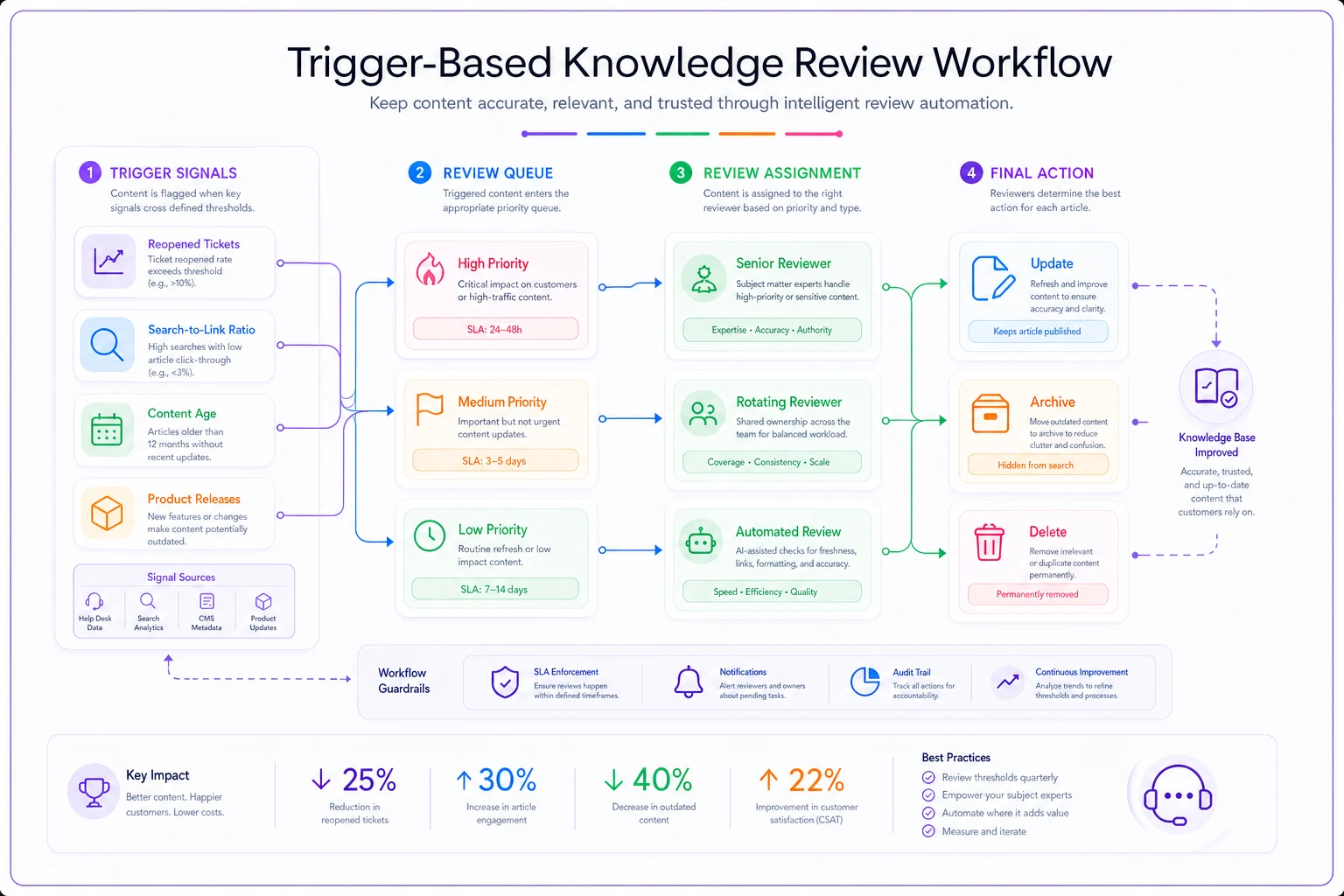
A simple trigger-based review workflow looks like this.
One mid-size SaaS company switched from quarterly reviews to trigger-based governance. Their misresolution rate dropped from 18% to 11% in four months. Not because they wrote better articles—because they killed the bad ones faster.
The review process itself matters too. Don't make senior agents review everything. Create tiers:
Critical articles (top 50 by usage): Senior agent + product team review monthly
Standard articles (next 200): Rotating agent review when triggered
Long-tail content: Automated deprecation unless manually saved
This isn't about perfection. It's about preventing obviously wrong information from sitting in your knowledge base for months unchecked.
Deprecation rules that prevent hoarding
Nobody wants to delete content. There's always someone who says "but what if we need it someday?" That's how knowledge bases become junkyards.
Create non-negotiable deprecation triggers:
-
No searches in 90 days = archived
-
No links in 180 days = deleted
-
Linked in 2+ misresolutions = immediate review or removal
-
Product feature deprecated = article removed same day
The archive isn't a safety net—it's a graveyard. Once something goes there, it's dead. Don't let agents search archived content. Don't surface it anywhere. If someone genuinely needs it, they can request restoration with a business case.
Deleting bad content improves support metrics more than writing new content. A support team with 500 solid, current articles outperforms one with 2,000 mixed-quality articles every time.
KPIs that measure actual health
Stop measuring article count. Stop tracking "coverage." These metrics reward quantity over quality.
Real knowledge health metrics:
| Metric | What it measures | Red flag threshold |
|---|---|---|
| Link-to-resolution rate | Articles that actually solve problems | Below 60% |
| Misresolution linkback | Articles causing ticket bounces | Above 5% |
| Search effectiveness | Searches that find useful content | Below 40% |
| Content decay rate | How fast articles become outdated | Above 15% monthly |
| Agent trust score | Which articles agents actually use | Below 30% adoption |
Track these weekly. Graph them monthly. Act on them immediately.
One pattern that comes up constantly: teams track article views like it means something. An article with 10,000 views and a 70% bounce rate is a failure, not a success. Focus on outcomes, not activity.
The compound effect of bad knowledge
Every outdated article creates work. Not just the original misresolution—the entire cascade that follows.
Customer follows bad instructions → Opens ticket → Agent provides correct solution → Customer frustrated → Escalates → Senior agent involved → Trust damaged → Churn risk increased
One bad article about billing that stayed live for 8 months at an e-commerce company caused:
-
430 unnecessary tickets
-
87 escalations
-
12 churned customers
-
Roughly $34,000 in support costs
All from one outdated article about applying store credit that nobody thought to update after a payment system migration.
This is why knowledge lifecycle governance matters. It's not about documentation quality in the abstract. It's about operational efficiency in practice.
Creating feedback loops that work
The best knowledge bases self-correct through systematic feedback loops. Not suggestion boxes or quarterly surveys—actual operational signals that trigger action.
Build these feedback mechanisms:
Agent flagging system: One-click flagging directly from the help desk interface. No forms, no friction. Agent flags article as wrong, outdated, or confusing, it goes into review queue immediately.
Make agent flagging one-click in the help desk UI to minimize friction and speed reviews.
Customer outcome tracking: Every article linked should track the ticket outcome. Did it resolve? Did the customer reply? Did they escalate? This data feeds directly into your deprecation rules.
Version control with rollback: When you update an article, track whether misresolutions increase. If the new version performs worse, roll back and flag for human review.
Cross-team validation: Product changes should automatically trigger knowledge review. Integration with your ticket surge response system ensures documentation updates happen during incident response, not months after the fact.
The feedback loop breaks when it requires too much manual effort. Automate the signal collection, human-review the responses.
Preventing knowledge base sprawl
Every support team starts with good intentions. "We'll document everything!" Six months later, there are fourteen articles about password resets and none of them are current.
Implement creation governance:
-
One article per issue (merge duplicates aggressively)
-
Required deprecation plan for every new article
-
Ownership assignment—someone's actual name, not "support team"
-
Automatic sunset dates unless manually renewed
Before creating new content, ask: Can we update an existing article instead? Will this solve a problem that appears in at least 20 tickets monthly? Who maintains this when the author leaves?
Most knowledge base problems come from creation without curation. It's easier to write new articles than fix old ones. That's how you end up with thousands of articles nobody trusts.
The AI automation advantage
Modern operational software changes how knowledge lifecycle governance actually works in practice. Instead of manual reviews and hoping agents flag problems, AI-powered platforms can automatically detect knowledge decay through pattern recognition.
These systems track which articles correlate with ticket reopens, which content agents consistently skip, and where search queries don't match available articles. They surface deprecation candidates based on actual usage patterns rather than arbitrary timelines.
AI automation can also maintain version control and flag articles for update when product changes ship. When integrated with your routing rules, the platform understands which articles matter for which customer segments and prioritizes reviews accordingly.
This isn't about replacing human judgment. It's about surfacing the right articles for human review at the right time. The platform handles detection and tracking; your team handles actual knowledge creation and curation.
Stop measuring coverage, start measuring resolution
Knowledge lifecycle governance isn't about having an article for everything. It's about having the right articles that actually work.
Most support teams would improve their metrics by deleting half their knowledge base. The articles that remained would be findable, trustworthy, and current. Agents would stop second-guessing documentation. Customers would stop bouncing between outdated solutions.
The governance framework isn't complex:
-
Track signals that predict misresolutions
-
Review based on triggers, not calendars
-
Delete aggressively when content fails
-
Measure outcomes, not activity
Start with your top 100 articles by usage. Apply the triage signals. Flag anything with a link-to-resolution rate below 60%. Review or remove within a week. Watch your resolution metrics improve.
The best knowledge bases are small, current, and trusted. Everything else is operational debt pretending to be documentation.
Ready to elevate your customer support?
Join 2,000+ support teams using Helpyly to reduce response times, automate workflows, and deliver outstanding customer experiences.