


Most support teams don't have a knowledge gap. They have a discoverability gap. The article exists, it's accurate, it even resolves the issue when someone actually reads it. But nobody finds it, so the ticket lands in the queue anyway — and now you're paying an agent to answer something you documented six months ago.
The frustrating part is that KB search analytics usually tell you this is happening. The signals are sitting right there in your dashboard. Most teams just don't know which numbers matter, what threshold counts as actually broken, or how to test a fix without waiting three weeks for data that never gets clean enough to act on.
This is a diagnostic workbook, not a strategy piece. We'll go query-by-query, set real thresholds, and work through the heuristics that separate "bad article" from "bad title" — with edits you can ship today and measurement windows that won't mislead you.
Start with the four query buckets, not the whole dashboard
If you open KB search analytics and try to read every query at once, you'll drown. There are usually thousands of them. Nearly every query falls into one of four buckets, and each bucket needs a completely different fix. Sorting them first stops you from applying the wrong medicine.
| Bucket | What the data looks like | What it means | What to fix |
|---|---|---|---|
| High search, low CTR | Query fires a lot, but few people click any result | Your titles/snippets don't match the intent | Title + snippet edit |
| High search, high CTR, high follow-up ticket | People click, then submit a ticket anyway | The article is found but doesn't resolve | Content rewrite |
| High search, zero results | Query returns nothing | Missing article or bad keyword coverage | New article or alias |
| Low search, high CTR, high resolution | Small volume, works fine | Leave it alone | Nothing |
That last row matters more than it looks. A lot of teams waste optimization effort on articles that are already working just because the raw traffic number is small. Volume isn't the same as a problem. A query with 40 searches a month and a 70% resolution rate is doing its job — don't touch it.
The buckets that actually cost you money are the first two, and they get confused constantly. Both show high search volume. The difference is where people drop off — before the click, or after. Get that wrong and you'll rewrite a perfectly good article when all you needed was a better title.
Signal thresholds: what "broken" actually means
Vague reactions like "this article isn't performing" don't lead anywhere useful. You need thresholds. These aren't universal laws — adjust them to your volume — but they're the rough lines that tend to hold across a lot of different help centers.
Never let a customer request slip through the cracks.
Helpyly helps you track, resolve, and optimize every support interaction effortlessly.
- Centralized ticket management
- Automated customer notifications
- Performance analytics dashboard
No credit card required
Click-through rate on internal KB search:
-
Above 50% → healthy. People are finding what looks right.
-
30–50% → soft signal. Worth watching, not urgent.
-
Below 30% → the title or snippet is failing. This is a discoverability problem.
One caveat people miss: if a query surfaces an instant answer or featured snippet inline, CTR will naturally look low because the person got what they needed without clicking. Don't flag those as broken. Segment them out first or you'll end up chasing the wrong thing.
Zero-result rate: Anything above 5–8% of total search volume returning zero results is a real gap. In practice, help centers can sit at 15–20% zero-result rates and nobody notices — because zero-result queries don't generate clicks, they're basically invisible unless you specifically pull them.
Query-to-ticket rate: This is the metric most teams never calculate, and it's the most important one. It's the percentage of people who search a given term and then still open a ticket within a short window — say, 30 to 60 minutes.
-
Under 10% → the article is resolving.
-
10–25% → partial. Some intents aren't covered.
-
Over 25% → the search is basically a stop on the way to the ticket form.
That last metric is where discoverability and content quality diverge. A high query-to-ticket rate on an article with good CTR means the content failed. High query-to-ticket with low CTR means they never got to the content at all.
The CTR-to-ticket heuristic that saves you the most time
For any query you're worried about, plot two numbers against each other: CTR and query-to-ticket rate.
-
Low CTR + high query-to-ticket → Title/snippet problem. People search, don't recognize the right result, give up, and file a ticket. The article might be fine — nobody's reading it. Fix the title first, measure, and only touch the body if it's still broken.
-
High CTR + high query-to-ticket → Content problem. People find it, open it, and still can't self-serve. This needs a rewrite, not a title change. Usually it's missing a step, buried the answer too far down, or answers a slightly different question than what's actually being asked.
-
High CTR + low query-to-ticket → Working. Leave it.
-
Low CTR + low query-to-ticket → Low intent or answered elsewhere. Safe to ignore most of the time.
The reason this matters: title edits are cheap and fast. Content rewrites are slow and usually require a writer or subject matter expert. If you can't tell the difference, you'll route every problem to your most expensive fix. This heuristic tells you which lever to pull before you spend anyone's time.
Worth mentioning — a mid-size SaaS help center had a "reset password" article with a solid 62% CTR but a query-to-ticket rate sitting around 30%. Everyone assumed the search was broken. It wasn't. The article covered the standard reset flow but never mentioned SSO users, who had no self-serve option and had to contact support. Two paragraphs added for the SSO case dropped follow-up tickets on that query by roughly a third. No title change would have touched that — it was purely a coverage gap masked by decent discoverability.
Sample fixes: title and snippet edits that move CTR
When the diagnostic points to a title/snippet problem, here's what actually works. These are small changes, deliberately so — you want edits you can ship and measure in isolation.
Match the searcher's words, not your product's words. Internal docs say "authentication credentials." Customers search "can't log in." If the title uses the internal term, CTR drops. Pull the top actual query phrasings from your analytics and rewrite titles to mirror them.
A typical before/after:
-
Before
"Credential Recovery and Account Access Management" — CTR around 22%
-
After
"Can't log in? How to reset your password" — CTR climbed into the low 50s within two weeks
Front-load the answer type in the snippet. The first 120 characters of the article body usually become the search snippet. If those start with a company preamble ("At Acme, we take security seriously..."), the searcher sees nothing useful. Rewrite the opening line to state what the article actually does: "Follow these steps to reset your password if you've forgotten it or been locked out."
Kill the near-duplicate competition. When three articles all rank for "refund," none of them get a clean CTR because the searcher can't tell which one is right. Consolidate or clearly differentiate titles by scenario: "Refund for annual plans," "Refund within 30 days," "Refund after cancellation." This overlaps with broader knowledge lifecycle governance — duplicate and stale articles quietly wreck discoverability, and pruning them is often a bigger CTR win than any single title edit.
Add aliases for zero-result queries. If people search "invoice" and your article is titled "Billing statements," the search returns nothing useful. Most KB platforms let you attach alternate search terms. Map the real query language to the existing article instead of writing a new one.
Pull the top actual query phrasings from your analytics before rewriting titles to ensure you're mirroring customer language.
When the diagnostic points to a title/snippet problem, these edits are intentionally small so you can measure them in isolation and avoid confounding changes.
Measurement windows: how to not fool yourself
This is where good diagnostics usually fall apart. Someone changes a title on Monday, sees a CTR bump by Wednesday, declares victory, and moves on. Then the number drifts back and nobody notices.
Short windows lie because of daily variance and low volume. Rough rules for reliable measurement:
-
Set a baseline first. Pull 2–4 weeks of data before you change anything. One-day snapshots are worthless.
-
Wait for a minimum sample, not a minimum time. For CTR, you want at least 200–300 searches on that query post-change before you trust the number. A low-volume query might need a month; a high-volume one, a few days.
-
Measure the same metric you were trying to move. If you changed the title to fix CTR, judge it on CTR — not ticket volume, which has too many other inputs.
-
Hold everything else steady. Don't edit the title and rewrite the body and change the search ranking in the same week. You won't know what worked.
-
Recheck at 30 and 60 days. Early lift often overstates the real effect. The 30-day number is usually closer to the truth.
The single most common mistake: comparing a week that included a product incident or a marketing push against a normal week. Traffic composition shifts and your query mix changes underneath you. Always sanity-check that the volume is roughly comparable across comparison periods before you trust the rate.
A short diagnostic workflow you can run this week
Block two hours and run through this. The sequencing matters — ship the cheap fixes immediately and defer the expensive ones. Most teams do it backwards: they start with the hard rewrites, run out of energy, and never touch the title edits that would've delivered the fastest wins.
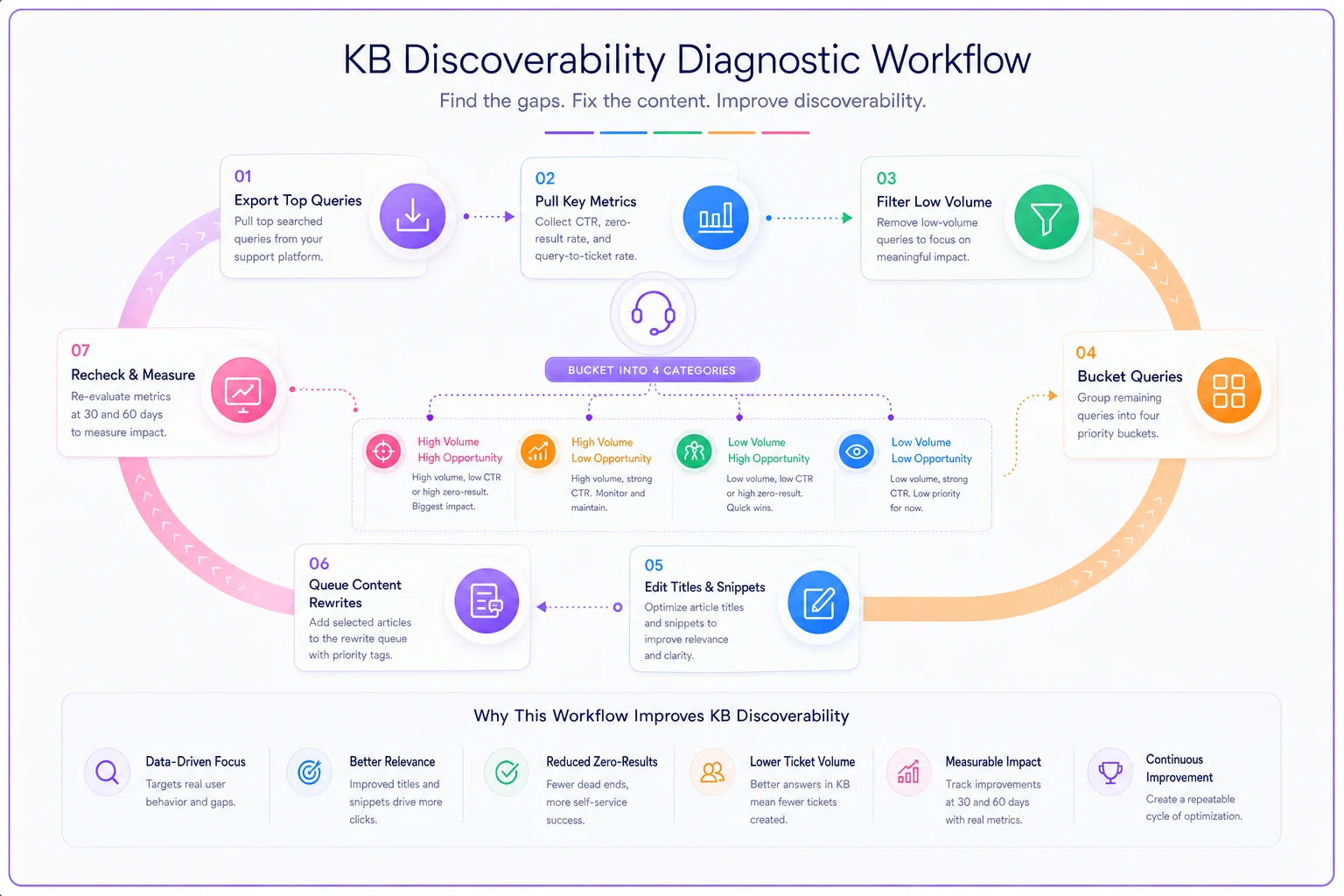
Export top 100 queries by volume (last 30 days) ↓ Pull CTR, zero-result flag, and query-to-ticket rate for each ↓ Drop low-volume + low query-to-ticket queries ↓ Sort remaining queries into the four buckets ↓ ┌───────────────────────────┬─────────────────────────┬─────────────────────┐ │ Low CTR / high ticket │ High CTR / high ticket │ Zero-result queries │ │ → Rewrite title + snippet │ → Flag for SME rewrite │ → Add aliases or │ │ │ │ create article │ └───────────────────────────┴─────────────────────────┴─────────────────────┘ ↓ Baseline each changed query before shipping ↓ Ship title/snippet edits first Queue content rewrites separately ↓ Recheck at 30 and 60 days against baseline
Here's a simple workflow visualization.
-
Export the top 100 KB search queries by volume for the last 30 days.
-
For each, pull CTR, zero-result flag, and query-to-ticket rate.
-
Drop everything with low volume and low query-to-ticket — not your problem.
-
Sort the rest into the four buckets from the table above.
-
For low-CTR/high-ticket queries, write new titles and snippet openers using the customer's actual phrasing.
-
For high-CTR/high-ticket queries, flag for a content rewrite and hand to an SME.
-
For zero-result queries, add aliases or create the missing article.
-
Baseline each changed query before shipping.
-
Ship the title/snippet edits first — cheap, fast. Queue the rewrites separately.
-
Recheck at 30 and 60 days against the baseline.
Titles and snippets are your highest ROI moves because they directly control whether the article gets seen at all. Everything else follows from that.
A quick checklist before you flag any article as "broken"
A quick checklist before you flag any article as "broken"
-
Have I separated instant-answer queries from real click opportunities?
-
Is the volume high enough that the CTR number actually means something?
-
Did I check query-to-ticket, not just CTR?
-
Is this a title problem or a content problem — and am I sure?
-
Are there duplicate articles splitting the clicks?
-
Did I baseline before changing anything?
-
Am I comparing normal periods, not incident-skewed weeks?
If you can't check most of these, you're not diagnosing — you're guessing.
When this is worth doing (and when it isn't)
This diagnostic makes sense when your KB has enough search traffic that patterns are stable — roughly a few thousand searches a month or more. Below that, the numbers are too noisy to bucket reliably, and you're better off just reading the actual queries by hand and using judgment.
It's also worth doing when a specific cluster of repetitive tickets keeps landing despite having documentation. That's usually the clearest signal of a discoverability gap rather than a knowledge gap, and it ties directly into the broader work of running a ticket-to-article lifecycle — prioritizing which articles to fix based on what's actually generating volume.
Where this is a bad use of time: brand-new help centers with thin traffic, or teams that don't have query-to-ticket data available. Without the ticket linkage, you're optimizing CTR in a vacuum and might make an article more clickable while it still fails to resolve anything. Get the data plumbing in place first.
A note on doing this at scale
Running this pass on your top 100 queries by hand is completely doable, and it's genuinely worth doing the first few times — it builds intuition for what your customers actually search. The manual approach breaks down when you're doing it monthly across thousands of queries and trying to track which edits you've shipped and what their baselines were.
That's where an operational platform that connects KB search analytics to ticket data earns its keep — not because it does anything you couldn't do in a spreadsheet, but because it keeps the measurement windows honest and stops you from losing track of what changed and when. The diagnostic thinking is the valuable part. Tooling just keeps it from decaying into a pile of half-remembered edits.
Discoverability failures and content failures look identical in a raw ticket count, but they're completely different problems with completely different fix costs. CTR and query-to-ticket, read together, tell you which one you're actually dealing with — and that distinction is what lets you spend your limited rewrite time where it counts while knocking out the cheap title fixes everywhere else.
Ready to elevate your customer support?
Join 2,000+ support teams using Helpyly to reduce response times, automate workflows, and deliver outstanding customer experiences.