

Most support teams don't decide to build a messy taxonomy. It happens by accretion. Someone adds billing-issue, someone else adds billing_problem six months later because the first tag didn't autocomplete, a vendor migration drops in Billing - General, and by the time anyone looks closely there are nine tags that all mean roughly the same thing. Then a VP asks "how many billing tickets did we get last quarter versus this quarter" and three people give three different answers.
The temptation is to just delete the junk and merge everything. That's exactly where teams break their own analytics. The moment you retag or collapse tags without a plan, your historical dashboards shift under your feet — and you usually don't notice until a quarterly report comes out looking wrong and nobody can explain why.
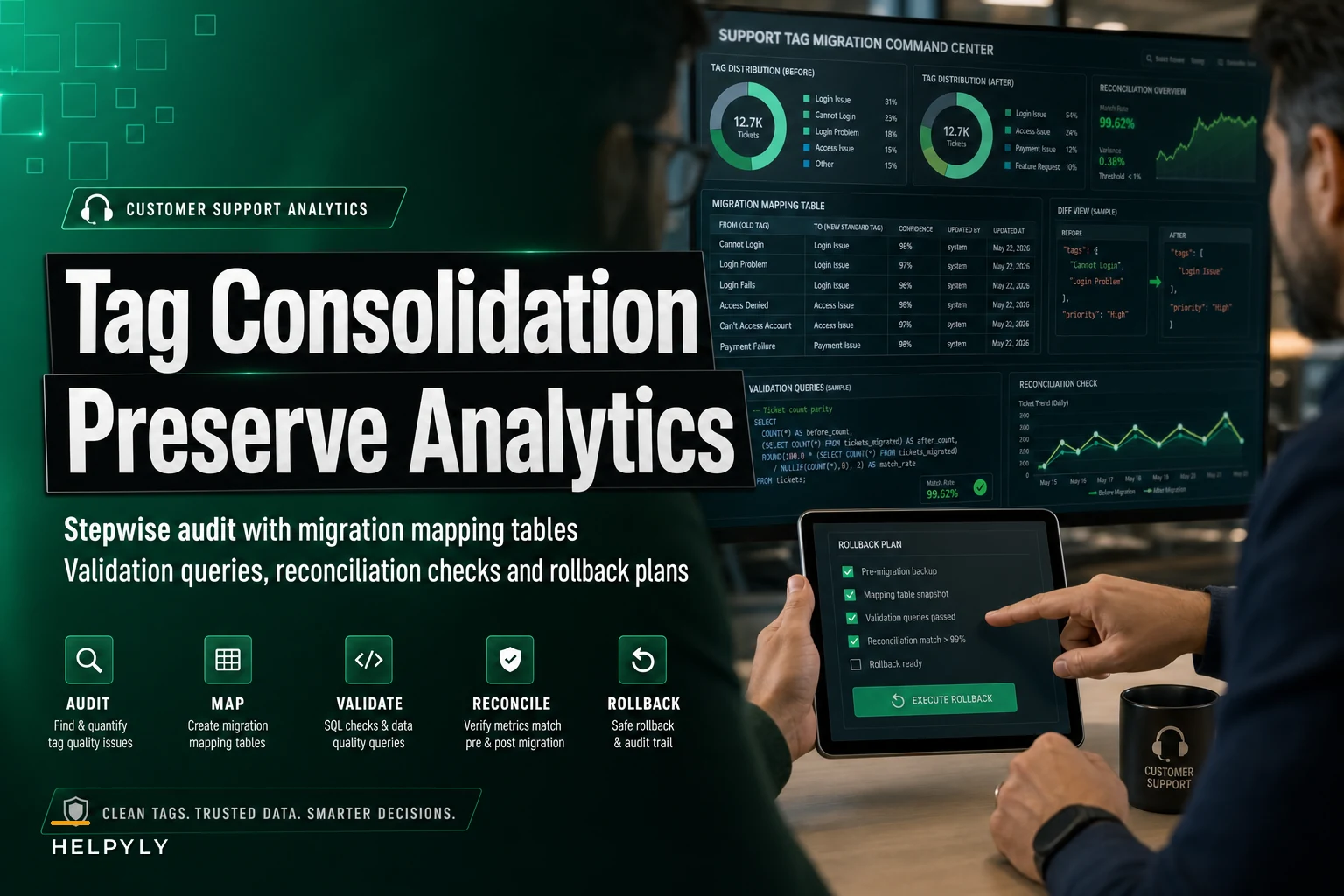
This is about doing ticket taxonomy consolidation carefully enough that your trend lines survive. The actual audit, the mapping table, the validation queries you run before and after, and the rollback you keep in your back pocket.
Why tag sprawl quietly corrupts your reporting
The failure mode isn't the duplicate tags themselves. It's that your dashboards, routing rules, and automations are all silently coupled to the old tag strings.
A typical example: your "Top 10 ticket drivers" dashboard groups by raw tag. You have password-reset, pwd-reset, and cant-login which together are actually your #2 driver. But because they're split across three values, each shows up around rank 7-9 individually, and leadership concludes password issues are minor. Meanwhile a genuinely smaller category looks bigger than it is because it uses one consistent tag. You end up making staffing and KB decisions based on a distorted map.
Nobody can tell you off the top of their head how many distinct tags they actually have. The honest answer is usually 3-5x more than they'd guess. One mid-size SaaS team thought they had "about 40 tags." The export came back with 212 distinct values, roughly 70 of which had been used fewer than five times total.
Those long-tail tags are the real danger. Too rare to matter individually, but numerous enough to poison any grouping logic.
Start with an audit, not a merge
Before you touch anything, pull a full inventory. You want every distinct tag with four numbers next to it: total lifetime usage, usage in the last 90 days, number of distinct agents who applied it, and whether anything downstream — a routing rule, a macro, an SLA policy, a saved view — references it.
Never let a customer request slip through the cracks.
Helpyly helps you track, resolve, and optimize every support interaction effortlessly.
- Centralized ticket management
- Automated customer notifications
- Performance analytics dashboard
No credit card required
| Tag category | Example tags | Lifetime count | Last 90 days | Downstream refs | Action |
|---|---|---|---|---|---|
| Clear duplicate | billing_problem, billing-issue, Billing - General | ~8,400 combined | ~1,900 | 2 routing rules | Merge into billing |
| Near-synonym | refund, refund-request, money-back | ~3,100 | ~640 | 1 macro | Merge into refund |
| Dead tag | beta-feedback-2023 | 46 | 0 | none | Archive, don't map |
| Overloaded tag | other | ~12,000 | ~2,800 | none | Leave, flag for re-triage |
| Legitimately distinct | gdpr-request, ccpa-request | ~900 | ~210 | 1 legal gate | Keep both separate |
Notice two entries that aren't merges. beta-feedback-2023 is dead — zero recent use — so you archive it rather than force it into a bucket where it'd muddy a real category. And the privacy tags look like duplicates but map to different legal workflows, so collapsing them would break a compliance handoff. Consolidation isn't "fewer tags wins." It's "every remaining tag means exactly one thing."
The audit table is a forcing function. Once every tag has a row and an action, the vague discomfort of "our taxonomy is messy" turns into a list of concrete decisions you can assign to people and track to completion.
Build a mapping table you can actually trust
The mapping table is the spine of the whole project. Every old tag gets exactly one row, and that row says where it goes. No ambiguity, no "we'll decide later."
-
old_tag— the exact raw string, including weird casing and spaces -
new_tag— the canonical value it maps to, orARCHIVEif it's being retired -
mapping_type—merge,rename,keep, orarchive -
confidence—high/review— anything a human needs to confirm -
downstream_action— notes on routing rules or macros that must change -
reviewer— who signed off
The trap people fall into is mapping against cleaned-up tag names instead of raw strings. Your system doesn't store "Billing Issue" — it stores Billing%20Issue or billing_issue or whatever the actual value is. Pull the literal distinct values straight from the database and map against those, or your migration will silently skip half the rows.
Keep the review confidence tier small but real. Most mappings are obvious. The handful that aren't — like whether cancellation means "subscription cancel" or "order cancel" — are exactly the ones that cause disputes three months later. Force a human decision now and record who made it.
Validation queries: run them before and after
This is the part teams skip and regret. You validate twice — once to establish a baseline before migration, once after — and the two sets of numbers have to reconcile.
-
Baseline counts. Before anything changes, record total ticket count per tag for a fixed window (trailing 12 months works well). Save this as a snapshot table, not a dashboard screenshot.
-
Projected post-merge counts. Using the mapping table, calculate what each canonical tag should total after consolidation. If
billing_problemhas 4,100 andbilling-issuehas 4,300, your post-mergebillingshould land near 8,400 for that window. -
Run the migration in a staging copy first. Never do the first pass on production data.
-
Actual post-merge counts. Query the real totals after the merge runs in staging.
-
Reconcile. Projected vs actual should match within a small rounding tolerance. Any gap means a mapping row got missed, a raw string didn't match, or tickets had overlapping tags that collapsed and deflated the count.
That last case — multi-tagged tickets — is the sneaky one. If a ticket had both refund and refund-request and you merge both into refund, your count of tagged tickets stays the same but your count of tag applications drops. Decide up front which metric your dashboards use, because the reconciliation math is different for each.
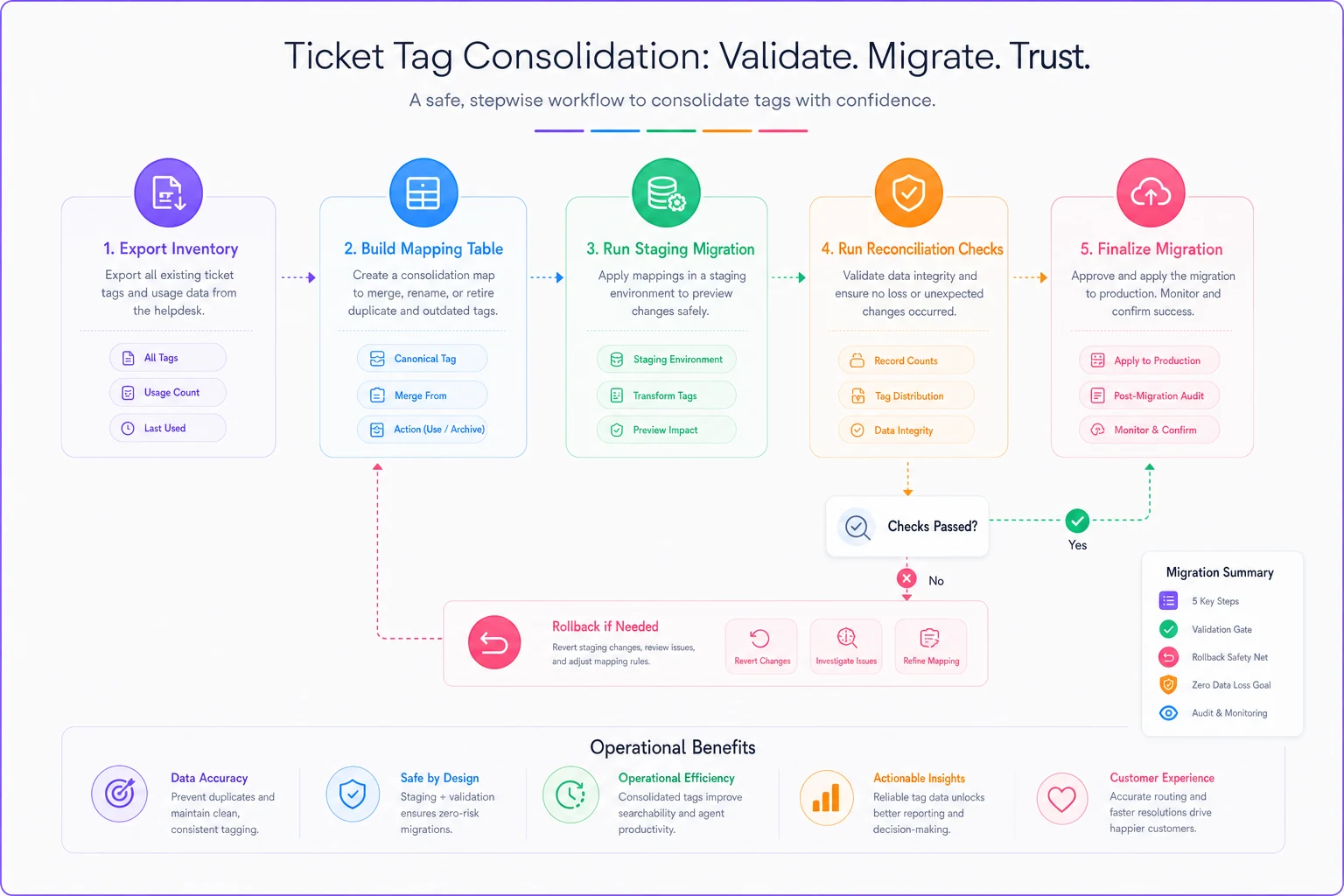
Here's a simple visual workflow for the validation and migration steps.
-
[ ] Baseline snapshot saved to a durable table, not a live view
-
[ ] Projected totals computed directly from the mapping table
-
[ ] Multi-tag overlap identified and accounted for
-
[ ] Staging migration run and reconciled before production
-
[ ] Downstream routing rules and macros updated to canonical tags
-
[ ] Saved views and scheduled reports repointed
-
[ ] Spot-check 20-30 random migrated tickets by hand
Spot-check 20-30 random migrated tickets by hand to catch semantic errors queries won't.
The manual spot-check catches things queries won't — like a merge that's technically correct but semantically wrong for a specific odd ticket.
Keep routing and knowledge workflows in sync
Tags don't live alone. They feed routing and they feed your knowledge base, so a consolidation that ignores those two systems creates new breakage even as it fixes the analytics.
On the routing side, any deterministic rule keyed off an old tag string stops firing the moment that tag disappears. If pwd-reset routes to your identity queue and you merge it into password-reset, update the rule in the same change window — not next sprint. A clean, well-structured hybrid ticket routing setup makes this much easier, because the rules are explicit and easy to audit against your mapping table rather than buried in scattered triggers.
On the knowledge side, consolidated tags often reveal that you've got three KB articles covering what's really one merged category — or one article tagged to a value that no longer exists. Fold the taxonomy cleanup into your existing knowledge lifecycle governance cadence so the review happens with the same signals you already use for deprecation. Doing both at once means agents' muscle memory only gets disrupted once, which is worth more than it sounds when you're managing a team that's already skeptical of another "process change."
Always keep a rollback
Even with staging and reconciliation, something will occasionally surprise you in production.
The cheapest insurance: before the production migration, write the original raw tag value into a separate field on each ticket — something like premigrationtags. You're not touching that field during the merge. If a dashboard comes out wrong or a stakeholder disputes the new numbers, you can reconstruct the exact prior state without restoring a backup.
Keep the mapping table immutable once applied. If you need to revise mappings later, create a version 2 rather than editing version 1, so you always know which rule set produced which state. The disputes that eat the most time aren't "did the merge work" — they're "which version of the taxonomy was live when this report ran." A versioned mapping table and a preserved original-tags field answer that in minutes instead of a day of archaeology.
A reasonable rollback window is one full reporting cycle. If a month passes and no reconciliation issues surface, you can retire the premigrationtags field. Pull it before that and you're gambling.
When this makes sense — and when to leave it alone
Consolidation is worth the effort when your tag count is well past what anyone can hold in their head, when duplicate tags are actively splitting real categories, and when leadership is making decisions off tag-based dashboards. That combination means the mess is costing you real decisions, not just tidiness.
It's a bad time mid-quarter if you report on trailing-tag trends and haven't built the baseline snapshot yet — you'll create a discontinuity in your own charts right when people are looking at them. Do it at a reporting boundary.
Some teams should not do a big-bang consolidation at all. If your tags feed legal, billing, or compliance workflows with audit requirements, a sweeping merge risks breaking an evidentiary trail. Those teams are better off consolidating one category at a time, each with its own reconciliation, rather than running the whole taxonomy through in one pass.
A real scenario
A B2B software support team of about 14 agents had let their taxonomy drift for roughly two years. The audit turned up around 180 distinct tags, with the top six "billing" variants scattered across the dashboard so that billing looked like a mid-tier concern.
They built a mapping table that collapsed those 180 into roughly 55 canonical tags, flagged about a dozen as review, and archived maybe 40 dead ones. The staging reconciliation caught two misses immediately — a tag with a trailing space, and an overlap case where merging two refund variants quietly dropped the applied-tag count by a few hundred. Both were fixed before production ever saw the change.
After the merge, "billing" jumped from an apparent rank 8 to the clear #2 driver — it had always been #2, the data just hadn't shown it. That single correction redirected roughly a week of planned KB work toward the category actually generating the volume. No historical dashboard broke, because the baseline snapshot and preserved original-tags field let them prove the new numbers reconciled to the old ones.
The point isn't the tag count going down. It's that the team could finally trust what the dashboard told them — and could prove, line by line, that the cleanup hadn't rewritten their history. Fewer tags only helps if the numbers underneath still add up to the truth you started with.
The point isn't the tag count going down. It's that the team could finally trust what the dashboard told them — and could prove, line by line, that the cleanup hadn't rewritten their history. Fewer tags only helps if the numbers underneath still add up to the truth you started with.
Ready to elevate your customer support?
Join 2,000+ support teams using Helpyly to reduce response times, automate workflows, and deliver outstanding customer experiences.