
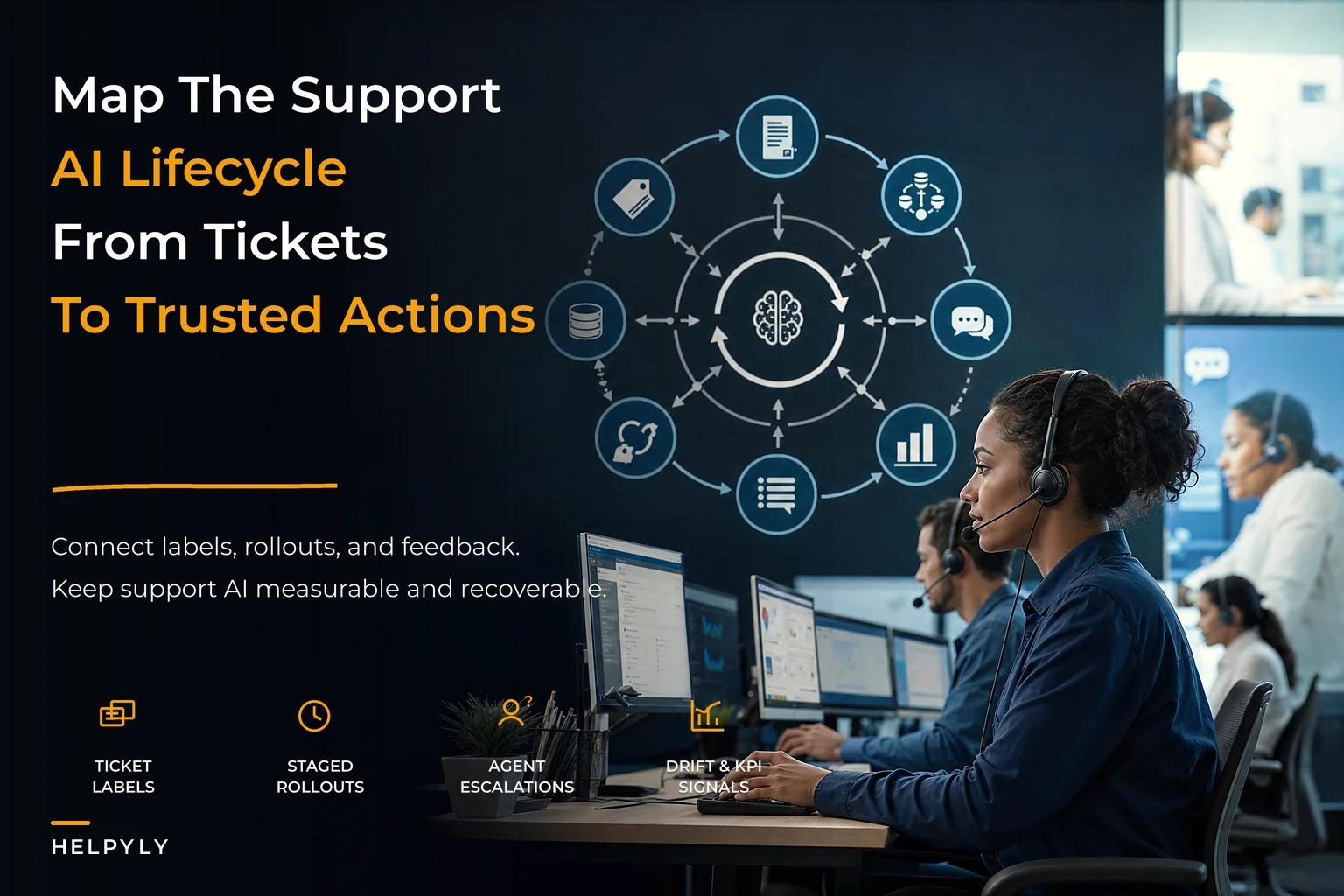

Most support teams don't decide to build an AI lifecycle. They back into one. Someone turns on suggested replies, someone else adds an auto-tagging model, a deflection bot shows up in the help center, and six months later nobody can answer a basic question: which model is running right now, who approved it, and what happens when it starts giving bad answers?
That gap — between "we have AI features" and "we have a system that manages AI over time" — is where the real operational pain lives. The failures rarely look like a dramatic model meltdown. They look like a suggestion feature that slowly drifts, a labeling backlog nobody owns, agents who stop trusting the tool, and a rollback plan that exists only in someone's head. The AI lifecycle for support is the connective tissue that keeps those pieces coordinated as volume grows and the model count multiplies.
This piece walks through how the whole thing fits together, where it tends to snap under load, and what a workable end-to-end system looks like when you treat model changes with the same discipline you'd apply to any other production change.
The lifecycle nobody drew on purpose
Here's the shape most teams end up with, whether they meant to or not:
Tickets come in. Some get labeled — by agents, by rules, sometimes not at all. Those labels feed models (reply suggestions, intent routing, sentiment, deflection). The models push outputs back into the agent workflow or straight to customers. Agents accept, edit, or ignore those outputs. And that acceptance behavior is new training signal, whether or not anyone captures it.
That loop is the lifecycle. The problem is that in most orgs it's a loop with no instrumentation. Labels get created but never versioned. Models get swapped but never logged. Drift happens but nobody sees it until CSAT dips and someone goes digging.
What you see across a lot of support orgs is that AI features get deployed faster than the operational scaffolding to run them. You end up with a machine that's technically working and completely unobservable. The lifecycle isn't broken because the models are bad — it's broken because there's no map connecting the labeling pipeline to the rollout to the KPI you actually care about.
The rest of this article is that map.
Stage 1: Ticket-driven labeling that doesn't rot
Everything downstream depends on labels, and labels are where quality quietly dies first.
Never let a customer request slip through the cracks.
Helpyly helps you track, resolve, and optimize every support interaction effortlessly.
- Centralized ticket management
- Automated customer notifications
- Performance analytics dashboard
No credit card required
The naive version: you dump a big batch of historical tickets to a labeling vendor or an internal team, get them tagged once, train a model, and move on. That works exactly until your product changes, your customer mix shifts, or a new issue category appears. Then your model is confidently trained on a world that no longer exists.
A ticket-driven labeling pipeline flips the timing. Instead of one giant labeling event, labels get produced continuously from live ticket flow, prioritized by what the model is actually uncertain about. A few things that separate a pipeline that holds up from one that rots:
-
- Labels are versioned, not overwritten. When a taxonomy changes ("Billing" splits into "Billing – Refunds" and "Billing – Disputes"), you keep the old label version mapped to the new one. Otherwise every historical comparison breaks silently.
-
- Uncertain and disagreed-on tickets get prioritized. Labeling 5,000 easy tickets teaches the model nothing. Labeling the 300 it's genuinely confused about moves the needle.
-
- Agent corrections count as labels. When an agent edits a suggested reply or re-routes a misrouted ticket, that's a free, high-signal label — if you capture it. Most teams throw it away.
-
- There's a defined owner and cadence. "Labeling" without an owner becomes "labeling when someone remembers," which becomes "labeling never."
A pattern worth knowing about: a mid-sized SaaS support team was auto-tagging tickets with a model trained nine months earlier. Routing accuracy had been fine at launch. By the time anyone checked, roughly one in six tickets was landing in the wrong queue — mostly because a new self-serve plan tier had created a whole category of questions the model had never seen. Nobody labeled the new category because nobody owned the labeling loop. The fix wasn't a smarter model; it was closing the gap between "new issues appearing in the ticket stream" and "those issues showing up in the labeling queue."
Getting this stage right is really a data problem, and it lives or dies on how your underlying ticket data is structured. If your schema doesn't cleanly capture things like final resolution category, agent edits, and reopen status, your labels inherit that mess. A well-defined operational support data platform with schema and SLOs is the thing that makes continuous labeling even possible — you can't version labels you can't reliably query.
Stage 2: Model-versioned suggestion rollouts
Once you're producing decent labels, the temptation is to just... ship the better model. Replace the old one, tell the team, move on.
That's the move that burns teams. Suggestion rollouts need to be treated like any other production deploy: versioned, staged, and reversible.
What "versioned" actually means in practice:
Every model in production has an ID, a training-data snapshot, a deployment date, and a record of what changed versus the previous version. When someone asks "why did suggestions get weird last Tuesday," you can answer it in minutes instead of guessing. This sounds obvious and it's almost never done.
Staged rollout beats big-bang every time. A rollout ladder for a new suggestion model usually looks like:
-
1. Shadow mode — the new model generates suggestions but agents never see them. You log what it would have suggested and compare against what agents actually did. Zero customer risk.
-
2. Internal canary — turn it on for a small group of experienced agents who know how to spot bad output and will actually report it.
-
3. Percentage rollout — 10% → 25% → 50% of eligible tickets, holding at each stage long enough to read the KPIs (more on that next).
-
4. Full rollout — only after the prior stage shows no regression on your guardrail metrics.
Shadow mode exists precisely to catch that gap before customers do.
The mistake here isn't skipping stages out of laziness. It's skipping stages because the new model looked better in offline evaluation. Offline accuracy and live agent acceptance are different animals. A model can score higher on a test set and still produce suggestions agents distrust — too generic, wrong tone, subtly off on edge cases. Shadow mode exists precisely to catch that gap before customers do.
When staged rollout is overkill
Not every change needs the full ladder. A tweak to a canned-response template or a typo fix in a prompt doesn't warrant shadow mode. Reserve the heavy process for changes that alter what the model recommends at scale — new base models, retrained suggestion engines, routing logic changes. Applying the full lifecycle to trivial changes just teaches your team that the process is bureaucratic theater, and then they route around it.
Stage 3: Drift signals mapped to real support KPIs
This is the stage that separates teams who have AI from teams who manage AI.
Drift is not an abstract ML concept here. It's the slow degradation you feel as: suggestion acceptance rate sliding, edit distance creeping up (agents rewriting more of each suggestion), reopens climbing on AI-resolved tickets, deflection rate dropping. The trick is connecting statistical drift signals to KPIs a support manager already tracks, so drift becomes something the whole team can see — not just a data scientist watching a distribution chart.
A practical mapping:
| Drift signal (technical) | Support KPI it shows up in | What it usually means |
|---|---|---|
| Rising prediction-confidence spread | Suggestion acceptance rate falling | Model seeing inputs unlike its training data |
| Agent edit distance increasing | Handle time creeping back up | Suggestions technically "right" but not usable as-is |
| Input distribution shift | New/unrecognized intents in routing | Product or customer-mix change |
| Deflection outputs marked unhelpful | Self-serve deflection rate dropping | KB or model no longer matches real questions |
| Sentiment model disagreement | Escalation volume mismatch | Model miscalibrated for current tone/context |
The point of the table isn't the specific thresholds — those depend on your baseline. The point is that every technical drift signal should have a KPI owner who feels it. If drift only lives in a dashboard nobody in support looks at, it's not a signal, it's a log entry.
Two things make this work. First, you need baselines that are actually trustworthy, which comes back to measuring the right things in the first place. If your KPI definitions are fuzzy, drift detection is fuzzy too. This is exactly why a disciplined metrics playbook that links support KPIs to decisions and experiments matters more than the drift math itself — the model outputs are only as legible as the metrics you compare them against.
Second, you need to distinguish drift from noise. A single bad day of acceptance rate isn't drift. Sustained movement across a rolling window, confirmed by a second correlated signal, is drift. Teams that fire alarms on every wobble train everyone to ignore alarms — the AI equivalent of a car alarm going off in a parking lot at 2am.
Stage 4: Rollout and rollback rules that don't require a meeting
The whole lifecycle is worthless if, the moment something goes wrong, the response is "let's schedule a call to discuss." By then you've already shipped bad suggestions to thousands of customers.
Rollback rules need to be defined before you deploy, written down, and tied to thresholds specific enough that anyone on call can execute them without asking permission.
A workable rollback rule set reads something like:
-
- Auto-rollback trigger If suggestion acceptance drops more than X% below the rolling 14-day baseline for two consecutive days, revert to the previous model version automatically.
-
- Hard stop trigger If reopens on AI-touched tickets exceed the manual baseline by a set margin, pause the feature entirely and route to human-only.
-
- Manual review trigger If edit distance rises but acceptance holds, flag for review rather than auto-revert — this is "usable but degrading," not "broken."
-
- Named owner Every trigger has a person and a backup who can pull it, plus a defined window to acknowledge (say, within 30 minutes during business hours).
The version discipline from Stage 2 is what makes rollback trivial. If you know exactly which model was running, and the previous version is still deployable, rollback is a config change, not a firefight. Teams that overwrite models in place instead of versioning them turn a five-minute rollback into a day of reconstruction.
This whole mindset — treating operational changes like code, with observable behavior and clean revert paths — isn't unique to AI. It's the same governance logic you'd apply to any critical process change, just pointed at model artifacts instead of workflows.
Stage 5: Agent escalation runbooks for when the model is wrong
A failure mode that catches teams off guard: the model isn't just occasionally wrong, it's confidently wrong in a way agents don't catch, and the escalation path assumes a human already flagged the problem.
The escalation runbook for an AI-assisted support flow has to answer a different set of questions than a normal escalation ladder. Not just "this customer issue is complex, send it up" — but "the AI's output itself is the problem." Those are different situations and they need different plays.
A model-aware escalation runbook covers:
-
- Bad-suggestion escalation An agent gets a suggestion that's factually wrong or off-policy. Clear one-click path to flag it, correct it, and log it as a labeling signal — not a buried feedback form nobody uses.
-
- Customer-facing error recovery A deflection bot or auto-reply already sent something wrong. Who owns the recovery message, what's the template, and how fast does a human take over the conversation.
-
- Systemic-vs-individual triage One bad suggestion is a data point. Ten bad suggestions on the same intent in an hour is an incident. The runbook needs a threshold that escalates from "log it" to "page someone."
-
- Fallback to human-only mode A documented, practiced switch that turns AI assistance off for a category or the whole queue, with agents ready to absorb the load.
The checklist below is the minimum any support team should have written down before turning on a customer-facing AI feature:
-
- [ ] Every deployed model has an ID, version, and rollback target
-
- [ ] There's a named owner for the labeling loop and a review cadence
-
- [ ] Drift signals are mapped to at least two support KPIs with baselines
-
- [ ] Rollback thresholds are numeric and executable without approval
-
- [ ] Agents have a one-click "this suggestion is wrong" action that feeds labeling
-
- [ ] There's a tested human-only fallback for every AI-touched flow
-
- [ ] Customer-facing error recovery templates exist and are pre-approved
-
- [ ] Someone reviews the shadow-mode logs before any full rollout
If you can't check most of these, you don't have a lifecycle — you have features and hope. That's worth saying plainly, because a lot of teams are running in exactly that state and don't realize it until something breaks publicly.
A real scenario: catching drift before customers did
A DTC brand with a support team of about 25 agents ran reply suggestions across their email and chat queues. At launch, agent acceptance sat around 70%, and average handle time had dropped noticeably — the model was pulling real weight.
About four months in, nothing looked broken. CSAT was steady. But handle time had crept back up, quietly, over several weeks. When they finally looked at the suggestion-level data, acceptance had slid to the low 50s and edit distance had climbed — agents were accepting suggestions and then rewriting half of them. The cause was mundane: the brand had launched a subscription option, and a big chunk of new tickets were subscription questions the model had never trained on. It wasn't producing garbage, just increasingly generic answers agents had to fix.
Because they had version history, the diagnosis took a couple of hours instead of a couple of weeks. They routed subscription tickets to human-only temporarily, pushed the new intent into the labeling queue as a priority, retrained, and rolled the updated model out through a percentage ramp. Acceptance came back into the high 60s within a few weeks and handle time settled back down.
The lesson wasn't "retrain your model." It's that the drift had been visible in the KPIs the whole time — they just hadn't wired the technical signal to a metric a manager was already watching. That's the whole problem in miniature.
How the stages connect as a workflow
It helps to see this as a cycle rather than a linear sequence. Labels feed models. Models produce outputs. Outputs drive KPIs. KPIs surface drift. Drift triggers rollback or retraining. Retraining feeds back into labeling. Agent escalations at any stage generate new labeling signal. The loop is continuous, and the quality of each stage directly constrains the next.
Visual below shows the cycle and how signals flow between stages.
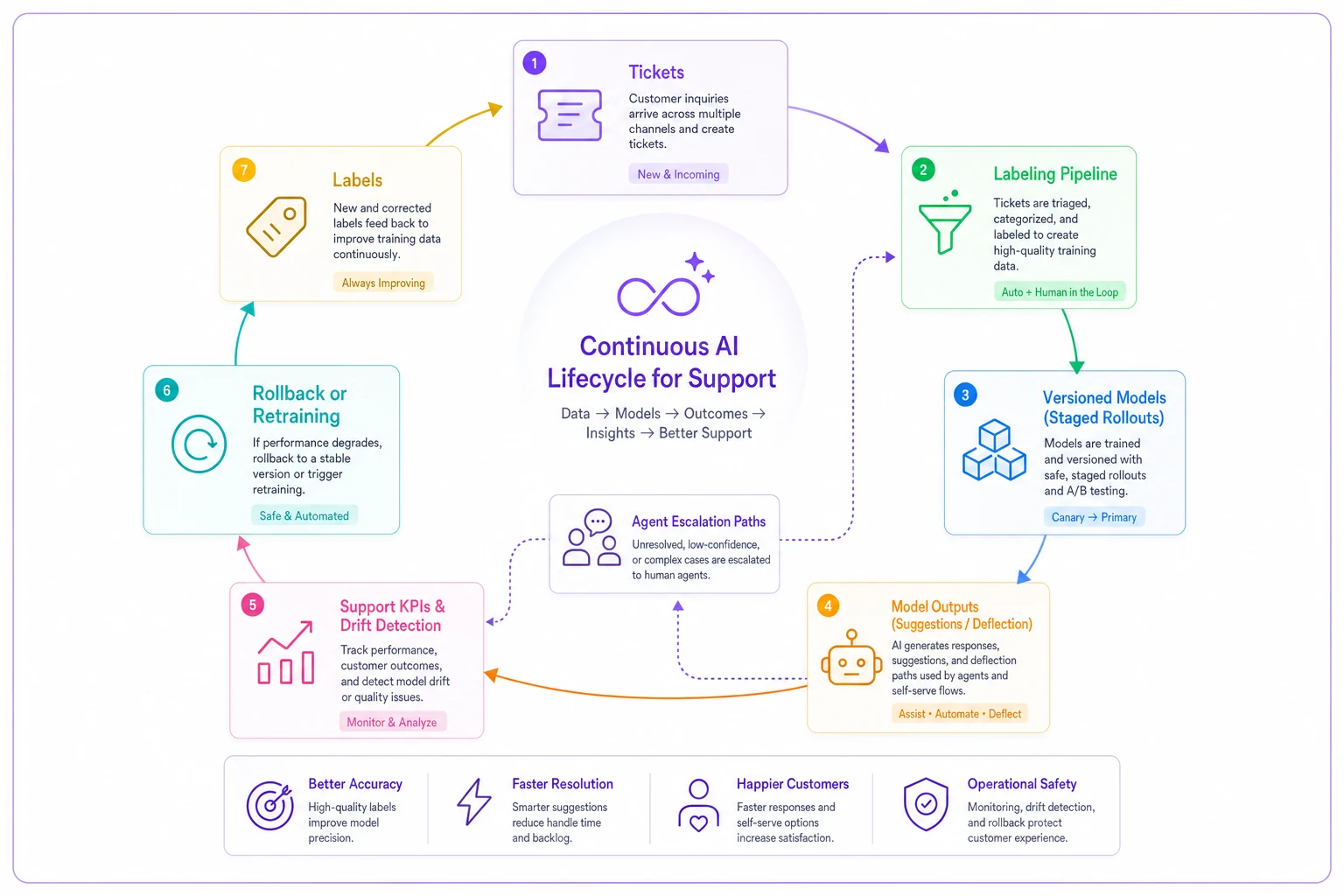
Where teams usually break this cycle: they treat labeling as a one-time task, they don't version models, and they have no defined owner for drift signals. Any one of those gaps degrades the whole system. All three together and you're essentially flying blind.
When building this full lifecycle actually makes sense
Not every team needs the whole apparatus, and pretending otherwise leads to over-engineering.
This makes sense when:
-
- You have more than one model in production, or you're about to
-
- AI output touches customers directly, not just internal suggestions
-
- Ticket volume is high enough that drift causes real damage before you'd notice it manually
-
- You're retraining or swapping models more than a couple times a year
This is overkill when:
-
- You've got a single, stable model and low volume — a monthly manual spot-check is fine
-
- Your AI usage is entirely internal suggestions with humans reviewing everything anyway
-
- You're still in early experimentation and haven't committed to any model in production
Who should not rush into this: teams that haven't nailed their metrics and data foundation yet. Building drift detection on top of unreliable KPIs just gives you confident, precise, wrong alerts. Get the measurement layer solid first — the lifecycle sits on top of it, not instead of it.
Bringing the stages together
The reason to think of this as a lifecycle rather than a checklist is that the stages feed each other. Labeling quality determines model quality. Model versioning makes rollback possible. Drift signals tell you when to trigger rollback. Escalation runbooks catch what drift detection misses. And agent corrections at the escalation stage flow right back into the labeling pipeline as fresh signal. Break any one link and the others degrade — usually silently, usually right when volume is highest and you have the least time to investigate.
The teams that run AI well in support aren't the ones with the fanciest models. They're the ones who treat every model as a living production system with an owner, a version, a KPI it's accountable to, and a way to turn it off. That's the whole game. The models will keep getting better on their own. The operational discipline around them is the part you actually have to build.
The teams that run AI well in support aren't the ones with the fanciest models. They're the ones who treat every model as a living production system with an owner, a version, a KPI it's accountable to, and a way to turn it off. That's the whole game. The models will keep getting better on their own. The operational discipline around them is the part you actually have to build.
Ready to elevate your customer support?
Join 2,000+ support teams using Helpyly to reduce response times, automate workflows, and deliver outstanding customer experiences.