


Most support advice is written for teams that have the luxury of specialization. Someone owns QA. Someone owns the knowledge base. Someone else handles forecasting and scheduling. When you have seven agents and one manager who is also answering tickets, that advice falls apart fast.
The trap small teams fall into isn't that they lack process. It's that they copy process designed for a 40-person org and then drown in overhead they can't maintain. A calibration cadence that needs three reviewers. A routing scheme with eleven skill queues. An SLA matrix with seven tiers. All of it looks professional. None of it survives contact with a team where everyone wears four hats.
This is a playbook for the opposite situation: how to run genuinely good support when you have fewer than ten people total, and most of them are generalists. Condensed SOPs that fit on one screen, role combinations that make sense when you can't hire specialists, and a short list of improvements you can actually finish.
The real constraint isn't headcount — it's attention
A ten-person team has plenty of ticket-answering capacity. What it doesn't have is spare attention for coordination. Every meeting, every handoff, every "quick sync" eats into the same pool of hours that would otherwise clear the queue.
Small teams fail not because the work is too hard, but because the overhead of running the work quietly consumes the people running it. A manager who spends six hours a week on scheduling spreadsheets, three on ad-hoc QA, and four on updating docs has already lost close to two full days before touching a single customer problem.
So the design principle for everything below is simple: if a process requires more than 20 minutes a week to maintain, it's probably wrong for a team this size. Condensed doesn't mean sloppy. It means you cut anything that doesn't change what a customer actually experiences.
Role combos that actually work under 10 people
Forget job titles. On a small team, roles are really just responsibilities that someone owns on top of their ticket work. The mistake is leaving these unassigned and assuming they'll get done. They won't. The queue always wins, and the invisible jobs — QA, KB upkeep, trend-spotting — quietly rot.
Never let a customer request slip through the cracks.
Helpyly helps you track, resolve, and optimize every support interaction effortlessly.
- Centralized ticket management
- Automated customer notifications
- Performance analytics dashboard
No credit card required
| Team size | Frontline agents | Owner roles (combined with ticket work) | What stays unowned (do it as a team) |
|---|---|---|---|
| 4–5 people | 3–4 | Lead = scheduling + escalations; one agent = KB + QA spot-checks | Trend review (weekly 20-min group) |
| 6–7 people | 4–5 | Lead = escalations + metrics; Agent A = KB owner; Agent B = QA + onboarding buddy | Forecasting (lead does it monthly) |
| 8–10 people | 5–7 | Lead = people + metrics; Senior agent = QA lead (part-time); Agent = KB owner; Agent = product-feedback liaison | Surge response (documented, rotate point person) |
A few things worth calling out.
The lead should not be the best agent. A common pattern on small teams: the strongest troubleshooter gets promoted to lead, then spends all day fielding escalations because they're still the best at solving them. Now your best problem-solver is a bottleneck and your SOPs never get written. The lead's job is to make the other agents able to resolve things — not to be the resolver of last resort.
QA and onboarding pair naturally. The person reviewing tickets already knows exactly where new agents go wrong. Combining those responsibilities means the QA owner builds onboarding material from real mistakes instead of theory. If you're formalizing that path, a structured 30-day onboarding syllabus with competency gates gives that person a ready framework rather than forcing them to invent one from scratch.
KB ownership is one person, period. Shared KB ownership on a small team means no KB ownership. One agent needs to be the name on the door, even if they only spend an hour a week on it.
Condensed SOPs: the one-screen rule
A support SOP that spans twelve pages will not be read. On a small team it probably won't even be finished — someone starts it, gets pulled into the queue, and leaves a half-finished Google Doc that slowly goes stale.
What works instead: SOPs that fit on a single screen, written as decision triggers rather than prose. The format that holds up is roughly "When X happens → do Y → if Z, escalate to [name]." No background, no philosophy — just the branch points.
Refund requests
-
Under $50, within 30 days → approve, log reason code, send template R1
-
$50–$200 → approve if first refund for this customer; otherwise flag to lead
-
Over $200, OR second+ refund → lead approval required before sending anything
-
Disputed charge / chargeback mentioned → stop, route to lead immediately, do not promise anything
That's the whole thing. It fits in a sticky note's worth of mental space, and a new agent can follow it on day three. The detailed reasoning lives in onboarding material; the SOP itself only contains what you need in the moment.
The most common mistake is writing SOPs that explain why. The "why" belongs in training. The SOP is a field reference you glance at mid-ticket, and every extra sentence makes it less likely to get used.
Pin one-screen SOPs where agents work (ticket UI or a sidebar) so they don't have to switch context mid-ticket.
A practical test: read your SOP out loud while imagining you have an angry customer waiting. If you'd skip any part of it, that part doesn't belong in the SOP.
Dashboards you can actually read in 30 seconds
Enterprise dashboards are built for analysts. Small-team dashboards should be built for someone glancing between tickets. If your morning check takes longer than reading a couple of texts, it won't become a habit.
For a sub-10 team, you need exactly four numbers visible at all times:
-
Open tickets (the backlog)
-
Oldest ticket age (your SLA risk, in hours)
-
Tickets resolved today vs. received today (are you gaining or losing ground)
-
Anything flagged for the lead (the escalation count)
That's the whole dashboard. The thing small teams get wrong is treating it as a reporting tool for later. At this size, the dashboard is an operational tool for right now — it answers one question: "Are we okay this morning, or do we need to rearrange the day?"
-
Oldest ticket under 8 business hours → green, work normally
-
Oldest ticket 8–16 hours → yellow, lead reassigns one agent to clear the aging queue
-
Oldest ticket over 16 hours → red, everyone works oldest-first until it clears
This removes the daily judgment call about whether things are bad enough to react. The threshold decides for you, which matters a lot when the person who'd normally make that call is themselves buried in tickets.
Weekly, add two slower metrics the lead looks at but agents don't need daily: reopen rate and the top three ticket categories. Reopens tell you whether you're actually fixing things or just closing them. The category list tells you where the next KB article or product fix should go. Everything else is noise at this scale.
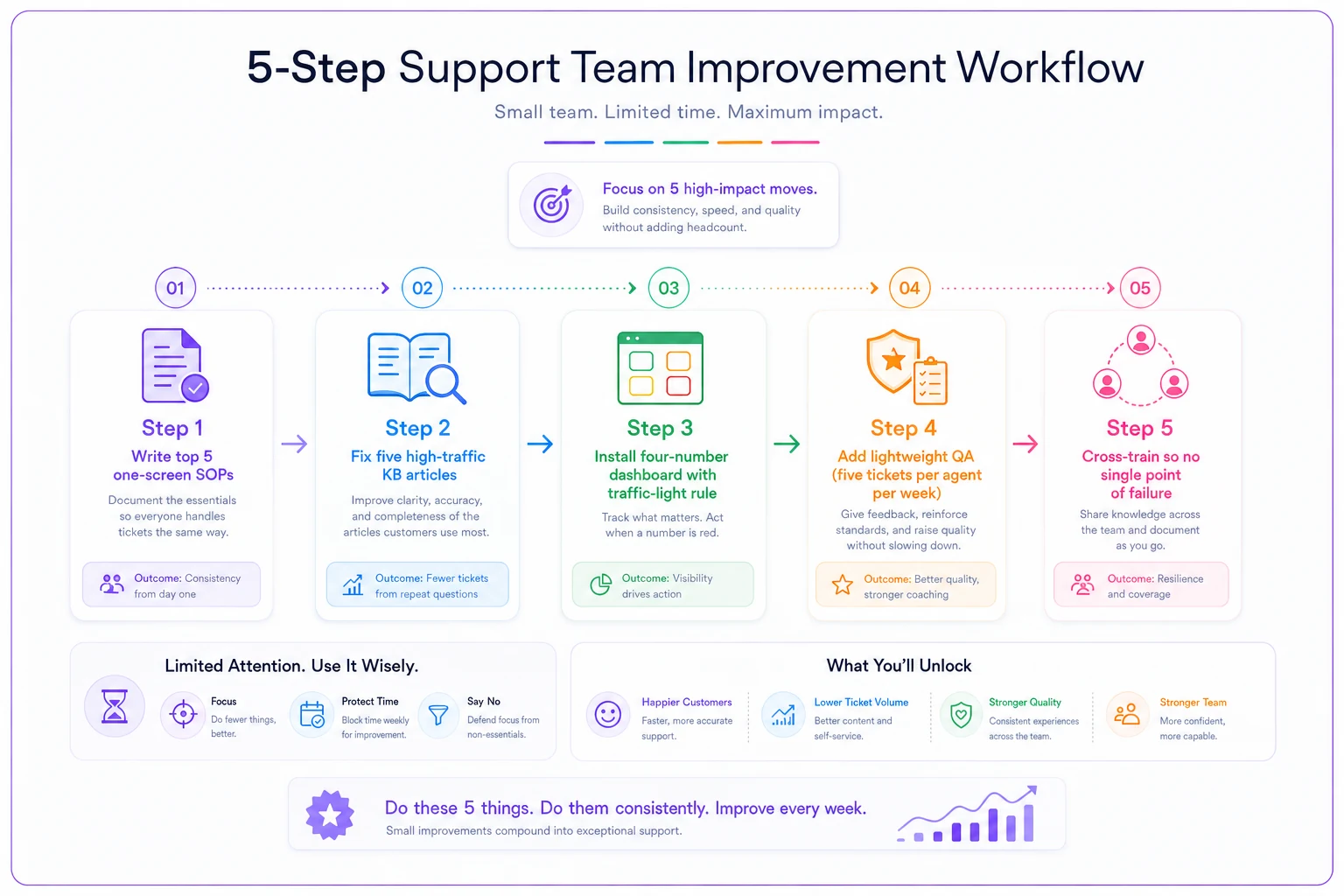
The five-step improvement list, in priority order
This is the part most small teams get backwards. They try to improve everything at once — new tooling, new macros, new QA process, new onboarding — and finish none of it because the queue keeps interrupting. The fix is doing exactly one of these at a time, in order, and not starting the next until the previous one runs on its own.
Step 1 — Write your top 5 SOPs (the ones that cause escalations). Don't document everything. Look at what agents ask the lead about most often, and turn those five situations into one-screen SOPs. This alone cuts interruptions to the lead dramatically, which frees up the exact person you need for everything else on this list. Low effort, immediate payoff.
Step 2 — Fix the five KB articles customers search for most. Pull your most common ticket categories, check whether a clear self-serve answer exists, and rewrite the five that get the most traffic but still generate tickets. You're not building a knowledge base from scratch — you're fixing the handful of articles that would deflect the most repetitive work.
Step 3 — Install the four-number dashboard and the traffic-light rule. Once SOPs reduce chaos, make the daily state visible so you stop reacting late. This is roughly a half-day setup, mostly configuration, and it changes how the whole team starts each morning.
Step 4 — Add lightweight QA: five tickets per agent per week. Not a calibration program. The QA owner reads five random closed tickets per agent weekly, notes one thing each agent did well and one to improve, sends it in two lines. Fifteen minutes per agent. This catches drift early and feeds directly back into Step 1's SOPs and Step 2's articles.
Step 5 — Cross-train so nobody is a single point of failure. Only after the above is stable. On a small team, one person being out sick shouldn't collapse a whole category. Pair agents up, rotate the harder ticket types, and make sure at least two people can handle each critical area.
The sequencing matters: each step makes the next one easier. SOPs free up the lead → fixed KB articles reduce volume → the dashboard makes problems visible → QA keeps quality from slipping → cross-training removes fragility. Doing them out of order — cross-training before you have SOPs, for example — means training people on processes that don't exist yet.
If you want to understand where this five-step list sits in a larger trajectory, it maps closely to the early stages of a staged support operational maturity model — moving from ad-hoc to measured without pretending you have the resources of a more mature, tooling-heavy operation.
Where light automation earns its keep (and where it doesn't)
Small teams are actually where thoughtful automation pays off most, because you have no slack. But the instinct to automate everything is a trap. The right question isn't "can this be automated" — it's "is this eating attention I can't spare?"
The things worth automating on a sub-10 team tend to be the invisible, repetitive coordination work rather than the customer-facing stuff:
-
Auto-tagging and routing so tickets land in the right place without the lead triaging each one by hand
-
Dashboard aggregation so your four numbers update themselves instead of someone building a spreadsheet every morning
-
Draft suggestions for common replies, where an agent reviews and edits rather than writes from scratch — useful as long as a human still approves before anything sends
-
Flagging anomalies like a sudden spike in one ticket category, so the trend review doesn't depend on someone noticing organically
What you should not automate at this size is judgment — refund decisions above a threshold, anything legal-adjacent, anything where a wrong auto-response damages a relationship you can't afford to lose. The whole advantage of a small team is that customers often feel they're dealing with real humans who care. Automating that away to save a few minutes is a bad trade.
AI-assisted tooling earns its place on a small team when it removes coordination overhead — the tagging, the aggregation, the first-draft grunt work — so your handful of people can spend their limited attention on tickets that actually need a person. It becomes a problem when it's bolted on to look modern and ends up creating review work that didn't exist before.
A real scenario
A regional e-commerce shop selling outdoor gear ran support with six people: one lead and five agents, handling somewhere around 900–1,100 tickets a week across email and chat. On paper it was fine. In practice the lead was fielding roughly 30 escalation questions a day from agents unsure how to handle refunds, warranty claims, and shipping disputes — and had no time left to actually fix any of it.
They started with Step 1 only. Five SOPs: refunds, warranty claims, shipping delays, address changes, and "customer is angry and threatening a chargeback." One screen each, decision-tree format. It took the lead about two afternoons to write.
Within a couple of weeks, escalation questions to the lead dropped by more than half. Agents could handle the common cases themselves. That freed enough time to do Step 2, rewriting a handful of warranty and shipping articles customers kept searching for. Repetitive tickets in those categories fell noticeably over the following month, somewhere in the 15–20% range.
Nothing dramatic happened to headcount or budget. The team stayed at six. But the lead went from firefighting to actually leading, reopen rates improved because answers got more consistent, and the whole operation felt calmer. The win wasn't a new tool or a hire — it was five one-screen documents and the discipline to finish them before starting anything else.
When this playbook is the wrong fit
This approach is built deliberately for small, generalist teams. A few situations where you should not use it as-is:
-
You're about to double in size. If you're going from 8 to 20 agents in a quarter, invest in specialized structures now; condensed combo-roles won't scale much past a dozen people.
-
You're in a heavily regulated space. Financial services, healthcare, anything with strict compliance requirements — the "one-screen SOP" simplification can skip mandatory steps you legally can't omit.
-
Your ticket mix is extremely complex and low-volume. If every ticket is a unique, high-stakes problem, the lean QA-and-SOP model matters less than deep expertise and generous time per ticket.
For most teams under ten, the problem was never a lack of ambition. It was trying to run an enterprise support operation with a corner-store crew. Strip the process down to what actually changes the customer experience, give every critical job a named owner, make the daily state visible in four numbers, and improve one thing at a time in order. That's the whole game at this size — and done honestly, a small team can deliver support that feels better than what far larger, far more complicated operations manage.
For most teams under ten, the problem was never a lack of ambition. It was trying to run an enterprise support operation with a corner-store crew. Strip the process down to what actually changes the customer experience, give every critical job a named owner, make the daily state visible in four numbers, and improve one thing at a time in order. That's the whole game at this size — and done honestly, a small team can deliver support that feels better than what far larger, far more complicated operations manage.
Ready to elevate your customer support?
Join 2,000+ support teams using Helpyly to reduce response times, automate workflows, and deliver outstanding customer experiences.