


Most support teams solved the obvious privacy problem years ago. Tickets get access controls, customer emails get locked down, and nobody's dumping CSV exports of raw chat transcripts onto their desktop anymore. That part's handled.
The leak nobody watches is the analytics layer. Redaction rules stop at the ticket view, and then raw data flows straight into the warehouse your BI tool queries, the experiment pipeline your QA team runs, and the dashboards your director screenshots for the weekly deck. PII that was carefully masked in the UI shows up in plaintext three systems downstream — and nobody notices because the person building the dashboard isn't thinking about privacy. They're thinking about resolution rate by channel.
This post is about that specific gap: moving redaction into the analytics pipeline itself, instead of trusting it happened upstream. If you've already read our piece on practical PII redaction, retention policies and access controls for support tickets, think of this as the part two that rarely gets written — what happens to that data once it leaves the ticket system and becomes a row in a table someone queries.
Where the leak actually happens
Walk the path a single ticket takes. A customer writes in: "Hi, my order #88213 to 44 Maple Ave never arrived, call me at 555-0144." The agent sees a redacted view. Good. But the ETL job syncing tickets to your warehouse every night doesn't apply the agent view — it pulls the raw body field. Now that message sits in a support_messages table, in full, address and phone number intact.
From there it spreads in ways that are genuinely hard to track:
-
An analyst writes a query grouped by issue type and accidentally
SELECT *s the message body into a shared Looker tile. -
A data scientist pulls six months of transcripts into a notebook to train a routing model. The notebook gets committed to a repo.
-
Someone exports a dashboard to CSV and emails it to a vendor for a QA calibration session.
None of those people did anything wrong by their job description. The privacy control simply didn't exist at the layer where they were working. In real operations, this is almost always how PII escapes — not through some dramatic breach, but through a dozen ordinary analytics workflows that each assumed someone upstream already cleaned the data.
The analytics pipeline is where your data is most copied, least governed, and most forgotten.
Why field-level masking beats "clean the source"
The instinct is to fix it at ingestion — scrub everything before it lands. That sounds right and it half-works, but it creates a different problem. Strip too aggressively at the source and you destroy analytic utility. You can't measure "how many tickets mention a specific product SKU" if you nuked every number that looked remotely like an identifier.
Never let a customer request slip through the cracks.
Helpyly helps you track, resolve, and optimize every support interaction effortlessly.
- Centralized ticket management
- Automated customer notifications
- Performance analytics dashboard
No credit card required
The better pattern is field-level masking inside the pipeline, applied based on how the data will be used — not a single rule slapped everywhere. Different consumers need different levels of exposure.
| Consumer | What they actually need | Masking level |
|---|---|---|
| Dashboard for managers | Counts, categories, SLA timers | Full redaction — no free-text bodies at all |
| QA calibration reviews | A few real transcripts, scoped | Reversible masking, access-logged |
| Experiment / model training | Patterns in language, not identities | Field-level masking + synthetic substitution |
| Finance / exec reporting | Aggregates only | Pre-aggregated, PII never present |
The thing people consistently miss: redaction isn't binary. The same message_body field should render completely differently depending on which pipeline is reading it. A manager dashboard gets a version where emails, phones, addresses, and order numbers are replaced with typed tokens (<EMAIL>, <PHONE>, <ORDER>). A model-training pipeline gets a version where those tokens are replaced with realistic fakes so the model still learns natural sentence structure.
That second part — synthetic substitution — is what keeps your analytics useful instead of just safe-and-useless.
Synthetic aggregation: keeping utility while removing identity
Say you want to analyze the most common phrasing customers use when they're angry, to improve your escalation triggers.
Raw version (dangerous): > "This is the THIRD time I've called about order 88213 and nobody at john.doe@email.com got back to me."
Over-redacted version (useless): > "This is the THIRD time I've [REDACTED] about [REDACTED] and nobody at [REDACTED] got back to me."
Synthetic-substitution version (safe and useful): > "This is the THIRD time I've called about order 44019 and nobody at casey.r@example.com got back to me."
The third version preserves everything the analysis needs — sentence rhythm, emotional markers, the presence of an order reference and an email — while the actual values are fake and point to no real person. For aggregate analysis, pattern detection, and most model training, this is the sweet spot.
For numbers-based analytics, the equivalent move is aggregate-with-a-floor. Don't report any metric for a group smaller than roughly 15–20 customers, because small cells re-identify people. If "customers in zip 90210 with refund complaints" is a group of three, that bucket can expose individuals even without a name attached.
A pattern worth enforcing: set a minimum cell size and roll anything below it into an "other" bucket automatically. One team built a dashboard breaking down complaints by city and subscription tier and month. Each filter was fine alone. Combined, several cells had a single customer in them — and anyone with access could effectively identify who complained about what. The fix wasn't more redaction. It was a minimum-cell-size rule applied at the query layer.
Query templates that preserve analytic utility
The place to enforce most of this is the query itself. If analysts write raw SQL against raw tables, you've already lost. The durable fix is giving them pre-built, privacy-safe query templates and views that do the right thing by default.
A workable setup in practice:
-
Raw tables are locked. Almost nobody queries them directly. Access is logged and rare.
-
Masked views sit on top.
vmessagesmaskedapplies token substitution to free text.vticketsaggonly exposes pre-grouped counts. -
Templates handle the common questions. "Volume by issue type," "CSAT by channel," "reopen rate by week" are parameterized queries that already include cell-size floors and exclude free-text PII.
-
Anything outside the templates requires review. A one-off analysis that needs real transcripts goes through an approval gate with logging.
The workflow for an analyst becomes: start from a template, change the date range and the grouping, run it. They never touch raw PII because the template never selects it. The ones who need more fill out a scoped request. This sounds bureaucratic but it's actually faster — most analysts are re-deriving the same five queries anyway, and templating them removes both the privacy risk and the repeated work.
Here's a simple workflow diagram that shows the flow from raw tables to masked views to templates and analysts.
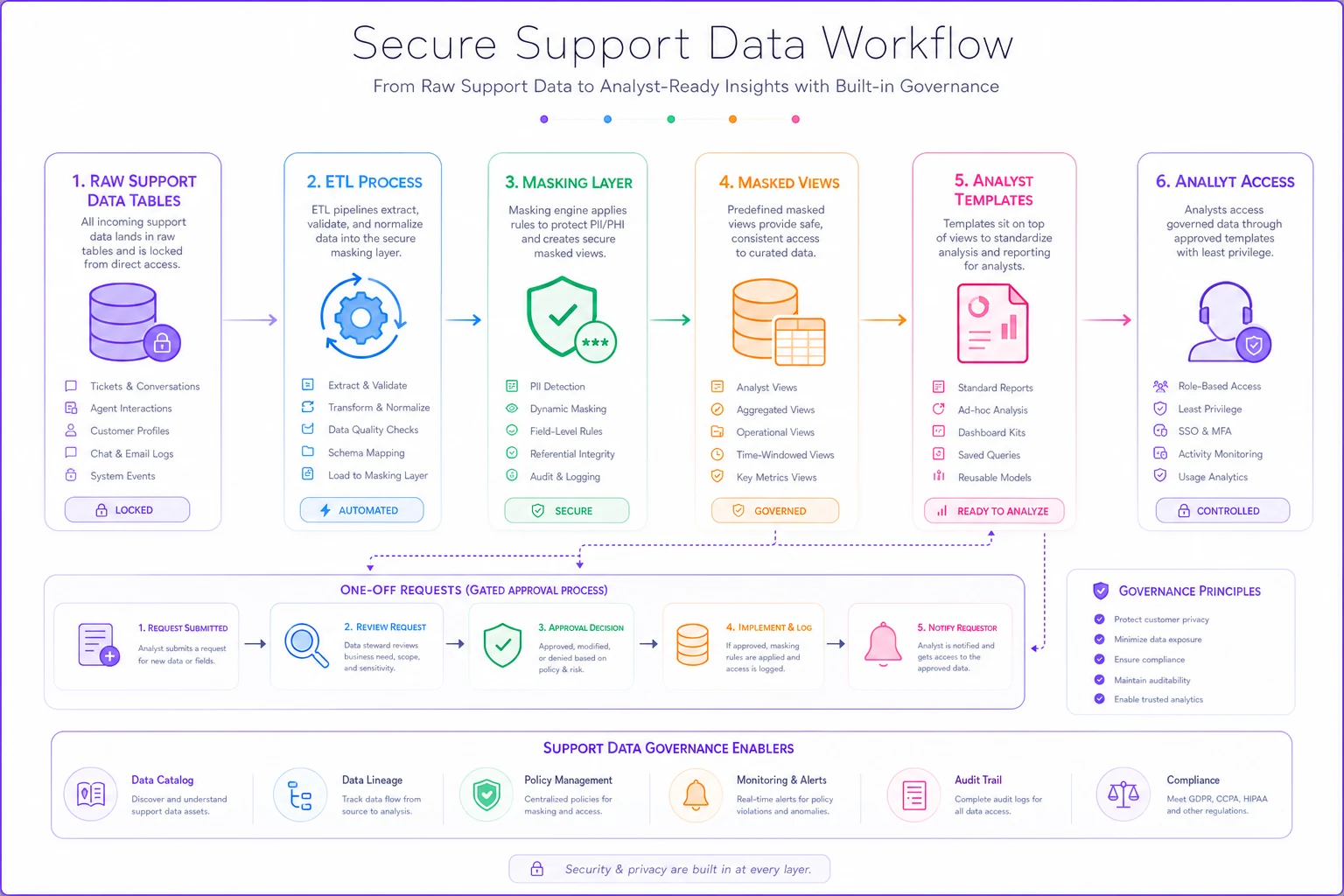
If you've set up your warehouse along the lines of an operational support data platform with a defined schema and SLOs, these views and templates slot in as a governed layer on top of what you already have. You're not rebuilding anything — you're adding masking and floors as a tier between the raw tables and the people querying them.
Automated retention enforcement for experiments and dashboards
This is the part almost everyone forgets. You can mask perfectly and still accumulate risk, because experiment outputs and dashboard caches live forever by default.
Where support data tends to pile up:
-
Notebooks with pulled transcripts sitting in a data science repo for two years.
-
Experiment result tables nobody deletes after the A/B test concludes.
-
Dashboard extract caches that snapshot raw data nightly and keep every snapshot.
-
CSV exports in shared drives from a calibration session eight months ago.
Each of these is a copy that fell outside your retention policy because the policy only covered the ticket system. The main dataset got deleted on schedule; the downstream copies did not.
Automated retention in the analytics layer means attaching an expiry to derived data, not just source data:
-
Experiment tables auto-drop 30–90 days after the experiment closes.
-
Notebook environments that pulled real (even masked) data get wiped on a schedule unless explicitly re-justified.
-
Extract caches hold a rolling window — say the last 13 months — and purge older snapshots automatically.
-
Any row-level export gets tagged and tracked so it can be cleaned up later, not left to rot in someone's Downloads folder.
Retention has to be enforced by the system, not by a reminder on someone's calendar. The moment it depends on a human remembering to delete an old experiment table, it won't happen. People leave, projects get abandoned, and the data lingers.
A quick checklist before you call it done
Run through this against your actual analytics setup, not the ticket UI:
-
[ ] Does raw free-text ever land in a table your BI tool can query? (If yes, that's the first thing to fix.)
-
[ ] Do your dashboards enforce a minimum cell size so small groups can't re-identify people?
-
[ ] Is there a masked view layer, or do analysts hit raw tables directly?
-
[ ] Do common analyses run through templates that exclude PII by default?
-
[ ] Does model-training data use synthetic substitution instead of raw or over-redacted text?
-
[ ] Do experiment output tables have an automatic expiry?
-
[ ] Do dashboard extract caches purge on a schedule?
-
[ ] Are one-off exports tracked so they can be cleaned up later?
If you can't check most of these, the gap isn't your redaction rules — it's that they stop before the analytics layer begins.
A real scenario
A mid-sized subscription e-commerce company, support team of around 20 people, had solid ticket-level controls. The problem surfaced during a vendor security review: the reviewer pulled a sample from their analytics warehouse and found full chat transcripts — addresses, phone numbers, all of it — sitting in a table feeding three dashboards. The redaction they were proud of only existed in the agent view.
They didn't rip anything out. Over roughly six weeks they did three things: locked the raw message tables so only the ETL service account could read them, built masked views with token substitution plus a minimum-cell-size floor of 20, and set experiment and extract tables to auto-expire after 60 days.
Day-to-day, analysts kept building the same dashboards — just off the masked views. What changed was the risk profile. The next audit found no row-level PII reachable from the BI layer. A side benefit nobody expected: clearing out orphaned experiment tables and old caches cut their warehouse storage somewhere in the 20–30% range, because years of forgotten snapshots were finally expiring on schedule.
The takeaway
Privacy-preserving support analytics isn't really about stricter redaction. Most teams already redact where customers and agents can see data. The failure is that the controls end at the UI, and the analytics pipeline — the part of your stack where data gets copied the most — inherits raw, unmasked, un-expiring data by default.
Move the masking into the pipeline. Give analysts safe views and templates so they never touch raw PII. Use synthetic substitution so your data stays useful instead of scrubbed into uselessness. And make retention something the system enforces on derived data automatically, because nobody is going to remember to delete a two-year-old experiment table.
Do those four things and your dashboards stay just as useful — they just stop being the quiet place where customer data leaks out.
Ready to elevate your customer support?
Join 2,000+ support teams using Helpyly to reduce response times, automate workflows, and deliver outstanding customer experiences.