

Most support QA coaching systems fail before they even start. Not because managers don't care about quality—they care too much. They try to review everything themselves, get buried in escalations, then abandon the whole process after three weeks.
Stop expecting one manager to review everything while putting out fires
The real problem isn't motivation. It's operational design. Support managers are trying to run QA like they're the only reviewer in a 50-person team, manually checking tickets between meetings, writing feedback at 7pm, then wondering why agents never improve.
This creates a vicious cycle. Agents make the same mistakes because feedback arrives two weeks late. Managers burn out trying to catch everything. Quality scores become meaningless when different reviewers judge the same interaction completely differently. Meanwhile, customers suffer through inconsistent support while everyone pretends the QA program is working.
Why traditional QA breaks at 15+ agents
Support QA falls apart around 15 agents because the math stops working. A manager reviewing 5 tickets per agent weekly needs 75 reviews. At 10 minutes per review plus feedback writing, that's 15+ hours—before any calibration, coaching conversations, or tracking improvements.
Never let a customer request slip through the cracks.
Helpyly helps you track, resolve, and optimize every support interaction effortlessly.
- Centralized ticket management
- Automated customer notifications
- Performance analytics dashboard
No credit card required
The typical response makes things worse. Teams add peer reviews without structure, creating wildly inconsistent scoring. Or they sample fewer tickets, missing critical issues. Some try monthly reviews, but by then patterns are already embedded and harder to fix.
What ends up happening: managers review frantically for two weeks, realize it's unsustainable, switch to "spot checks" that catch nothing systematic, then eventually stop reviewing altogether except when something blows up. Quality becomes reactive firefighting instead of proactive improvement.
This isn't a dedication problem. Running QA through a single-reviewer bottleneck while that person also handles escalations, meetings, and planning is like trying to inspect every package in a warehouse while also driving the delivery truck.
Building async review workflows that actually scale
Asynchronous QA means reviews happen in parallel, not in sequence. Instead of one person reviewing everything, you distribute reviews across trained reviewers—senior agents, team leads, even cross-team peers—using clear scorecards and calibrated standards.
Start with review assignments that match reviewer capacity. Senior agents might handle 10 reviews weekly of newer teammates. Team leads take 15–20 focusing on complex cases. The manager reviews a strategic sample: escalations, new agents, and calibration checks.
| Reviewer Type | Weekly Capacity | Focus Areas | Review Timing |
|---|---|---|---|
| Manager | 15 reviews | Escalations, new agents, calibration samples | Tuesday/Thursday blocks |
| Team Leads (2) | 20 reviews each | Complex tickets, coaching targets | Daily 30-min blocks |
| Senior Agents (3) | 10 reviews each | Peer reviews, basic compliance | Flexible async |
| Cross-team | 5 reviews | Fresh perspective on borderline cases | Weekly rotation |
The key: each reviewer has protected time, clear assignments, and specific evaluation criteria. Reviews flow continuously rather than bunching up on Friday afternoon.
Create review queues based on priority, not just random sampling:
-
New agents get 100% review coverage for the first two weeks
-
Remediation targets get reviewed at 3x normal frequency
-
Escalated tickets get automatically flagged for review
-
Customer complaints trigger an immediate review
-
Random baseline covers roughly 10% of all other tickets
This turns QA from a manager marathon into a distributed system where quality insights come from multiple perspectives.
Here's a simple workflow showing how reviews are assigned and processed asynchronously.
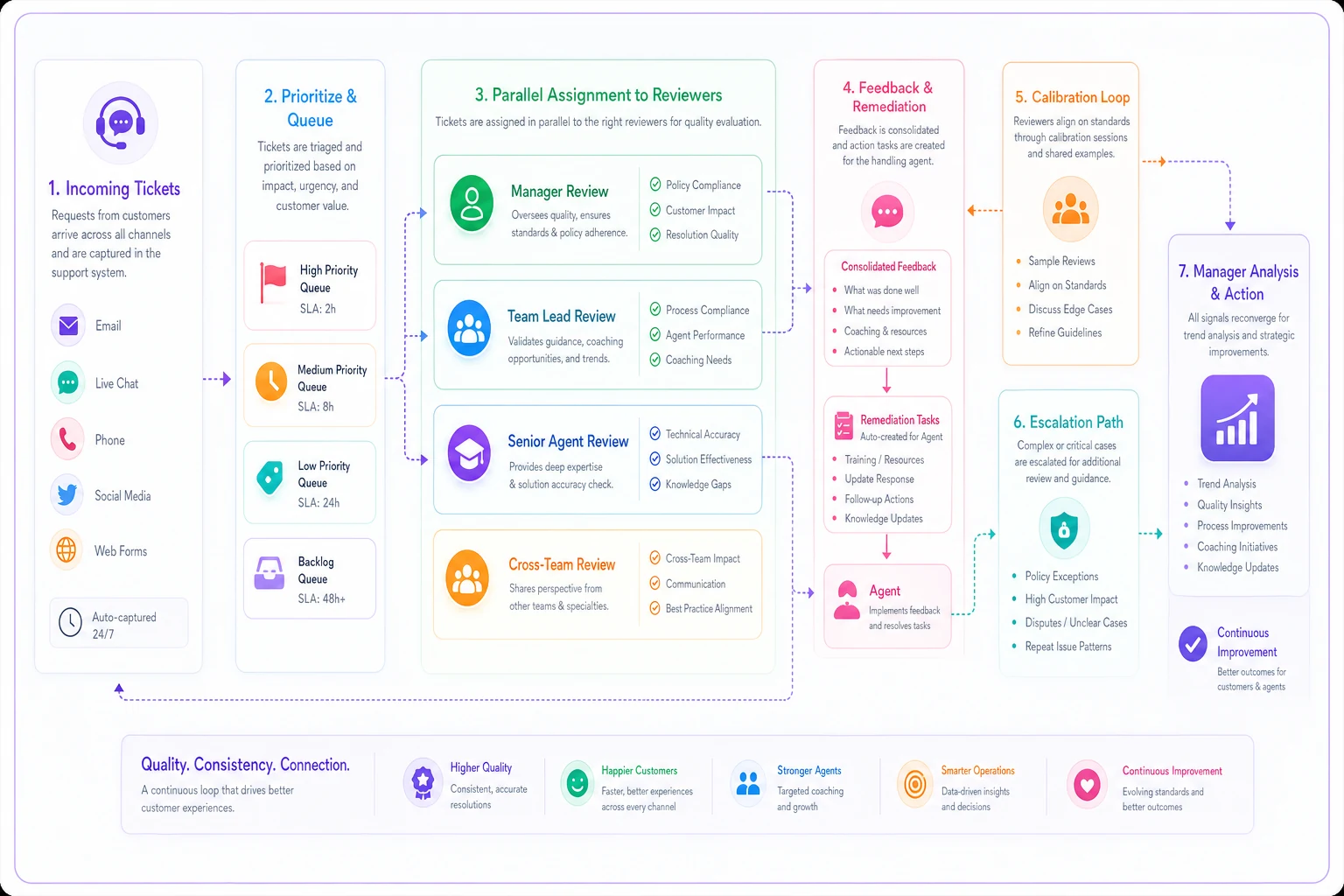
This illustrates review assignment, parallel processing, feedback loops, and escalation paths.
Scorecards that eliminate subjective scoring debates
Generic scorecards create endless arguments about what "good" means. An agent thinks they showed empathy; the reviewer disagrees. Nobody can prove either position because the criteria says "demonstrates appropriate empathy."
Behavioral scorecards remove interpretation by defining exact observable actions. Instead of "appropriate empathy," you score: "Acknowledged customer's specific frustration in first response" or "Used customer's exact words when summarizing issue."
Authentication & Security
-
✓ Verified account with two factors before discussing details
-
✓ Never shared password/access information
-
✓ Flagged suspicious access patterns to security team
Problem Identification
-
✓ Restated issue using customer's language
-
✓ Asked clarifying question about [specific aspect]
-
✓ Checked account history for related issues
-
✓ Documented reproduction steps if technical
Resolution Process
-
✓ Provided correct solution for identified problem
-
✓ Explained why issue occurred (when customer asked)
-
✓ Set clear expectation for resolution timeline
-
✓ Confirmed solution worked before closing
Communication Quality
-
✓ Response addressed all customer questions
-
✓ No grammar errors that changed meaning
-
✓ Used accessible language (no unexplained jargon)
-
✓ Tone matched situation severity appropriately
Notice what's missing: subjective words like "appropriate," "good," "sufficient." Every item is observable—you can point to the exact message where it did or didn't happen.
Weight sections based on business impact. Security violations might auto-fail. Communication issues might reduce score by 10%. A ticket can pass with minor grammar issues but fail if the wrong solution was provided.
Calibration sessions that prevent scoring drift
Without calibration, reviewer standards drift apart within weeks. One reviewer gives 95% scores for basic competence. Another gives 75% for the same performance. Agents get confused, managers lose trust in scores, and the whole system starts feeling pointless.
Weekly calibration keeps everyone aligned—but most teams run these wrong. They argue about scores instead of discussing standards. They review easy tickets everyone agrees on instead of edge cases. They skip documentation of decisions.
Pre-session (async): Everyone reviews the same 3 tickets independently, scoring without discussion. Include one clear pass, one clear fail, and one borderline case. Reviewers submit scores before the meeting.
During session (30 minutes):
First 10 minutes: Show score spreads without names. Identify where reviewers diverged most. Focus discussion there, not on tickets everyone scored similarly.
Next 15 minutes: Review the borderline ticket line by line. Not "what score should this get?" but "what specific behaviors do we observe?" Document exact criteria interpretations:
-
"Customer asked 'why' 3 times—counts as needing root cause explanation"
-
"Agent provided workaround but not permanent fix—meets minimum bar but note for coaching"
-
"Typo in greeting doesn't affect score unless pattern continues"
Final 5 minutes: Revise scorecards based on discoveries. If everyone interpreted "timely response" differently, specify: "Initial response within 2 hours for standard priority."
Post-session:
-
Update scorecard with clarifications
-
Share example tickets showing each score level
-
Track calibration attendance and score variance trends
Teams doing this consistently see reviewer variance drop from 20+ points to under 5 points within about six weeks.
Remediation workflows that fix problems, not just document them
Most QA programs identify problems then hope agents somehow fix themselves. They send scores, maybe add a comment like "needs improvement on empathy," then wonder why nothing changes.
Real remediation requires structured intervention paths based on specific gaps. Not "your scores are low" but "you're missing authentication steps—here's the focused training module, practice scenario, and check-in schedule."
Critical Failures (Immediate Intervention):
-
Security breach
Instant coaching session + retraining on protocols
-
Wrong solution causing damage
Shadow senior agent for next 5 similar tickets
-
Compliance violation
Complete certification refresh before handling more tickets
Pattern Failures (3+ occurrences):
-
Authentication skips
Daily authentication checklist for 2 weeks
-
Tone issues
Review recorded successful interactions + practice responses
-
Technical accuracy
Pair with technical specialist for knowledge transfer
Performance Gaps (Score under 75%):
-
Week 1
Self-review of failed tickets with manager feedback
-
Week 2
Shadow high performer handling similar cases
-
Week 3
Handle tickets with real-time coach review
-
Week 4
Return to normal with 2x review frequency
Document remediation in tracking sheets showing the specific gap identified, intervention applied, progress checkpoints, success metrics, and graduation criteria.
Automated nudges that catch issues before they become patterns
Waiting for weekly QA reviews means problems compound. By the time you catch an authentication skip pattern, the agent might have skipped it 40 times. Automated nudges catch issues immediately.
Response Quality Alerts:
-
Ticket closed in under 60 seconds → "Quick close detected. Did you verify resolution?"
-
Copy-paste response used 5+ times today → "Template overuse warning. Consider personalization."
-
No questions asked on technical ticket → "Diagnosis reminder
Confirm you understood the issue fully."
Behavioral Pattern Alerts:
-
3 tickets without authentication today → "Security check
Remember verification requirements"
-
Customer reopened ticket → "Reopen alert
Review original resolution for gaps"
-
Escalation after agent response → "Escalation triggered
Flag for immediate QA review"
Proactive Coaching Nudges:
-
New ticket type detected → "First time with [category]. Review knowledge base article?"
-
Score trending down → "Performance alert
Schedule 1:1 to discuss support strategies?"
-
Positive customer mention → "Great job! Customer highlighted your help. Keep it up!"
Configure the first nudge as a private reminder to the agent, and escalate only on repeated occurrences.
Configure nudges to escalate intelligently. First occurrence: gentle reminder to agent. Third occurrence: alert to team lead. Pattern across team: flag for training gap analysis. The escalation path matters as much as the nudge itself.
The compound effect of consistent QA operations
A subscription box company with 30 support agents had typical QA chaos. Their manager reviewed tickets sporadically, usually after complaints. Scores meant nothing because three different reviewers scored completely differently. Agents ignored feedback because it arrived too late to matter.
They rebuilt QA using async workflows. Four senior agents became certified reviewers, handling around 10 reviews each weekly. The manager focused on escalations and calibration. They switched from vague scorecards to behavioral checklists. Weekly calibration sessions brought score variance from 30 points down to 7.
-
First-contact resolution improved from 67% to 81%
-
Customer satisfaction scores increased 11 points
-
Escalations dropped by 40%
-
Agent confidence scores improved (internal survey)
-
Manager worked normal hours instead of reviewing tickets at night
The real change wasn't just metrics. Agents started requesting reviews on challenging tickets. They knew they'd get useful feedback quickly, not generic criticism weeks later. QA became a coaching tool rather than a judgment process.
When async QA makes sense vs. when it doesn't
Async QA works when you have:
-
10+ agents making scale challenging
-
Multiple experienced agents who could review
-
Clear performance standards to codify
-
Basic ticketing system for tracking
-
Management support for protected review time
It struggles when:
-
Team is under 5 agents (manager can handle directly)
-
No senior agents ready to review others
-
Wildly inconsistent service approach
-
No ticketing system or call recordings
-
Culture resists peer feedback
For teams of 5–10 agents, hybrid models work better. Manager reviews new agents and problems, seniors help with peer review, but avoid complex distribution systems that create overhead beyond the value they deliver.
Making QA sustainable with operational design
The difference between QA that lasts and QA that dies isn't dedication—it's design. Traditional QA expects superhuman effort from managers. Sustainable QA distributes work across capable reviewers, automates pattern detection, and focuses human effort where judgment matters most.
Most support teams don't need perfect QA. They need consistent QA that catches major issues, develops agents progressively, and doesn't burn out managers. That means accepting that not every ticket gets reviewed, but important patterns get caught. Not every score is perfectly calibrated, but standards stay reasonably aligned.
AI-powered operational platforms handle a lot of the heavy lifting here—distributing reviews, tracking scores, triggering alerts, managing remediation workflows. That frees managers to focus on actual coaching conversations instead of spreadsheet management. When QA runs automatically in the background, managers can spend time developing agents rather than just scoring them.
If you're building out your support structure more broadly, it's worth reading how a 30-day onboarding syllabus can produce independent support agents and how escalation ladders with threshold-driven ownership routing can cut churn. Both tie directly into how QA fits inside a broader support ops system.
Start with async review distribution to spread the load. Add behavioral scorecards to remove subjective arguments. Run weekly calibrations to maintain standards. Build remediation paths that actually fix problems. Let automated nudges catch issues early. Together, these create a support QA coaching system that actually lasts.
Quality improves when QA becomes systematic rather than sporadic. Design the system to run without burning anyone out, and improvement follows naturally. The goal isn't perfection—it's consistency at a sustainable pace.
Ready to elevate your customer support?
Join 2,000+ support teams using Helpyly to reduce response times, automate workflows, and deliver outstanding customer experiences.