

Most support automation programs don't fail because the technology is bad. They fail because nobody treats them like a portfolio. One team builds a deflection bot. Another spins up a macro that auto-tags tickets. Someone in ops wires up a Zendesk trigger that nobody documents. Six months later you've got forty-odd automations running, half of them nobody can explain, a few quietly making things worse, and no way to say which ones actually earned their keep.
That's the real problem at scale — not "should we automate" but "how do we manage a growing pile of automations like a set of investments that each have a cost, a return, a risk profile, and an end-of-life."
Finance teams figured this out decades ago. They don't fund every project that looks shiny. They run the numbers, set hurdle rates, stage the spend, and kill things that stop performing. Support orgs rarely apply that discipline to automation, and it shows. This is a walkthrough of how to build a support automation portfolio that behaves like a managed asset base — with investment thresholds, a prioritization scorecard, shadow-testing before anything touches a customer, hard gates for go-live, and a retirement process so dead automations don't rot in production.
Why automation portfolios drift into a mess
The drift is predictable. It happens the same way across most teams, regardless of industry or tooling.
Early on, automation is opportunistic. Someone notices a repetitive task, builds a quick fix, it works, everyone's happy. No scorecard exists because there's nothing to compare against — it's the first automation. But that first win sets a bad precedent: automation gets justified by gut feel and local wins instead of portfolio-level economics.
Then volume grows. More automations show up, each solving a narrow problem, each owned by whoever happened to build it. Nobody's tracking cumulative cost. Nobody's tracking interactions between automations — the auto-close rule that fights the auto-reopen rule, the two deflection flows that both fire on the same ticket and confuse the customer. In real operations, this usually happens when the person who built automation #7 has left the company and automation #22 silently depends on its output.
What breaks is accountability. Ask a support leader "what's the NPV of your automation stack?" and most can't answer. They can tell you tickets went down. They can't tell you whether the automation that reduced tickets cost more to maintain than it saved, or whether a different automation is quietly inflating reopen rates and eating the savings elsewhere.
The pattern repeats constantly: teams measure automation activity — how many automations exist, how many tickets touched — instead of automation returns — net dollars, net quality change, net risk. Activity always looks good. Returns are where the uncomfortable truths live.
The financial floor: what clears the bar
Before anything gets built, it needs to clear a financial threshold. Not a vague "this feels worth it" — an actual number.
Never let a customer request slip through the cracks.
Helpyly helps you track, resolve, and optimize every support interaction effortlessly.
- Centralized ticket management
- Automated customer notifications
- Performance analytics dashboard
No credit card required
The core question is simple: does the net present value of this automation, over a realistic lifespan, beat the cost of building and maintaining it, with enough margin to justify the operational risk?
Here's a stripped-down NPV worksheet you can adapt. Say you're evaluating an automation that handles a chunk of password-reset and account-access tickets.
| Line item | Value | Notes |
|---|---|---|
| Tickets/month addressed | ~2,400 | From actual volume, not projections |
| Fully-loaded cost per ticket | $4.80 | Includes agent time, overhead, tooling |
| Realistic deflection/handling rate | 55% | Shadow-tested, not vendor's claim |
| Gross monthly savings | ~$6,340 | 2,400 × 0.55 × $4.80 |
| Monthly maintenance cost | $1,100 | Eng time, monitoring, content upkeep |
| Net monthly benefit | ~$5,240 | |
| Build cost (one-time) | $18,000 | |
| Expected useful life | 24 months | Before major rework needed |
| Discount rate (monthly) | ~0.8% | Reflects your cost of capital + risk |
Run the net monthly benefit across 24 months, discount it back, subtract the build cost, and you get your NPV. In this example it clears comfortably — but the interesting part isn't the math, it's the inputs.
Two inputs sink most automation business cases:
-
The deflection/handling rate is fantasy. Vendors quote 70-80%. Real-world rates after you account for misroutes, follow-ups, and customers who bounce back annoyed are often 40-60%. Plug in the fantasy number and every automation looks great — your portfolio is built on sand.
-
Maintenance cost gets forgotten. Automations are not "build once." They need content updates, monitoring, re-tuning when products change. A rule of thumb worth keeping: if you can't name who maintains it and how many hours a month it costs, your NPV is fiction.
Set a hurdle. A reasonable floor is that an automation must show a positive NPV over 18-24 months and a payback period under roughly 9-12 months. Longer paybacks are fine for infrastructure, risky for anything touching customer-facing logic that'll need rework when your product shifts. If you want a deeper treatment of the per-ticket economics that feed this model, the cost-per-ticket and automation NPV models are worth working through before you set your thresholds.
The prioritization scorecard
NPV tells you if an automation is worth doing. It doesn't tell you which one to do first when you've got a dozen candidates and limited engineering time. That's what a prioritization scorecard is for.
The mistake most teams make is scoring on value alone. A high-value automation that's technically fragile and legally sensitive should not jump the queue ahead of a medium-value one that's safe and easy. Value is only one axis.
Score each candidate across five dimensions, each 1-5:
-
Financial return — NPV and payback, normalized against your other candidates.
-
Implementation effort — build complexity, dependencies, integration surface. Lower effort scores higher.
-
Risk exposure — customer-facing blast radius, compliance sensitivity, reversibility if it goes wrong.
-
Data readiness — do you have clean signals to drive and monitor it? Automations built on messy data fail quietly.
-
Strategic fit — does it reinforce where the support org is heading, or is it a one-off?
Weight them to your situation. A regulated business weights risk heavily. A fast-scaling startup might weight effort and return. Multiply, sum, rank. The point isn't the exact formula — it's forcing every candidate through the same lens so prioritization stops being a popularity contest between whoever lobbies hardest.
Pro-tip: give modest extra weight to low-effort enablers that reduce downstream complexity — they often unlock multiple higher-value automations.
Worth flagging: the automations that score highest on "exciting" almost never score highest on the board. The boring ones — tagging, routing cleanup, data normalization — tend to win on effort and risk while quietly enabling three other automations downstream. Fund the boring enablers early.
Shadow-testing before anything goes live
This is the step teams skip, and it's the one that saves you from shipping an automation that looks great in a demo and tanks in production.
Shadow-testing means running the automation in parallel with your live process — it sees real tickets, makes real decisions, logs what it would have done — but it never touches the customer or the actual workflow. You're comparing its shadow decisions against what agents actually did.
A basic shadow-test runbook:
-
Define the comparison window. Run for enough volume to be meaningful — usually 2-4 weeks or a few thousand decisions, whichever gives you statistical confidence.
-
Capture both tracks. Log the automation's intended action and the human's actual action on the same tickets. Tag divergences.
-
Measure three things agreement rate (how often automation matches good human decisions), harm rate (how often it would have done something clearly wrong), and edge-case behavior (what it does with weird, ambiguous, or malicious inputs).
-
Review divergences by hand. Don't just look at the aggregate. Pull the cases where automation and humans disagreed and judge who was right. Sometimes the automation is actually better than tired agents — that's useful signal too.
-
Stress the failure modes. Feed it the ugly tickets on purpose. The ones with missing data, sarcasm, multiple intents, angry customers.
A quick visual of the shadow-testing workflow helps align stakeholders.
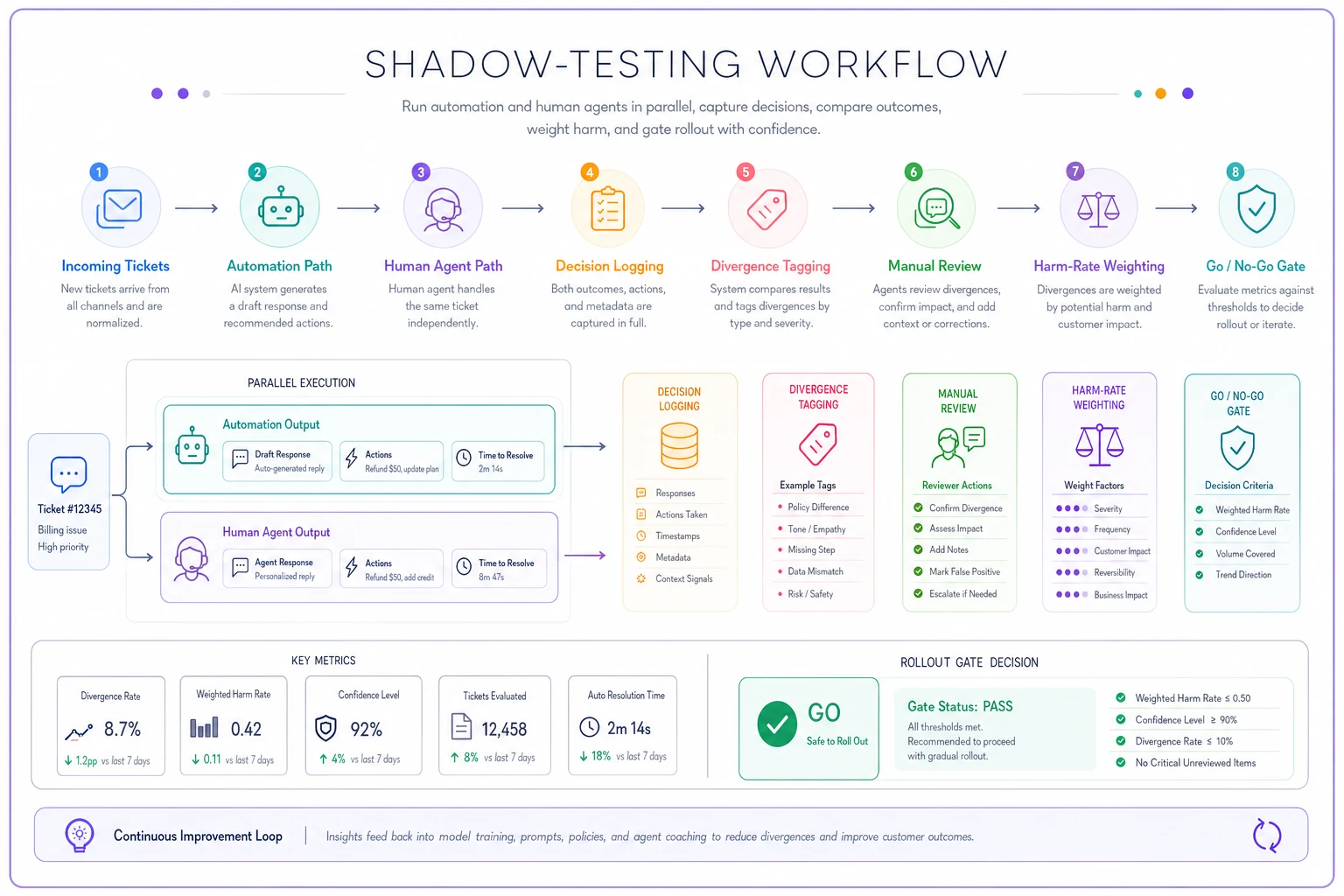
The insight most teams miss: a high agreement rate is not the same as a low harm rate. An automation can agree with humans 92% of the time and still be dangerous, because the 8% where it diverges is concentrated in exactly the high-stakes cases — refunds, account closures, legal threats — where being wrong is expensive. Weight harm by consequence, not by frequency.
Treat these shadow-tests with the same evidentiary standard you'd apply to any support experiment. The practices in support experimentation governance for finance-grade evidence apply directly — you want results you could defend to a skeptical CFO, not a cherry-picked demo.
Gating criteria: the go/no-go checklist
An automation that cleared the financial floor, ranked well on the scorecard, and survived shadow-testing still shouldn't go live automatically. It needs to pass a gate.
Gates exist because the person who built an automation is the worst person to decide if it's safe to ship. They're invested. A gate is a deliberate, slightly adversarial checkpoint.
A go-live gate checklist:
-
Shadow-test harm rate below your defined threshold (weighted by consequence, not raw count)
-
A documented owner — name, not a team — accountable for performance and maintenance
-
Rollback plan tested, not just written. You've actually flipped it off and confirmed the fallback works
-
Monitoring and alerting in place before launch, with thresholds that page someone
-
A defined kill-switch condition
"if X metric crosses Y for Z period, it auto-disables"
-
Compliance/legal sign-off if it touches regulated workflows or customer data decisions
-
Baseline metrics captured so you can measure actual vs. projected after launch
-
Interaction check
confirmed it doesn't conflict with existing automations
That rollback point deserves emphasis. The teams that run automation well treat their automations like deployable code — versioned, observable, reversible. Building that muscle is the whole premise of treating support playbooks like code with rollback rules and observability. If you can't cleanly turn an automation off and have the process fall back to a known-good state, it hasn't earned production.
Measuring in production: did it do what the worksheet promised?
This is where portfolios usually go blind. The automation ships, the launch celebration happens, and nobody circles back to compare actual performance against the NPV worksheet that justified it.
You committed to numbers. Go check them. Thirty days in, ninety days in, compare projected net benefit against actual. The deflection rate you assumed — is it holding? The maintenance cost — is it higher than planned because it keeps breaking? The reopen rate — did the automation quietly push work downstream instead of eliminating it?
A realistic pattern: an automation projected $5,200/month net benefit, delivered about $3,400 in month one, climbed to roughly $4,600 by month three as content got tuned and edge cases got handled. That's a fine outcome — it's trending toward projection. What you're watching for is the opposite: projected $5,200, delivering $1,800 and not improving, because the handling rate was fantasy and the maintenance burden is double what you planned. That automation is a candidate for rework or retirement, and the only reason you know is that you measured.
Build a lightweight portfolio review — monthly or quarterly — where every live automation reports: projected vs. actual net benefit, quality trend, maintenance hours, and any incidents. The ones underperforming get a decision, not a shrug.
Retiring automations: the part everyone forgets
Automations don't die on their own. They accumulate. And a stack of half-dead automations is worse than useless — it's actively dangerous, because stale logic keeps making decisions on a business that's changed around it.
Automations should be retired when:
-
Actual net benefit has gone negative, or dropped below the maintenance cost
-
The underlying problem is gone (the product bug it handled got fixed, the ticket type disappeared)
-
It's been superseded by a better automation covering the same ground
-
It's become a maintenance sinkhole — breaking constantly, eating more eng time than it saves
-
Compliance or product changes have made its logic stale or risky
A phased retirement runbook that doesn't break things:
-
Flag and announce. Mark the automation for retirement, notify owners and dependent teams. Nothing gets silently yanked.
-
Dependency audit. Map what depends on this automation's output — other automations, reports, downstream rules. This is where the surprises live.
-
Shadow-off. Run it in reverse
disable its action but keep it logging what it would have done, so you can confirm nothing critical breaks when it's gone.
-
Partial cutover. Route a slice of traffic to the no-automation path. Watch the metrics the automation was supposed to protect.
-
Full disable with fallback confirmed. Turn it off completely, with the manual or alternative process confirmed working.
-
Archive, don't delete. Keep the logic, the history, and the reason for retirement documented. You'll want it when someone asks "did we ever try automating this?" eighteen months from now.
Retirement is a release, not a deletion. The same rollback and observability discipline you apply to launching automations applies to killing them. Teams that treat retirement casually end up with the classic failure — someone disables an automation that twelve other things quietly depended on, and support breaks in a way nobody can diagnose for two days.
When this level of rigor makes sense — and when it doesn't
Finance-grade portfolio management is overkill for a three-person support team with two automations. If you can hold your entire automation stack in your head and explain each piece from memory, you don't need a scorecard. Just keep building sensible things and pay attention.
When the portfolio approach earns its weight:
-
You've got more than roughly 10-15 live automations and they're interacting
-
Multiple people or teams are building automations independently
-
You're spending real engineering budget on automation and finance is asking what the return is
-
Automations touch regulated workflows, money movement, or customer data decisions
-
You've already been burned by an automation that quietly made things worse
When it's a bad idea: when you're so early that the overhead of scorecards and gates would slow down a team that just needs to ship a few obvious wins. Don't build governance for a problem you don't have yet. Premature process is its own kind of waste.
Who should not do this: teams that won't actually enforce the gates. A scorecard you override every time someone important wants their pet automation shipped is worse than no scorecard — it's theater that gives false confidence. If leadership won't respect the kill-switch conditions and retirement decisions, don't bother building them. The discipline only works if the "no" has teeth.
A real scenario
A mid-sized SaaS support team — around 30 agents, handling roughly 40k tickets a month — had accumulated about 35 automations over two years. Deflection flows, auto-tagging, routing rules, canned-response triggers, a few deflection bots. Leadership thought they were in great shape. Tickets-per-agent looked good.
When they finally ran a portfolio review against NPV thresholds like the ones above, the picture changed. Of the 35 automations, roughly a third were delivering clear positive returns. Another third were marginal — slightly positive but eating more maintenance time than anyone had accounted for. And a handful were net-negative: one auto-close rule was closing tickets customers then reopened at a rate high enough that it was creating work, inflating reopen metrics and quietly costing an estimated $2k-$3k a month in rework and annoyed-customer handling.
None of that showed up in aggregate ticket counts. It only surfaced when each automation had to report actual-vs-projected and someone audited the interactions.
The cleanup took about a quarter. They retired six automations, reworked four, and tightened gates on everything new. The net effect wasn't some dramatic deflection jump — it was roughly $7k-$9k a month in recovered value, mostly from killing the net-negative automations and reclaiming maintenance hours that marginal ones were draining. The less visible win: they could finally answer "what's our automation stack actually returning" with a number instead of a shrug.
The system, not the shiny parts
The reason to build a support automation portfolio this way isn't to slow anybody down or make support feel like accounting. It's that automation, left ungoverned, compounds its own mess. Each new automation adds value and adds surface area — more to maintain, more to break, more that can interact badly with everything else. Without a system to invest, measure, and retire with real discipline, that surface area eventually costs more than the automations save.
The teams that get this right aren't the ones with the most automations or the fanciest tooling. They're the ones who can tell you, for any automation in production, what it costs, what it returns, who owns it, how to turn it off, and when it's scheduled to die. That's not a technology problem. It's a portfolio-management problem — and support leaders who treat it like one stop guessing about whether their automation is working and start knowing.
The teams that get this right aren't the ones with the most automations or the fanciest tooling. They're the ones who can tell you, for any automation in production, what it costs, what it returns, who owns it, how to turn it off, and when it's scheduled to die. That's not a technology problem. It's a portfolio-management problem — and support leaders who treat it like one stop guessing about whether their automation is working and start knowing.
Ready to elevate your customer support?
Join 2,000+ support teams using Helpyly to reduce response times, automate workflows, and deliver outstanding customer experiences.