

Most support teams don't discover how fragile their stack is until a vendor goes down at the worst possible moment. The ticketing platform's status page turns yellow, your telephony provider starts dropping calls, the knowledge base API times out — and suddenly the workflow everyone's rehearsed just stops. Agents sit there refreshing dashboards. Customers keep arriving. Nobody's quite sure whether to wait it out or start improvising.
The uncomfortable truth is that most continuity plans are written for your systems failing. In practice, most support-impacting incidents come from third parties: the CCaaS provider, the CRM, the auth layer, the chat widget, the payment processor whose outage suddenly floods you with billing tickets. You don't control the fix timeline, you don't control the comms, and you're often the last to know something broke.
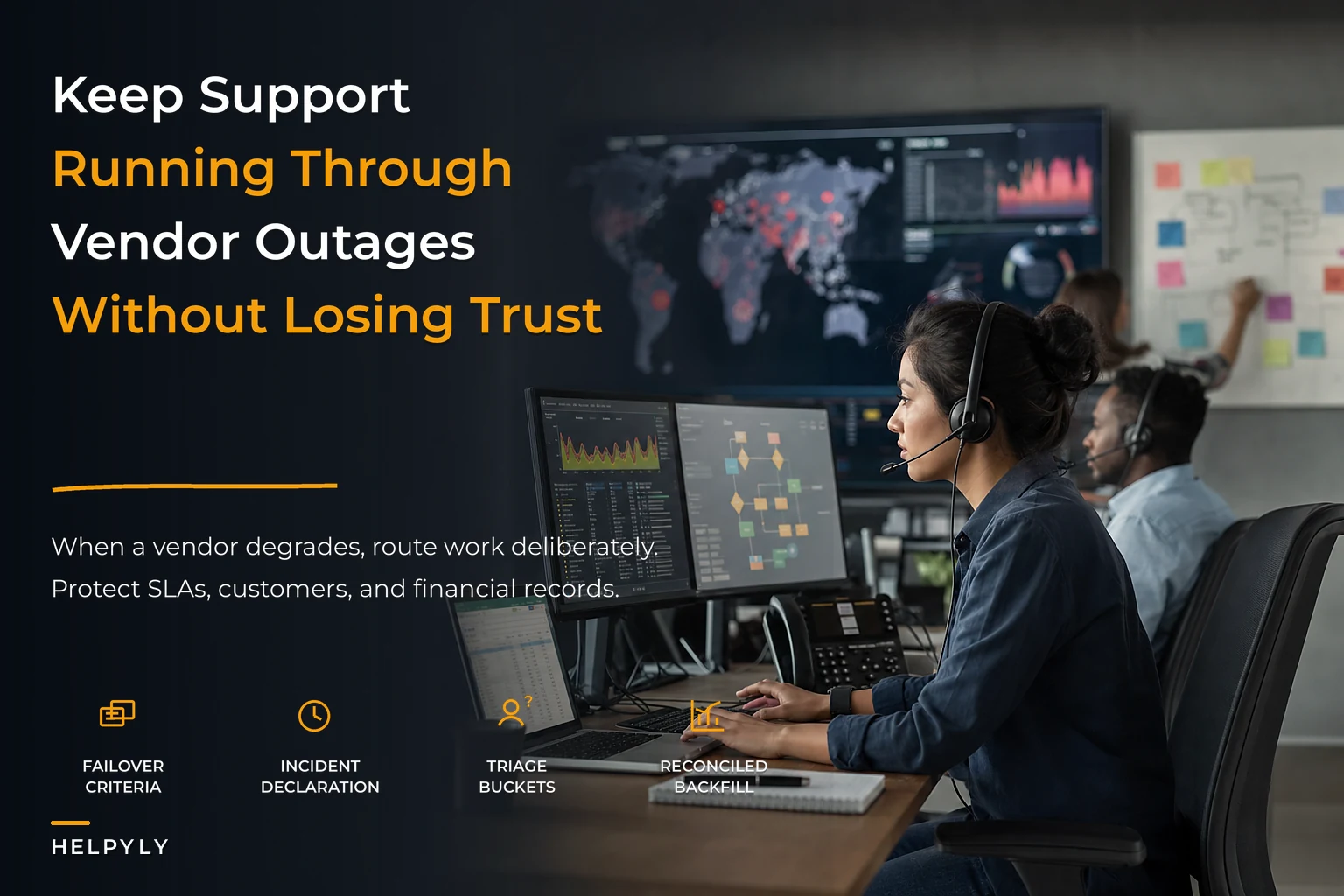
This is a playbook for that reality. Not a "have a backup plan" lecture — an actual operating model for deciding when to fail over, how to route temporarily, what it costs you in SLA and dollars, and how to verify you're actually serving customers instead of just looking busy.
Why vendor outages break support differently than internal outages
When your own infrastructure breaks, you at least have visibility. Your engineers are in the incident channel, you know the blast radius, you can estimate recovery. Vendor outages strip all of that away. You're operating on a status page that updates every 20 minutes with vague language like "investigating elevated error rates."
The pattern that comes up repeatedly across teams: the outage itself isn't the real problem. The ambiguity is. A partial degradation — where 30% of tickets fail to sync but 70% go through fine — is far more dangerous than a clean, total outage. With a full outage, everyone knows to switch to plan B. With partial degradation, half the team keeps working normally while the other half quietly loses tickets, and nobody realizes the gap until customers escalate.
At small scale this is annoying but survivable. One person notices, pings the team, you muddle through. What breaks at scale is coordination. When you've got 40 agents across three time zones and two of your five vendors are simultaneously degraded, muddling through turns into duplicated work, missed SLAs, and customers getting three different answers because nobody actually agreed on what the fallback process is.
The teams that handle this well don't have better vendors. They have pre-decided failover criteria and a routing recipe that doesn't require a meeting to activate.
Failover criteria: the decision has to be made before the incident
The single biggest mistake is treating failover as a judgment call made live, under pressure, by whoever happens to be online. By the time someone escalates "hey, should we switch to the backup?" you've already lost 40 minutes.
Never let a customer request slip through the cracks.
Helpyly helps you track, resolve, and optimize every support interaction effortlessly.
- Centralized ticket management
- Automated customer notifications
- Performance analytics dashboard
No credit card required
You want failover triggers that are objective and observable — not "when it feels bad." Something like: if ticket sync failures exceed a threshold for more than X minutes, failover activates automatically, not by committee.
| Vendor / System | Degradation signal | Failover trigger | Fallback action |
|---|---|---|---|
| Ticketing platform | Sync errors or API 5xx | >10% error rate for 15 min | Route intake to shared inbox + manual log |
| Telephony / CCaaS | Call drop or connect failure | >5% dropped calls for 10 min | Publish callback number, switch to secondary carrier |
| Live chat widget | Widget load failure | Widget down for 5 min | Swap to email/contact form banner |
| Auth / SSO provider | Agent login failures | Agents can't authenticate | Break-glass local accounts |
| Payment / billing vendor | Customer-facing errors | Confirmed vendor incident | Pre-drafted billing-delay macro + spike prep |
Notice the last row. When a customer-facing vendor breaks — payments, shipping, a core product dependency — your failover isn't about your own tools. It's about bracing for the ticket flood that's already on its way. Teams that use anomaly detectors and signal thresholds to catch spikes before customers complain get a 15–30 minute head start on staffing and macros, which is often the difference between a controlled response and a swamped queue.
Automate metric collection for failover triggers to avoid human delay.
One thing people miss: your failover triggers need a de-escalation side too. Plenty of teams fail over cleanly and then stay in degraded mode for hours after the vendor recovered, because nobody defined when to switch back. Define both directions.
Temporary routing recipes that actually hold up
Failing over is only useful if the fallback path is real and rehearsed. A "backup process" that lives in a doc nobody has opened since onboarding is not a backup process.
The routing setups that survive contact with a live incident share a few traits: they're low-tech enough to run when your fancy tools are the thing that broke, and they preserve enough context that you can reconcile everything cleanly afterward.
A workable temporary routing flow:
-
Declare the mode. One person — the incident lead — posts in a fixed channel: "Ticketing degraded — failover MODE B active." No ambiguity about whether you're in normal ops.
-
Capture at the edge. New contacts get logged in whatever still works — a shared spreadsheet, a secondary inbox, a form. Every entry gets a temporary ID, customer identifier, timestamp, and a one-line summary. That's it. Don't try to replicate your full ticket schema mid-incident.
-
Triage manually with a simple rule. Three buckets
revenue-blocking, time-sensitive, and can-wait. During an outage you serve the first two and set expectations on the third.
-
Answer with pre-approved macros. Not custom prose. Pre-written continuity messages that acknowledge the disruption without overpromising a fix time you don't control.
-
Hold a reconciliation queue. Every temporary entry gets flagged for backfill once systems recover, so nothing silently disappears when normal ops resume.
That last step is where most teams get burned. They handle the outage well, then lose 60 tickets because the manual entries never made it back into the system of record. Customers who were "handled" during the incident get a follow-up email a day later asking if they still need help — and now they're annoyed twice.
The mechanics of temporary routing and templated comms under pressure overlap heavily with surge response. If you haven't already built the muscle for spinning up triage roles and swap-in routing quickly, the ticket surge response playbook covering triage roles and temporary routing is the natural companion to this one — vendor outages and demand spikes use nearly the same operational moves.
Below is what a simplified failover routing flow looks like from trigger to reconciliation:
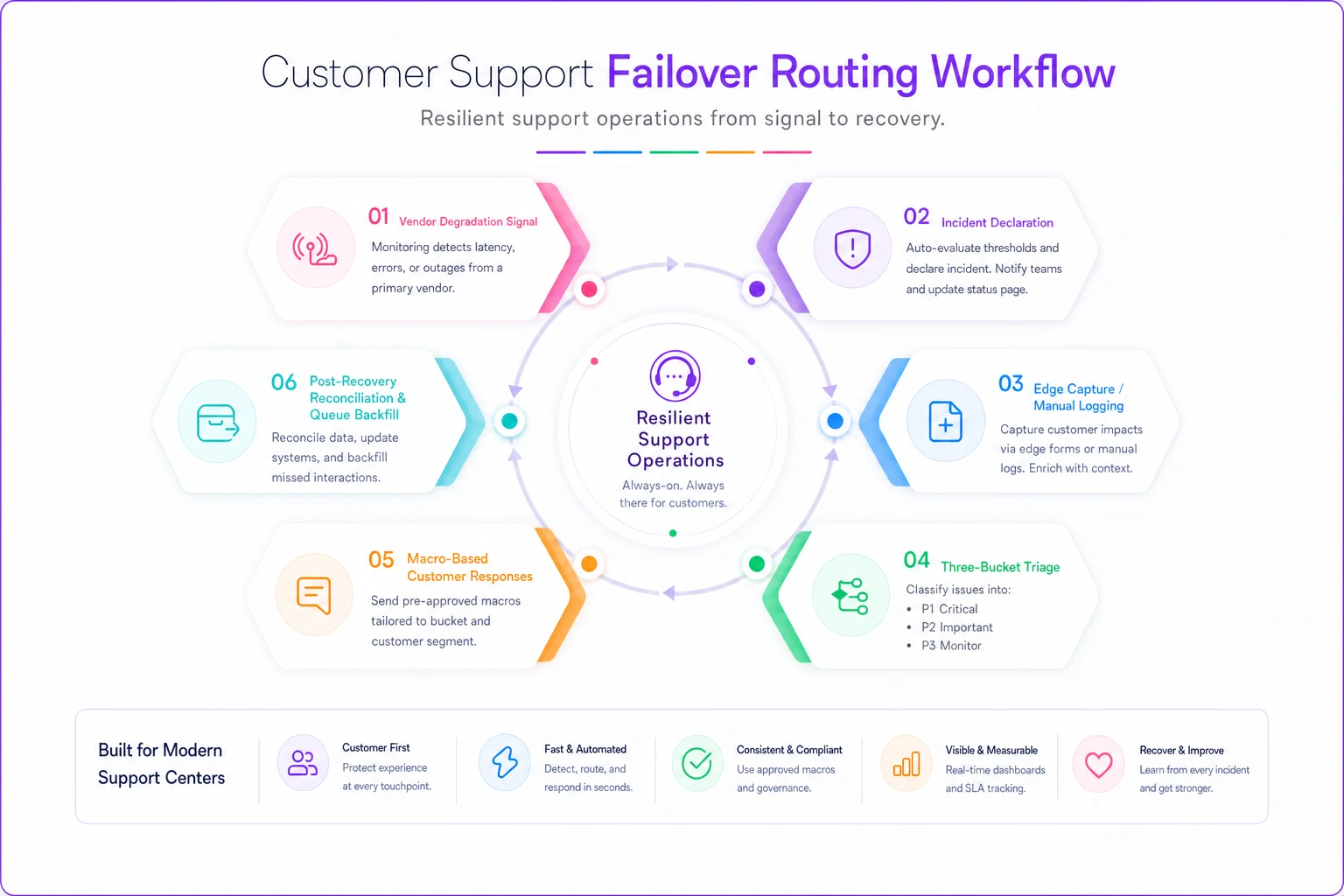
Each step in that flow needs to be executable without a meeting, without the person who built the runbook, and without the tools that are currently broken.
Mapping the outage to SLA and finance impact
This is the part support teams skip and later regret, because when leadership asks "how bad was it?" you want a number, not a vibe.
Every vendor incident has two cost surfaces: the SLA cost — breached response and resolution targets, and any credits or penalties tied to them — and the operational cost — overtime, reprioritized work, deferred projects. Mapping these ahead of time turns an outage from a mystery into a line item.
-
SLA exposure How many tickets breach if the vendor is down for an hour at peak? If you'd breach 80 tickets and 20% carry contractual credits, that's a real dollar figure.
-
Labor cost Manual routing is slower. If handle time roughly doubles during failover and you're pulling people off other work, price that gap.
-
Downstream revenue risk For customer-facing vendor outages, the support cost is often dwarfed by churn or refund risk from customers who couldn't complete a purchase.
A realistic example: a mid-sized SaaS support team — around 25 agents — had their telephony provider degrade for close to three hours on a US afternoon. Call connect rates dropped to roughly 60%. Because they'd never mapped the impact, the "cost" reported upward was just "phones were down." When they later reconstructed it — breached SLAs on about 140 interactions, somewhere around $2k–$3k in service credits, five agents pulled onto callback duty — the real cost landed north of $8k for a single afternoon. That number finally got them budget for a secondary carrier and a proper failover runbook. Before that, the outage was invisible on the P&L, so nothing changed after the first three incidents.
The lesson isn't the exact figure. It's that an unmeasured outage produces no organizational learning. If you can't attach cost to the pain, you can't justify the fix, and you'll relive the same incident every few months.
Verification: proving you're actually serving customers
During an outage, activity is not the same as service. Agents can be extremely busy while customers quietly go unanswered. You need verification steps that confirm outcomes, not effort.
Three checks worth building into the incident flow:
-
Coverage check Are new inbound contacts actually landing somewhere a human sees them? Test it yourself — send a contact through every open channel and confirm it appears in the fallback queue. Do this at the start of failover, not after.
-
Response-reality check Pull a small sample of manual entries mid-incident and confirm customers got an actual acknowledgment, not just an internal note.
-
Leak check Compare inbound volume against your normal baseline. If your monitoring says 200 contacts came in but your manual log only has 130, you have a 70-contact hole and need to find where they're falling through.
The leak check catches the most dangerous failure mode: a channel that appears to be working but is silently dropping contacts. A chat widget that loads but doesn't deliver messages to agents is worse than one that's obviously down, because nobody investigates a widget that looks fine.
Post-incident, verification continues. Every temporarily-handled contact needs confirmation it was fully resolved — not just triaged — before you close the incident. A fast, incomplete answer given under outage pressure has a much higher chance of bouncing back as a reopen.
Building the runbook so it survives handoffs
A runbook is only as good as its ability to be executed by someone who didn't write it. The person who designed your failover plan will inevitably be on vacation when the outage hits. If the runbook requires their tacit knowledge, you don't have a runbook — you have a dependency.
A vendor-outage runbook should include:
-
Trigger definitions — the exact, observable conditions that activate failover (from your criteria table)
-
Named roles — who declares the incident, who runs comms, who owns the manual queue (roles, not people, so it works across shifts)
-
The routing recipe — step-by-step, low-tech, executable by any tenured agent
-
Pre-approved customer macros — written and legally cleared in advance
-
Status page and comms templates — internal and external, so nobody drafts messaging under pressure
-
Reconciliation procedure — exactly how manual entries get backfilled
-
De-escalation criteria — when and how you return to normal ops
-
Impact-capture template — the fields you need to reconstruct SLA and cost afterward
The runbook should also capture vendor-specific realities: which vendor has a secondary region you can switch to, which one has a status API you can poll, which one historically takes six hours to resolve anything so you should fail over immediately rather than waiting. This kind of operational knowledge gets lost when tools are picked purely on features — a lot of continuity pain traces directly back to integration and dependency choices made during selection, which is why it's worth thinking about vendor integration debt when selecting support vendors before you're locked in. A vendor with no failover path and a slow incident-response track record becomes your continuity liability.
The runbook isn't a living document in the sense that it changes constantly — it's a stable artifact that gets tested and updated after each incident, not in between. Keep it short enough that someone can actually read it at 2am during an outage.
Where automation genuinely helps — and where it doesn't
There's a natural instinct to automate the whole failover sequence. Some of it should be automated: detection, alerting, and the initial mode declaration are all things software handles faster and more reliably than a human refreshing a status page. AI-assisted monitoring that watches vendor error rates and inbound volume patterns can flag a degradation before your team feels it, and auto-draft the first internal alert with the relevant context already attached.
But the failover decision and any customer-facing judgment during a live incident are where you want a human confirming. Automated systems misread partial degradations. They'll route to a fallback that's also broken. During an outage — when customer trust is already strained — an automated response that overpromises a fix time does more damage than a slightly slower human one.
The right split: automate the sensing, alerting, logging, and reconciliation grunt work. Keep humans on the mode decision, triage prioritization, and anything a customer will actually read. The goal of automation here isn't to remove people from the incident — it's to eliminate the 40-minute delay before anyone realizes there is an incident, and to make sure nothing falls through the cracks when it's over.
When a full failover setup is worth it — and when it isn't
Not every team needs a secondary carrier and a fully rehearsed break-glass procedure. Building all of this has a real cost in setup time and ongoing drills.
Worth the full investment when: you have contractual SLAs with financial penalties, your volume is high enough that an hour of downtime breaches dozens of tickets, or your customer base reacts strongly to disruption. If a three-hour outage costs you thousands and erodes trust, the runbook pays for itself the first time it's used.
Overkill when: you're a small team with forgiving customers and low volume, where an outage means a slightly delayed response and an apologetic email. A lightweight fallback inbox and a couple of pre-written macros are enough. Don't build a NASA-grade continuity program for a five-person team handling 30 tickets a day — the drills alone will cost more than the outages.
Who shouldn't attempt this yet: teams that haven't nailed their normal-day routing and escalation. Continuity planning assumes a stable baseline. If everyday operations are already chaotic, adding a failover layer on top just gives you two flavors of chaos. Fix steady-state operations first, then build the outage layer.
The mindset that actually keeps customers served
Vendor outages are going to happen. You won't prevent them, and you rarely control their timeline. What you control is whether your team executes a rehearsed, measurable response or improvises in a panic while customers stack up.
The teams that come out of an outage with their reputation intact aren't lucky — they made the decisions in advance. They know their triggers, the routing recipe runs without a meeting, they capture impact so the outage produces learning instead of amnesia, and they verify outcomes instead of assuming activity equals service. Everything falls back into the system of record cleanly when it's over.
Build the runbook before you need it, drill it at least once so it survives a handoff, and treat every incident as data for the next one. The outage you're prepared for is a rough afternoon. The one you're not is the one customers remember.
Build the runbook before you need it, drill it at least once so it survives a handoff, and treat every incident as data for the next one. The outage you're prepared for is a rough afternoon. The one you're not is the one customers remember.
Ready to elevate your customer support?
Join 2,000+ support teams using Helpyly to reduce response times, automate workflows, and deliver outstanding customer experiences.